


Our free depreciation calculators help UK small businesses accurately calculate annual and monthly depreciation for accounting and tax purposes. Calculate fixed asset depreciation instantly using the straight line or reducing balance methods.
What is Asset Depreciation?
Depreciation is an accounting method that spreads the cost of a fixed asset (such as equipment, vehicles, or machinery) over its useful life. Instead of deducting the full purchase price in year one, you claim a portion of the cost each year as an expense.
For example, if you buy a Computer for £900 and expect to use it for 3 years, you would typically depreciate £300 per year rather than write off the full £900 in the first year. This provides a more accurate picture of your business’s financial performance and aligns expenses with the revenue the asset generates.
Disclosure: This content may contain affiliate links, which means if you click on them, I may get a commission (without any extra cost to you).
Why depreciation matters for small businesses:
- Accurate financial reporting: Shows the true value of your assets over time
- Tax compliance: Required for proper accounting records and tax returns
- Business planning: Helps plan for asset replacement and manage cash flow
- Profit calculation: Ensures expenses are matched to the periods when assets generate income

Methods to Calculate Depreciation
There are two main methods which are used to calculate depreciation.
| Feature | Straight Line Method | Reducing Balance Method |
|---|---|---|
| How it works | Same amount depreciates each year | Percentage applied to the remaining value each year |
| Calculation | (Cost – residual value) / useful life | Book value x depreciation rate |
| Yearly depreciation | Equal amounts | Higher amount in the early years |
| Best for | Assets that lose value steadily (furniture, computers) | Assets that lose value quickly (vehicles) |
| Simplicity | Very simple – same amount each year | More complex – recalculate each year |
If you are unsure which method to use, have a look at our guides on straight-line depreciation and reducing balance depreciation.
Asset Depreciation Calculator 1 – Straight Line Method Depreciation
How to use the Straight Line Calculator
- Step 1: Enter the asset cost (excluding VAT if you can reclaim it)
- Step 2: Enter the useful life in years
- Step 3: Enter the salvage value at the end of its useful life
The calculator results will show you the total annual depreciation and also the monthly depreciation expense. Post these figures as a journal to your accounts; this will reduce your asset value on the balance sheet and increase the depreciation expense on the profit and loss statements.
Asset Depreciation Calculator 2 – Declining Balance Method Depreciation
If you are unsure of the depreciation percentage to use for depreciation, you will need to speak to an accountant to confirm the figure.
How to use the declining balance depreciation Calculator
- Step 1 – Enter the asset cost
- Step 2 – Enter the depreciation percentage
If your asset needs to depreciate for more than 5 years, calculate the first 5 years. Take the final written-down value from year 5 and enter it into the asset value. It will then calculate the next 5 years.
Straight Line vs Declining Balance Method
The image below illustrates the difference between the straight-line method and the reducing balance method of depreciation. As you can see, the straight line is consistent each year, while the reducing balance depreciates more in the early years, but both have the same cost and salvage value.

Fixed Asset Register
A fixed asset register is an important tool for businesses, enabling them to track tangible assets such as property, equipment, and vehicles. This register allows businesses to know what assets they own, the cost of each asset, the location and when it was purchased.
Maintaining a clear record of all physical assets helps businesses identify missing items and prevent theft. Having a fixed asset register helps businesses get the most out of their assets while cutting down on the risks involved. To assist with this, we have developed a free fixed asset register.
When you have a depreciation method in place, you should continue to use the same process for all the assets unless an accountant has advised otherwise.
Depreciation Calculation Using Xero
Xero offers a range of depreciation features, making it an efficient and reliable tool for businesses.

The first step is to set up fixed assets in Xero, which involves entering the asset cost, purchase date, and expected useful life. Xero then automatically calculates the depreciation amount based on the chosen method, whether it be the straight-line or the declining balance method.
This eliminates the need for manual calculations and reduces the chances of errors. Additionally, Xero allows for easy tracking of assets’ current book value and accumulated depreciation over time.
Accounting Software Best Deals

XERO – 80% Discount for 6 Months – Cloud accounting, unlimited users, bank feeds, MTD compatible

QuickBooks – 90% off for 7 Months – Sole traders, easy to use, MTD-compatible

Tide – Free with Tide Bank Account – All your banking and accounts in one place, MTD compatible
Straight Line Method of Depreciation Calculator UK
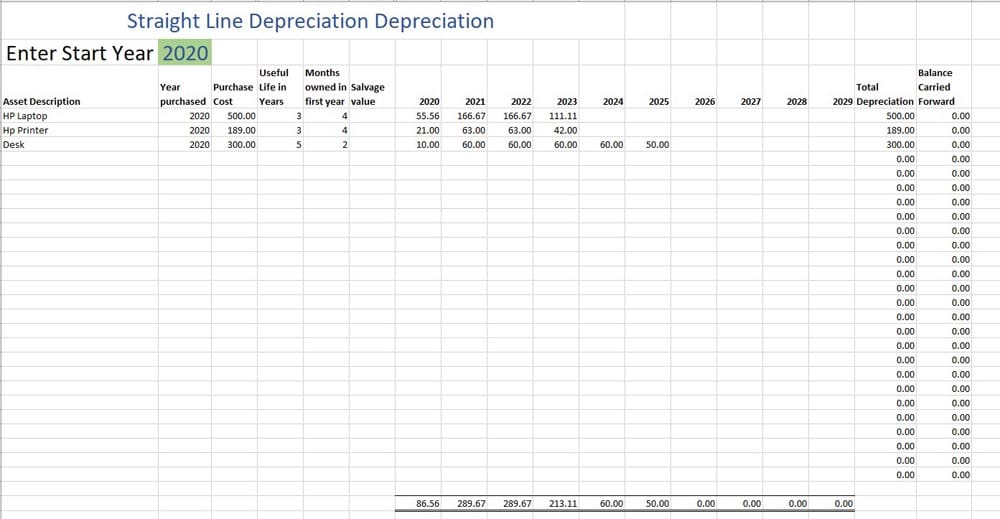
If you use the straight-line depreciation method and want to calculate depreciation for more than one asset, why not download our free Excel template depreciation schedule? The spreadsheet will show the total depreciation for each year, ready to post to the accounts.
FAQ
What is the simplest depreciation formula?
The simplest formula is the straight line method: (asset cost – salvage value) / useful life
What is Salvage Value
Salvage value is the estimated value of an asset at the end of its useful life.
Can I change the depreciation method?
Businesses typically apply methods consistently, but may change them if justified and appropriately disclosed.
Return from the depreciation calculator to depreciation page.
