


Self-Employed Bookkeeping: A Guide for Sole Traders
Simple, practical bookkeeping guidance to help you complete your self-employed finances and stay on top of your records.
Self-employed bookkeeping is the process of recording your business income and expenses, so you know how much profit you are making and have the figures you need for your tax return. Accurate records also make it easier to manage your money, claim allowable expenses, and meet HMRC requirements.
You can keep your records using a spreadsheet or accounting software. Software may be more suitable if you want automatic bank feeds, invoicing or receipt capture. Whichever method you choose, update your records regularly.
This guide explains self-employed and sole trader bookkeeping, including the records you need to keep, allowable expenses, cash basis accounting, Making Tax Digital and choosing the right bookkeeping system.
Disclosure: This content may contain affiliate links, which means if you click on them, I may get a commission (without any extra cost to you).
Self-Employed Bookkeeping – At a Glance
- Self-employed people must keep records of all business income and expenses; HMRC can ask to see them for up to five years after the Self Assessment deadline
- You need to record sales invoices, purchase receipts, bank statements, and any cash transactions
- You can use a spreadsheet, accounting software or paper records. However, digital records are compulsory under Making Tax Digital for Income Tax if your qualifying income exceeds £50,000 from April 2026, £30,000 from April 2027 or £20,000 from April 2028.
- Good bookkeeping means fewer surprises at tax time, lower accountancy fees, and a clearer picture of how your business is performing
- Download our free self-employed Excel bookkeeping template below to get started today
What is Bookkeeping?
Bookkeeping is the process of recording the money coming into and going out of your business. This includes sales, expenses, invoices and payments. Keeping these records up to date helps you understand how much profit you are making and provides the figures needed for your Self Assessment tax return.
Choosing the Right Bookkeeping System
The right sole trader bookkeeping system depends on the number of transactions you have, whether you raise invoices and whether Making Tax Digital applies to you. For a small self-employed business with straightforward income and expenses, an Excel spreadsheet may be all you need. Our free self-employed cash book template is designed for general bookkeeping and Self Assessment, letting you record money in and out, track your bank balance and see a simple profit and loss summary.
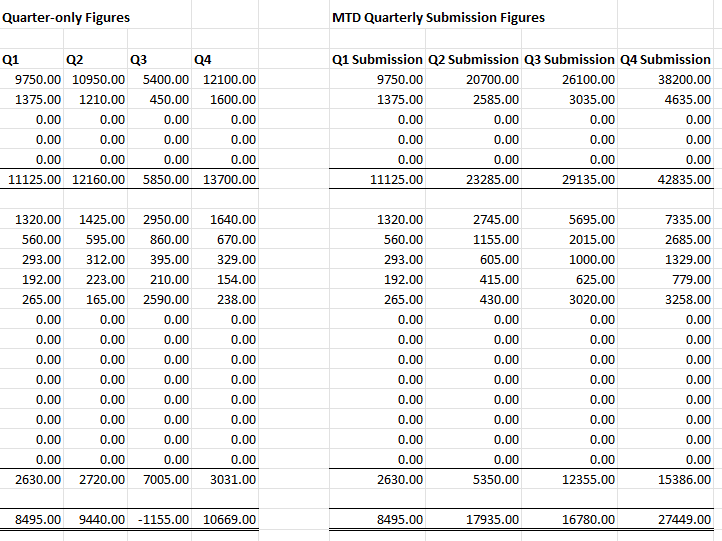
If you need to use Making Tax Digital for Income Tax, we also have a free MTD spreadsheet template for sole traders. It keeps digital records of your income and expenses and calculates quarterly and cumulative MTD figures. You will still need compatible bridging software to submit the updates to HMRC.
Accounting software is useful if you want to save time with automatic bank feeds, create invoices, upload receipts or keep your records ready for Making Tax Digital. Most packages also give you an up-to-date view of your income, expenses and profit.
When choosing a system, consider what you actually need, how easy it is to use, and the monthly cost. There is little point in paying for features you are unlikely to use.
Accounting Software Best Deals
XERO – 80% Discount for 6 Months – Cloud accounting, unlimited users, bank feeds, MTD compatible

QuickBooks – 90% off for 7 Months – Sole traders, easy to use, MTD-compatible

Tide – Free with Tide Bank Account – All your banking and accounts in one place, MTD compatible
Self Assessment, Income Tax and NI
If you’re self-employed, you’re responsible for reporting your income and paying tax through the Self Assessment system. Each tax year runs from 6 April to 5 April, and you’ll need to submit your tax return by 31 January the following year. This return includes all your income and allowable business expenses, and calculates how much income tax and National Insurance you owe. Keeping good bookkeeping records throughout the year makes completing your Self Assessment much easier and helps you avoid mistakes or penalties.
Making Tax Digital (MTD) for Income Tax Self Assessment (ITSA)
Making Tax Digital (MTD) for Income Tax is now in force. Sole traders and landlords whose total qualifying income from self-employment and property was over £50,000 in 2024/25 should have started using it from 6 April 2026. The threshold falls to over £30,000 from April 2027 and over £20,000 from April 2028. Those affected must keep digital records, send quarterly updates and complete their annual Self Assessment tax return using compatible software.
Under MTD for Income Tax, the usual quarterly update deadlines are 7 August, 7 November, 7 February and 7 May. You must also submit your tax return and pay any tax due by 31 January following the end of the tax year.
If you earn over £50,000, you must use MTD-compatible software now. If your qualifying income was over £30,000 in 2025/26, you will need to use MTD for Income Tax from 6 April 2027. Preparing now gives you time to choose compatible software and become familiar with it before your first quarterly update.
If you prefer accounting software over a spreadsheet, see our guide to the best accounting software for self-employed businesses, where we compare the main options for sole traders, including MTD support, invoicing, and bank feeds.

If you are a landlord, you may find specialised software that handles your accounting and property management a better fit. A popular choice is Landlord Vision.

Profit and Loss Account and Balance Sheet
A Profit and Loss account summarises your business income and expenses over a period and shows whether you have made a profit or loss. For a sole trader, the profit figure is particularly important as it forms the starting point for calculating your taxable business income.
A Balance Sheet shows what the business owns and owes at a particular date. It includes assets such as money in the bank and equipment, liabilities such as loans and amounts owed, and the owner’s capital. Not every sole trader needs to prepare a formal Balance Sheet, particularly when using cash basis accounting, but it can still provide a useful view of what the business owns and owes.
What Accounting Records Do You Need to Keep?
HMRC requires all self-employed individuals to keep records of their business income and expenses. Use the same system throughout the year and update it regularly. This avoids having to reconstruct your records shortly before the January tax deadline.
You need to keep two categories of records: income records and expense records.
Income records include:
- Sales invoices you’ve issued to customers
- Till receipts or records of cash sales
- Bank statements showing money received
- Any other proof of income, for example, online payment records from PayPal, Stripe, or similar platforms
Expense records include:
- Receipts and invoices for anything you’ve bought for the business
- Bank and credit card statements
- Mileage logs if you claim vehicle expenses
- Records of any business use of your home
- Payroll records if you employ anyone
Other records to keep:
- Records of any grants received
- If you’re also employed, your P60 or P11D from your employer
- VAT records if your business is VAT-registered
💡 Tip: You can store invoices and receipts digitally. Make sure each copy is clear, complete and backed up, as HMRC may ask to see evidence supporting a transaction.
How Long to Keep Records
You must keep your self-employment records for at least 5 years after the 31 January submission deadline for that tax year.
| Tax Year | Filing Deadline | Keep Records Until |
|---|---|---|
| 2024-25 | 31st January 2026 | 31st January 2031 |
| 2025-26 | 31st January 2027 | 31st January 2032 |
| 2026-27 | 31st January 2028 | 31st January 2033 |
What Counts as a Valid Record?
A valid record shows the date, amount, and nature of a transaction. For expenses, you need to show what you bought and that you used it for business. If HMRC ever questions a claim, a bank statement alone may not be enough; you need the original invoice or receipt to support it.
📌 Example: A plumber buys £150 of pipe fittings from a trade supplier. The supplier invoice showing the date, amount, supplier name, and description of goods is the valid record. A bank statement showing a £150 payment to the same supplier supports it, but doesn’t replace the invoice.
How Often Should You Update Your Bookkeeping?
Try to update your bookkeeping at least once a week or once a month, depending on the number of transactions you have. Record your sales and expenses, save copies of receipts and check the figures against your bank statement.
At the end of each month:
- Check that all bank transactions have been recorded
- Match payments to invoices and receipts
- Follow up on unpaid customer invoices
- Review your income, expenses and profit
- Put money aside for your tax bill
Regular bookkeeping is quicker and more accurate than trying to reconstruct everything shortly before the Self Assessment deadline.
Do Sole Traders Need a Separate Bank Account?
Sole traders are not legally required to open a business bank account, although some personal bank account terms prohibit business use. Keeping business and personal transactions separate makes bookkeeping much easier and reduces the chance of missing an expense or recording a personal purchase by mistake.
Most accounting software can connect to your bank account and automatically import transactions. This saves time and makes it easier to check that every transaction has been recorded.
Allowable Expenses for the Self-Employed
When you are self-employed, you can deduct allowable business expenses from your income before calculating your taxable profit. Keeping complete records helps ensure that you claim everything you are entitled to.
The golden rule is that an expense must be wholly and exclusively for business purposes to be deductible. If something has both personal and business use, you can only claim the business portion.
Common Allowable Expenses for the Self-Employed
Category | What you can claim |
|---|---|
Office costs | Stationery, printer ink, postage, software subscriptions |
Travel | Business mileage, train and bus fares, parking (not commuting) |
Vehicle costs | Fuel, insurance, servicing – business proportion only, or flat-rate mileage |
Stock and materials | Goods bought to resell, raw materials used in your work |
Tools and equipment | Tools, machinery, and computers used for work |
Professional fees | Accountant fees, solicitor fees for business matters |
Marketing | Website costs, advertising, business cards |
Insurance | Public liability, professional indemnity, business insurance |
Bank charges | Business account fees |
Training | Courses that improve skills you already use in your business |
Home office | A proportion of heating, electricity, broadband, or simplified – see home office expenses |
Clothing | Protective clothing or a uniform with a logo – not everyday clothes |
Record expenses when they occur and keep the supporting invoices and receipts. This reduces the risk of missing allowable costs from your tax return. A bookkeeping package can help you stay organised, or you can keep all your receipts in a folder or electronic document.
Good to know: If your gross trading income is £1,000 or less, the Trading Allowance may mean you do not need to register for Self Assessment. If your income is higher, you may be able to claim the allowance instead of your actual business expenses.
What Are Owner’s Drawings?
As a sole trader, you can take money from the business for personal use. This is known as drawings. Drawings are not a business expense and do not reduce your profit or the amount of tax you pay.
For example, if your business makes a £30,000 profit and you withdraw £20,000 for personal use, your business profit is still £30,000.
Record drawings separately from business expenses so they are not included in your Profit and Loss account.
Bookkeeping tip: Consider transferring part of your income or profit into a separate savings account throughout the year. This can help prevent an unexpected shortfall when your Income Tax and National Insurance become due.
Cash Basis vs Accruals Accounting – Which Should You Use?
Cash basis has been the standard accounting method for most sole traders and eligible partnerships since April 2024. You can choose traditional accounting instead if it suits your business better.
Our free template uses cash-basis accounting. This means you record income when you receive the money and expenses when you pay them. It is generally easier to manage and well-suited to sole traders and small businesses.
Accruals accounting records income when it’s earned and expenses when they’re incurred, regardless of when cash moves. It gives a more accurate picture of your financial position at any point, but it is more complex to manage. Most self-employed people only need accrual accounting if they have significant debtors, creditors, or stock.
How to Complete Your Self-Employed Accounts
Start by choosing where you will record your transactions and store your invoices and receipts. This could be a spreadsheet or accounting software. Whichever method you use, update it regularly and check the figures against your bank statement.
Accounting software can import bank transactions and store photographs or copies of receipts. This keeps the supporting documents with the relevant transaction and reduces the amount of information you need to enter manually.
Many providers offer a free trial, free plan or introductory discount. Test the features you are likely to use before committing to a paid plan, particularly bank feeds, invoicing, receipt capture and MTD reporting.
To help, we have written a QuickBooks vs Xero comparison available as a free PDF.
Self-employed Accounting Software

Accounting software can save time, particularly if you have lots of transactions, raise invoices regularly or need to comply with Making Tax Digital.
The main advantages over spreadsheets are automatic bank transaction imports via bank feeds, VAT returns and MTD submissions handled within the software, and a real-time view of your profit at any point in the year.
Which Software Is Best for the Self-Employed?
The three most widely used MTD-compatible packages for sole traders in the UK are Xero, QuickBooks, and Sage. All three provide bookkeeping tools such as income and expense tracking, bank feeds and invoicing. Features and MTD for Income Tax support vary between plans, so check what is included before signing up.
Xero includes automatic bank feeds, invoicing and integrations with many other business applications. Its JAX assistant can create an invoice from instructions entered in the chat, which reduces the number of screens a new user needs to navigate. It’s also a good choice if you work with an accountant or bookkeeper who uses Xero. Currently offering an 80% discount for 6 months.
Sage UK offers a free sole trader plan covering income and expense recording and MTD reporting, making it the strongest option if budget is the main consideration. Paid plans add invoicing, VAT, and payroll. Currently offering a 90% discount for 6 months on paid plans.
QuickBooks suits sole traders who need built-in mileage tracking, receipt capture, and tax estimate features. It currently offers a 90% discount for 7 months.

Excel Spreadsheets
A spreadsheet is a perfectly valid way to manage self-employed bookkeeping, especially if your business is straightforward and your transaction volume is low. All of our templates are free to download, require no sign-up, and work with both Microsoft Excel and Google Sheets.
The best spreadsheet depends on whether you need to use Making Tax Digital for Income Tax.
For general sole trader bookkeeping: use our free self-employed cash book template. It runs from April to March and provides the income and expense totals you need for your Self Assessment records.
For MTD for Income Tax: use our free MTD spreadsheet template. It records your digital transactions and provides quarter-only and cumulative figures ready to use with compatible bridging software
Other useful templates for the self-employed:
- Business expense template – tracks individual expense claims
- Mileage log template – records business journeys for mileage claims
- Cash flow forecast template – projects your income and outgoings forward
- Profit and loss template – end-of-year summary for your Self Assessment
⚠️ Warning: A spreadsheet cannot submit MTD updates to HMRC by itself. You will need compatible bridging software that maintains the required digital links, or a full accounting software package.
Paper Bookkeeping Records
Paper records are still permitted if you are not required to follow MTD for Income Tax. However, a spreadsheet or accounting software is usually easier to update, search and back up.
Self-Employed Bookkeeping Example
Our self-employed bookkeeping example follows a computer repair specialist using our free cashbook template. In the business example, they rent small premises, pay utility bills, purchase computer parts, and sell computer repair services.
Customers pay for each sale directly into the business bank account. Once the receipt appears on the bank statement, record it in the cash book. Outgoings are paid either by debit card or Direct Debit and are easy to track. A few business expenses are also claimed using an expense claim form and paid by bank transfer.
Our free guide is available if you are unsure what business expenses you can claim.
The example below shows the business’s income and expenditure for April.
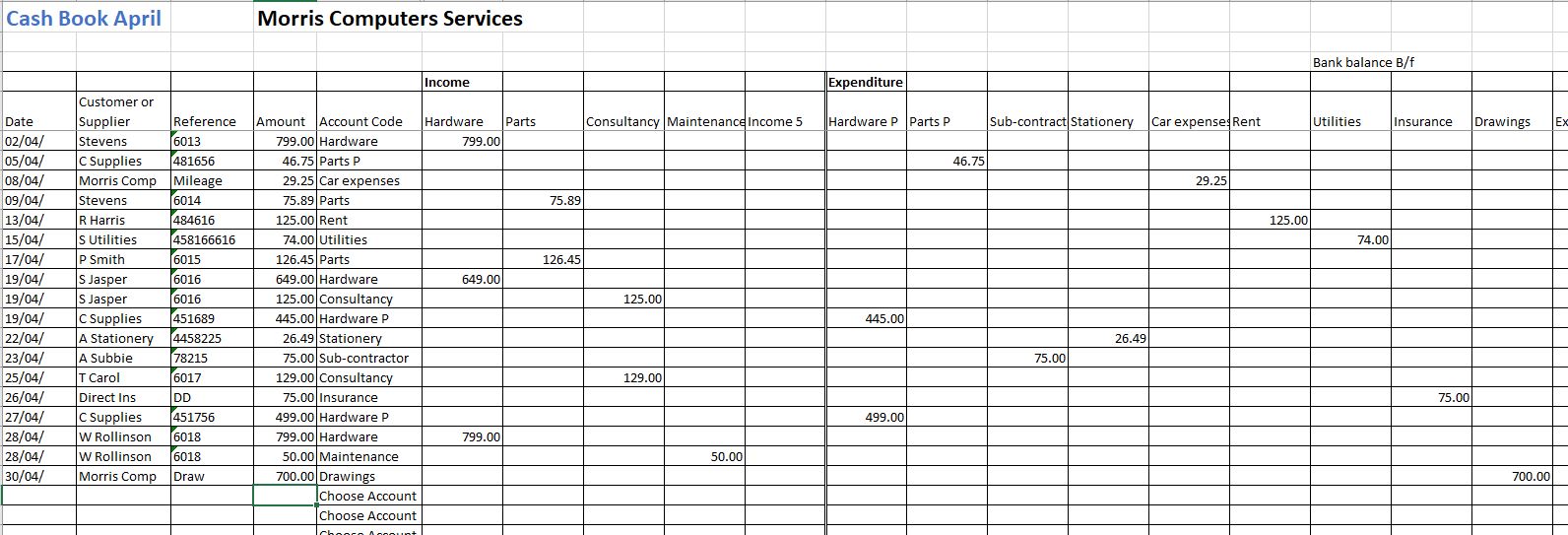
The totals page of the template shows all the figures for April and the end-of-month bank balance. Check that the closing balance in the cash book agrees with the balance on the bank statement. If there is a difference, you must complete a bank reconciliation.

The totals page will look like this at the end of the year:
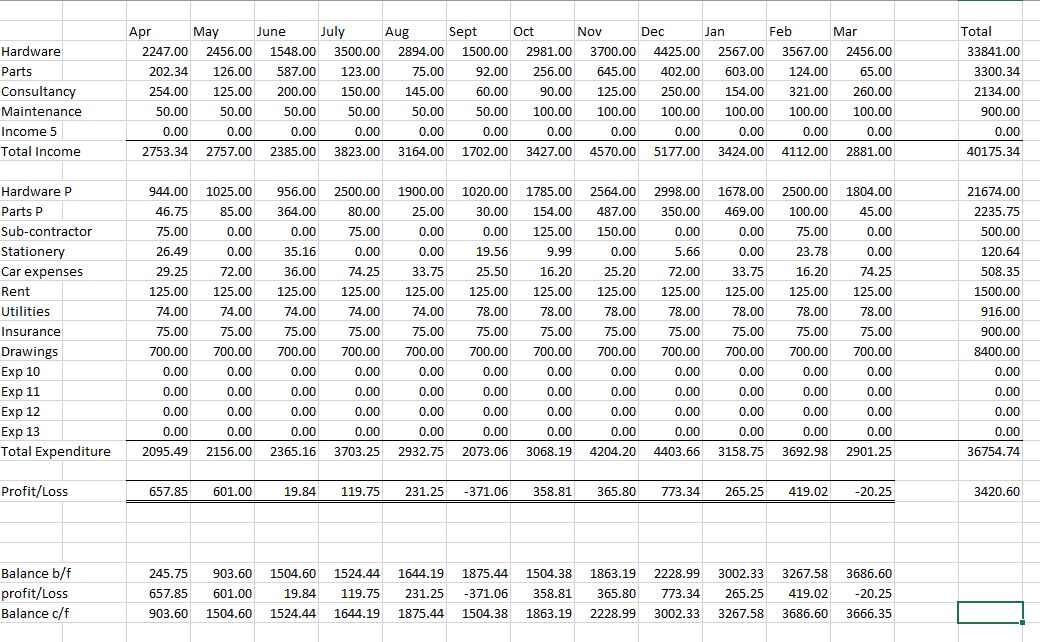
Once all the figures for the year are posted, you are ready to submit them to HMRC for self-assessment. The template shows total outgoing payments of £36,754.74, but this includes £8,400 of owner’s drawings. Drawings are not a business expense, so they must be removed when calculating profit. Allowable business expenses are therefore £28,354.74, giving a profit of £11,820.60.
The business owner must pay taxes on the profit. Self-employed tax calculators can calculate the tax due. The best calculator is employed and self-employed.
Self-Employed Bookkeeping Template
Our template uses the cash basis accounting method. This means you record income when you receive it and expenses when you pay them. It’s a simple method many self-employed individuals and small businesses prefer. The template runs from April to March, but the UK tax year runs from 6 April to 5 April. For the 2025/26 tax year, include transactions dated from 6 April 2025 to 5 April 2026. Do not include transactions from 1 to 5 April 2025, as these belong to the previous tax year. Enter transactions dated 1 to 5 April 2026 at the bottom of the March 2026 sheet so they are included in the year-end totals. If your accounting year ends on 31 March, you can use the April-to-March template without making this adjustment.
Full instructions on using the cash book template are available.
Licence Agreement
By downloading our free templates, you agree to our licence agreement, allowing you to use the templates for your own personal or business use only. You may not share, distribute, or resell the templates to anyone else in any way.

For MTD submissions, visit our MTD spreadsheet template page for details on how to use Excel and bridging software.
FAQ for Self-Employed Bookkeeping
What records do I need to keep as self-employed?
Keep records of all business income and expenses, sales invoices, purchase receipts, bank statements, and mileage logs if you claim vehicle costs. HMRC accepts digital copies, so photographing receipts and storing them electronically is fine. You must keep all records for at least five years after the 31 January submission deadline for that tax year.
Can I do my own bookkeeping as a self-employed person?
Yes, most self-employed people manage their own bookkeeping using accounting software or a spreadsheet template. You don’t need accounting qualifications. It’s worth hiring a bookkeeper or accountant if your affairs are complex, you’re behind on records, or you’re unsure what to claim on your Self Assessment return.
Do I need a Business Bank Account if I am Self-Employed?
You do not need a separate business bank account, but it is better to have one. It helps you keep personal and business transactions separate. Most banks offer business accounts.
How do I Know How Much Tax to Pay?
Your Self Assessment tax return calculates the Income Tax and National Insurance due on your profits and any other taxable income. It is sensible to set aside part of your income throughout the year so the money is available when payment is due. You can use our self-employed tax calculator to estimate the amount in advance.
Does Making Tax Digital affect self-employed people?
Yes, in phases. From April 2026, it is mandatory for sole traders and landlords with a qualifying gross income over £50,000; from April 2027, for those over £30,000; and from April 2028, for those over £20,000. Qualifying income means gross income from self-employment and property rental only.
Conclusion on Bookkeeping for Self-Employed
Whether you choose accounting software or a spreadsheet, good sole trader bookkeeping depends on recording transactions regularly and keeping evidence of your income and expenses.
Whichever system you choose, record your income and expenses regularly, keep copies of invoices and receipts, and check the figures against your bank statements. You can download our free self-employed cash book template to get started.
Related Articles
Best Accounting Software for Self-Employed
Self-Employed Allowable Expenses
Free Business Expense Template
Bank Reconciliation Guide & Template
Home Office Expenses for the Self-Employed
Disclaimer: This information is for general guidance only and does not constitute tax advice. Check current HMRC guidance or seek professional advice if you are unsure how the rules apply to your circumstances.
