

A trial balance is an internal accounting report that lists every account in your general ledger alongside its closing balance, shown in either a debit or credit column. When your bookkeeping is correct, the total debits will equal the total credits.
Whether you run a small business, work as a sole trader, or are studying accounting, understanding the trial balance is essential. It sits at the heart of the accounting cycle and is the foundation for preparing your accounts and balance sheet.
This guide is designed for small business owners, sole traders, and accounting students. It explains what a trial balance is, the different types, what it does and does not detect, and how accounting software makes the process much easier.
Disclosure: This content may contain affiliate links, which means if you click on them, I may get a commission (without any extra cost to you).
Although a trial balance may equal the debits and credits, it does not mean the figures are correct. Errors can still occur in data entry, such as entering wrong amounts or posting to the incorrect account code.
At a Glance
- Lists all general ledger account balances at a specific date, in the standard trial balance format
- Debit balances go in the left column; credit balances go in the right column
- Debits and credits must balance — if they do not, there is a recording error
- There are three main types: unadjusted, adjusted, and post-closing
- A balanced report does not guarantee your accounts are error-free
- Produced automatically by software as part of its standard report
- Used to prepare financial statements and catch errors early
What is a trial balance in accounting?
A trial balance is an accounting report that lists closing balances of all general ledger accounts.
In a double entry accounting system, every business transaction is recorded twice — once as a debit and once as a credit of equal value. The trial balance verifies that this rule has been followed consistently across all your ledger accounts. Below is a simple table showing debits and credits for double entry.
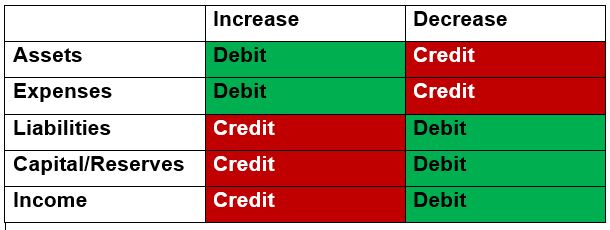
It lists every account, asset, liability, equity, revenue, and expense and shows the closing balance for each. Accounts with debit balances appear in the left column; accounts with credit balances appear in the right column. You then add up both columns. If they are equal, your bookkeeping is mathematically correct.
The trial balance is an internal report — it is not sent to HMRC or Companies House. Its job is to give you and your accountant confidence in the figures before preparing formal financial statements.

The three types of trial balance
There are three main types, each prepared at a different stage of the accounting cycle. Understanding them helps you see where each one fits in the process of preparing financial statements.
| Type | When prepared | What it shows | Purpose |
| Unadjusted trial balance | Before adjusting entries | Raw ledger balances | Starting point — spot obvious errors |
| Adjusted trial balance | After adjusting journal entries (accruals, prepayments, depreciation) | Updated balances after period-end adjustments | Basis for preparing financial statements |
| Post-closing trial balance | After closing entries at year-end | Permanent accounts only (assets, liabilities, equity) | Confirms books are ready for the next period |
Unadjusted trial balance
The unadjusted trial balance is prepared first, directly from the general ledger balances before any period-end adjustments. It is the starting point; businesses use it to catch obvious errors before any further work is done.
Adjusted trial balance
After adjusting journal entries have been made, recording accruals, prepayments, and depreciation, the adjusted trial balance is created. It reflects the true financial position of the business at period-end, and both the P&L account and the balance sheet are built from it. This is the most important version for financial reporting.
Post-closing trial balance
The post-closing trial balance is prepared after closing entries have been made at the end of the accounting period. Closing entries transfer the balances of temporary accounts (revenue and expense) to retained earnings, clearing them and preparing them for the next period. It then contains only permanent accounts — assets, liabilities, and equity — confirming the books are ready to start fresh.
Trial Balance Example
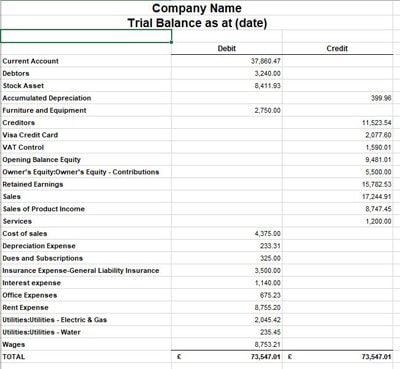
Below is an example downloaded from QuickBooks into Excel. The figures include all the balances from both the balance sheet and the Profit and Loss account. The totals of debits and credits are the same, and therefore, it balances.
This trial balance example includes all the balance sheet items first, followed by the profit and loss account.
You will need to make a journal entry if you review the trial balance and notice an adjustment is necessary. The journal entry will need a debit and a credit. Accounting systems will not accept a journal entry unless it balances. Looking at the trial balance makes it easier to determine the journal entries.

What does a trial balance include?
It lists every account in your chart of accounts that has a balance during the period. The typical accounts you will see include:
Balance sheet accounts (permanent accounts)
- Assets: bank, cash, debtors (accounts receivable), stock/inventory, equipment, property
- Liabilities: creditors (accounts payable), loans, VAT liability, PAYE liability
- Equity: capital, retained earnings, drawings
Profit and loss accounts (temporary accounts)
- Revenue / Sales: income from trading and other income
- Cost of sales: direct costs of goods or services sold
- Expenses: wages, rent, utilities, insurance, marketing, and all other overheads
Temporary accounts are closed off at the year-end and their balances transferred to retained earnings. Only permanent accounts carry forward into the next period.
What is the purpose of a trial balance?
This report serves several important purposes in the accounting cycle. For small business owners and students, understanding these uses explains why it is such a fundamental part of bookkeeping.
1. Verify mathematical accuracy
The primary purpose is to confirm that debits equal credits across all ledger accounts. If they do not, a mathematical error exists somewhere in the bookkeeping records and must be found and corrected before financial statements can be prepared.
2. Prepare financial statements
This version is the foundation for preparing formal financial statements. Your accountant uses the listed figures to prepare the P&L account and the balance sheet. Without complete and accurate accounting records, these reports cannot be prepared reliably.
3. Detect errors early
Running it at the end of each month helps you catch trial balance errors before they compound. Spotting a misposting in March is far less stressful than finding it in January when finalising the previous year’s accounts.
4. Provide a complete financial picture
It provides accountants, bookkeepers, and business owners with a single document that shows every account balance. This makes it easy to see the overall financial position at a specific date and to spot anything unusual or out of place.
5. Support the year-end process
At the year’s end, the trial balance is an essential step before preparing statutory accounts. Accountants and auditors use it to review all balances, confirm that adjusting and closing journal entries have been posted correctly, and verify that the books are ready for statutory accounts.
What errors does a trial balance detect — and what does it miss?
This is one of the most important things to understand. The report verifies that debits equal credits — but that does not guarantee your accounts are completely accurate. It will catch certain errors, but not others, including:
| Error type | What it means | Caught by trial balance? |
| Mathematical errors | Addition or subtraction mistakes in ledger accounts | Yes — debits will not equal credits |
| Missing entries | A transaction omitted from the bookkeeping records entirely | No — both sides are missing so it still balances |
| Misclassified accounts | Amount posted to the wrong account (e.g. rent coded as equipment) | No — debits and credits still match |
| Wrong category | Revenue coded as a liability, for example | No — amount is correct, just in the wrong place |
| Compensating errors | Two errors that cancel each other out | No — the errors offset so totals still equal |
| Unbalanced report | Debits do not equal credits | Yes — always signals a recording error to investigate |
⚠️ Warning: A balanced report does not mean your accounts are error-free. Omitted transactions will not cause an imbalance because both sides of the entry are absent. Misclassified accounts and journal entries posted to the wrong place are also invisible. Regularly reviewing individual ledger accounts and performing account reconciliations are the only reliable ways to catch these kinds of errors.
Trial Balance Format
A trial balance follows a simple, consistent layout. There is no single prescribed format, but the standard structure used by businesses and accounting software across the UK is the same:
- The business name and date appear at the top — the date is usually the last day of the accounting period.
- A list of accounts runs down the left-hand side, drawn from your chart of accounts and grouped by type — assets, liabilities, equity, revenue, and expenses.
- Two columns sit to the right — Debit on the left and Credit on the right.
- Each account balance is entered in a single column — never in both.
- Totals appear at the bottom of each column. If your bookkeeping is correct, they will be equal.
That is the complete trial balance format. It is deliberately simple — the value is not in the layout but in what the totals tell you.
Trial Balance Template
To make your own trial balance, either use accounting software or download our free template.
Accounting Software Best Deals

XERO – 90% Discount for 6 Months – Cloud accounting, unlimited users, bank feeds, MTD compatible

QuickBooks – 90% off for 7 Months – Sole traders, easy to use, MTD-compatible

Tide – Free with Tide Bank Account – All your banking and accounts in one place, MTD compatible
How to prepare a trial balance
Preparing one manually involves working through your general ledger and listing every account with its closing balance. Use this trial balance format as your guide:
- List all your general ledger accounts — every account with a balance during the period, covering all assets, liabilities, equity, revenue, cost of sales, and expenses.
- Identify the closing balance for each account. Decide whether it carries a debit or a credit balance.
- Enter debit balances in the left column. Assets and expense accounts typically carry debit balances.
- Enter credit balances in the right column. Liabilities, equity, and revenue accounts typically carry credit balances.
- Total both columns separately.
- Check that both columns balance. If they match, your books are complete for the period. If not, investigate and correct it before proceeding.
Trial balance vs balance sheet — what is the difference?
These two documents are related but serve very different purposes.
The trial balance is an internal working document that lists all ledger accounts and their balances — revenue, expenses, assets, liabilities, and equity. It is not a formal financial statement and is not published externally. Its purpose is to verify mathematical accuracy and provide the data needed to prepare financial statements.
The balance sheet is a formal financial report that shows the business’s assets, liabilities, and equity as of a specific date. It is derived from the trial balance but includes only permanent account balances—not revenue or expenses. Limited companies file it with Companies House.
Trial balance and accounting software
For small businesses using Sage UK, Xero or QuickBooks, the trial balance is one of the most useful reports available. Because the software automatically posts a double entry for every transaction you record, the debit and credit columns will always equal each other — as long as the data has been entered correctly.
To produce it, you go to the reports section, select the trial balance, and choose your date. It shows all ledger balances as at that date.
Trial balance limitations
This report is a useful tool, but it has limitations that every business owner and student should understand.
- It only catches mathematical errors. If total debits do not equal total credits, there is definitely a problem — but a balanced report does not guarantee all transactions have been recorded correctly.
- Omissions are invisible. If a transaction has been completely omitted from the bookkeeping records, both sides of the entry are absent, so the report still balances. Regularly reviewing individual ledger accounts is the only way to spot these missing transactions.
- Misclassified accounts are not detected. Posting to the wrong account code will not cause an imbalance — the amount is still recorded as a debit, just in the wrong place. Account reconciliation is needed to catch these.
- It is time-consuming to prepare manually. For businesses with many accounts, manual preparation takes time and increases the risk of errors. The software removes this problem entirely.
- It is not a substitute for a full audit. It confirms mathematical accuracy, not the completeness or reliability of your financial reporting as a whole.
Frequently asked questions about the trial balance
Trial Balance Conclusion
A trial balance lists all general ledger account balances at a specific date, split into debit and credit columns. Total debits must equal total credits — if they do not, there is a recording error to investigate. There are three types: unadjusted, adjusted, and post-closing. The adjusted version is used to prepare your profit and loss account and balance sheet.
A balanced report confirms mathematical accuracy but does not guarantee error-free records. Missing transactions, misclassified accounts, and entries posted to the wrong account will all go undetected. Xero, QuickBooks, and Sage all produce the trial balance automatically — preparing it monthly helps catch errors early and simplifies your year-end process.
Related pages on Business Accounting Basics
Last updated June 2026
