

A manual stock control system or an inventory management system can be an excellent way for small businesses to keep track of their stock.
By tracking stock levels and usage, you can ensure that you have enough stock of the products that your customers need. Additionally, you can keep your inventory costs as low as possible by monitoring inventory levels and ordering new items when necessary. Implementing a manual system may take a little extra time and effort, but the benefits are well worth it!
For a business not holding much stock, a simple manual inventory control system may suit your needs. A system can be set up using a card system, an Excel spreadsheet or a book.
This article includes details on how to set up an Inventory control system and two free Excel templates, a manual record card and a simple stock system to track more inventory.
Disclosure: This content may contain affiliate links, which means if you click on them, I may get a commission (without any extra cost to you).

What is Inventory or Stock?
Inventory or stock is the goods and materials that a business has on hand. Inventory can be raw materials, finished products, or work-in-progress. Businesses need inventory to ensure they have the right goods to meet customer demand. Too little inventory can cause lost sales, while too much inventory can tie up cash flow and lead to higher storage costs.
Businesses track inventory levels using inventory management software or manual records, which can help business owners decide about ordering, storage, and production. Inventory management is a critical part of running a successful small business.
What are the Different Inventory Control Systems?
Depending on the size of your business will depend on the stock control system that is required. A simple stock card system might be enough for a small business, whereas a more significant business will require more complex inventory management software.
Stock Cards
A card system or sheets is the simplest form of using a manual stock control system. It involves filling out an index card for each item in your inventory. The cards are typically kept in alphabetical order, but you can organize them however it makes sense for your business.
On each stock card, you’ll record information such as the item’s name and description, product code or SKU number, quantity on hand, and other important details about the item.
For a card system, each stock item will have its own separate card. The card should include the following information:
- Description
- Location of stock
- Reorder levels, quantities and lead times (if this method is used)
- Supplier details
This system can also be used in a stock book, having a separate page for each stock item.
We have included a free easy-to-use Excel stock sheet at the end of this article.

SpreadSheets
A spreadsheet system is a more comprehensive inventory control system. It requires setting up an Excel spreadsheet with columns for each piece of information you want to track, such as item number, description, quantity on hand and reorder level.
You’ll also need to include formulas to help you keep track of your inventory totals and other calculations. We have included a free excel template at the end of this article to help you get started.
Inventory Management Software or Automated Systems
For larger businesses, automated inventory control systems can be purchased off the shelf. This type of software offers more advanced features such as barcode scanning, automatic ordering and tracking of inventory levels.
It also usually includes a range of reports to help you keep track of your inventory totals and make decisions about what to order and when. Inventory management software can take time to set up, but it’s well worth it in the long run.
Accounting Software
Many accounting software programs now have inventory control features. This type of software usually includes basic inventory tracking and reporting capabilities but doesn’t offer the same level of control as a dedicated inventory management system.
It can be helpful for smaller businesses or those just getting started with inventory tracking, but it may not meet your needs as your business grows. QuickBooks – get a 90% discount for 7 months.
Inventory Control Methods
Even using a manual inventory control system, there are several controls that a small business will need to put in place. These include:
Set Minimum Stock Levels
One of the most important things to do is to set a minimum stock level for each item. This is the level at which you need to reorder so that you don’t run out of stock. Having the correct amount of stock should mean that you have enough for orders.
Inventory Count
At least once a year, it’s essential to take a physical count of your inventory. This helps ensure that your stock records are accurate and up to date. An accurate inventory count will help ensure the figures for the stock is correct in the accounts.

Monitor Inventory
It’s important to monitor your inventory regularly. This means looking at how quickly items are selling, what needs to be reordered and any new products that may need to be added. A good monitoring system will help you anticipate demand and keep on top of your stock levels.
Manage Inventory Returns
Managing returns is an important part of stock control. It’s important to have a system for dealing with returns, whether a refund or exchange. This will help ensure you can handle any customer service issues efficiently and accurately.
Track Expiry Dates of Inventory
If you have perishable products or have a short shelf life, it’s crucial to track their expiry date. This will help make sure that any expired stock is removed and not sold.
Past Stock History
It’s helpful to track past stock history. This means looking at how much of an item has been sold and when so you can better understand customer buying patterns. This helps inform future ordering decisions and allows you to plan inventory levels accordingly.
Free Stock Control Sheet
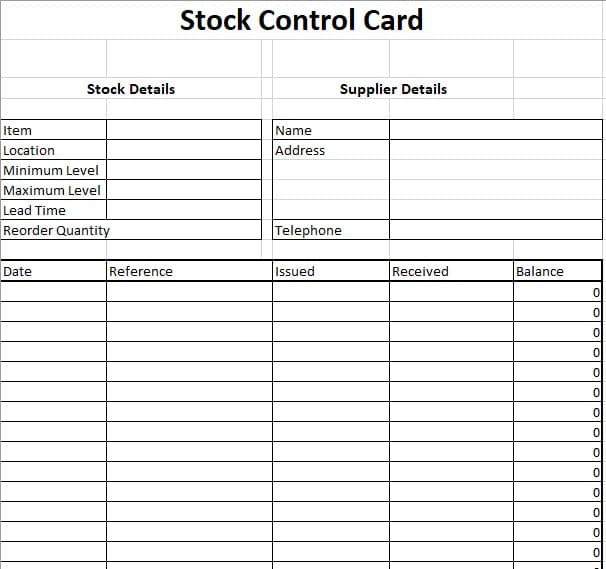
To use this record, you will need a page printed for each stock item and enter the details of the products, supplier and stock. Enter the transaction on the record each time stock is added or removed. If you keep your stock records up-to-date, you will be able to check on all your stock without leaving your desk.
You will also be able to reorder stock with the information on the record.
Inventory Control Using Excel

To help manage inventory, we have created a simple stock control Excel spreadsheet that allows you to track all your stock. It shows a list of all your stock and quantities on one page and when you need to reorder. Each inventory item has its sheet to record transactions.
This simple manual system for tracking inventory is enough for a business that holds small amounts of stock.

Features of our manual inventory system
- Track 15 different stock items
- A sheet to show all the inventory levels and if an item needs reordering
- Add details of the supplier for easy reference
- Each inventory item has details of the ins and outs to see the past inventory history
Instructions for our Inventory Control System Spreadsheet
- Download the Inventory Control Spreadsheet below and save a copy.
- All the information on the front spreadsheet is taken from the individual stock sheets, so do not change it.
- On the item sheet, enter the stock description, location, where to purchase it from, reorder levels and opening balance.
- Record all transactions of incoming and outgoing stock.
- Add any notes either below the record or after each item.
- Once this is complete, check the totals page for any stock that needs reordering.
If you have more than 15 items, you can use more than one spreadsheet.
If you do not have Excel, you can use Google Sheets or any alternative spreadsheet software.
Inventory Management Conclusion
Small businesses need to implement several inventory control methods to keep track of their stock. This includes setting minimum stock levels, counting inventory at least once a year, monitoring inventory, and managing returns. It’s also essential to track past stock history, customer demand and expiry dates of perishable items.
You can use a free Excel spreadsheet to help with your manual inventory management system.
Excel Stock Control Downloads
By downloading our free templates, you agree to our licence agreement, allowing you to use the templates for your own personal or business use only. You may not share, distribute, or resell the templates to anyone else in any way.

Return from Manual stock control to the what is stock control page.
