


A small business can use a purchase order template to purchase goods or services from a supplier, usually in bulk and on credit terms. A purchase order (also called a purchase requisition) is the document that authorises this purchase. The purchase order should include specific details about what you are buying, when it will be delivered, how much you are paying, and the company’s contact details.
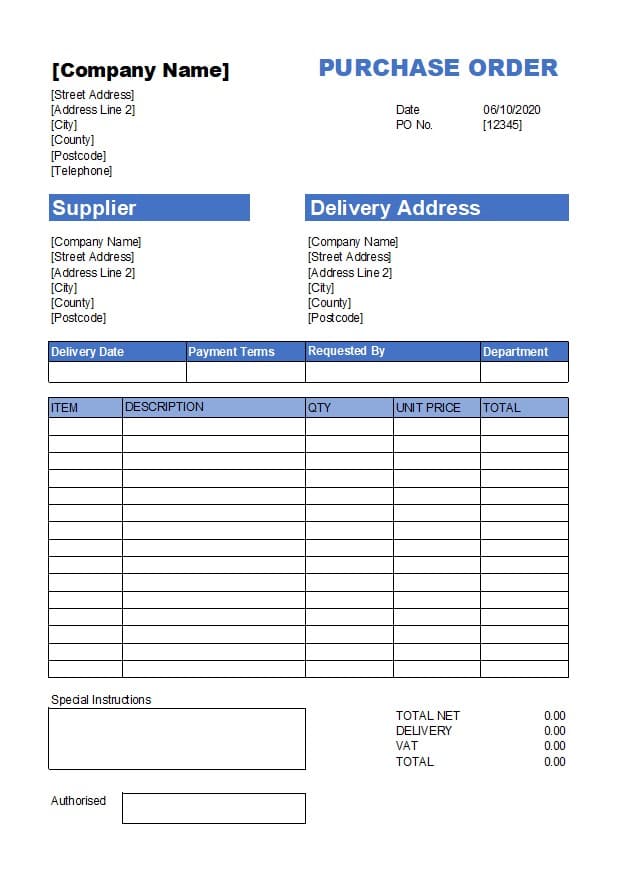
The purpose of a purchase order is to ensure that all the necessary information needed to complete the purchase has been made clear before proceeding with it, thereby avoiding misunderstandings that could lead to costly disputes between buyer and seller later down the line. The purchaser may also specify other items they expect from their suppliers, such as punctuality of deliveries or quality of the goods supplied.
A purchase order spreadsheet can help you ensure that all the necessary information is included in your purchase orders and can also help speed up the purchase process.
Disclosure: This content may contain affiliate links, which means if you click on them, I may get a commission (without any extra cost to you).
Our Free purchase order templates are available in Microsoft Excel, Google Sheets and other alternative packages. They are easy to use and can be downloaded at the end of this page.
We have also developed a worksheet to include a log of all your orders and the template. It makes it easy to see when orders are open, goods are received, and the invoice is received.
Purchase Order Procedures
If you are new to purchase orders or need more information, a good starting point is to read our section on what a purchase order is. The page includes standard procedures for issuing a new order to a supplier and the needed process.
A purchase order is a form between a buyer and a seller that sets out the terms for goods or services. The buyer creates the documents and sends them to the seller. The seller will confirm whether they accept the order or if any amendments are needed.
Further reading is available on everything you need to know about purchase orders.
Purchase Orders and Accounting Software
Using accounting software such as Sage UK, QuickBooks, and Xero to produce purchase orders can significantly streamline the purchasing process for businesses of all sizes. These software programs make it easy to create and track purchase orders and integrate with inventory management systems.

This means that businesses can quickly and accurately generate purchase orders based on their current inventory levels, ensuring they have the necessary supplies on hand to meet customer demand.
Purchase Order Format
There are a few things that you need to include in a purchase order. The most important items are your business details, supplier details, PO number, order date, shipping information, expected date of goods or supplies, description, and value.
The more information in the purchase order, the better; notes can also be added in the description or an email.
Free Purchase Order Template UK – Instructions
- Download the free PO template – the link is at the bottom of the page.
- Save the template to either your hard disc or the cloud.
- Enter your business information, including company name, address and telephone number.
- If the delivery address is always the same, enter it now.
- You now have a template to use time and time again.
- If you do not have autosave enabled, save the Excel document again; it is the template you will use for all the orders.
Example Purchase Order
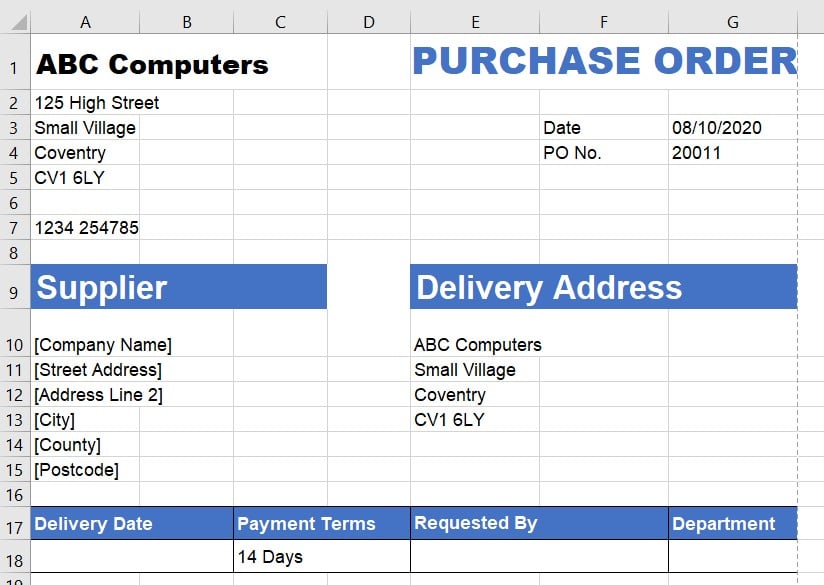
Below is an example of our business template.
Purchase Order Form Template Excel Instructions
- When you start a new purchase order, save the template as a different file name. If you are using many purchase orders, it makes sense to use the PO number, perhaps followed by the supplier name.
- Choose a numbering system; never start from one. An example might be to use the year followed by a number.
- You are now ready to start entering the rest of the details. Purchase order date, click on it, and today’s date will appear if you want a different date, change it.
- Enter the supplier’s details in full, including the delivery date (if available), payment terms, the requester, and the department.
- You are now ready to enter all the details of the products or services that you are ordering. Add as much detail as possible to the description. It makes the items required clear to the supplier. Enter the quantity and unit price. The total will be calculated automatically for you.
- Include any special delivery instructions, such as the delivery address or the contact person, before delivery. It is worth including an intended delivery date.
- Add any delivery charge.
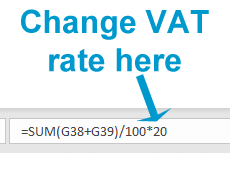
- The VAT is automatically calculated at 20%. If the VAT rate is different, change the last number in the formula below.
The purchase order is now ready. If the company’s purchase order procedures require an authorised signature, this is the time to obtain it. The purchase order can then be sent to the supplier by email, post, or hand delivery.
Purchase Order Example
Below is an example of a purchase order using the Microsoft Excel template.
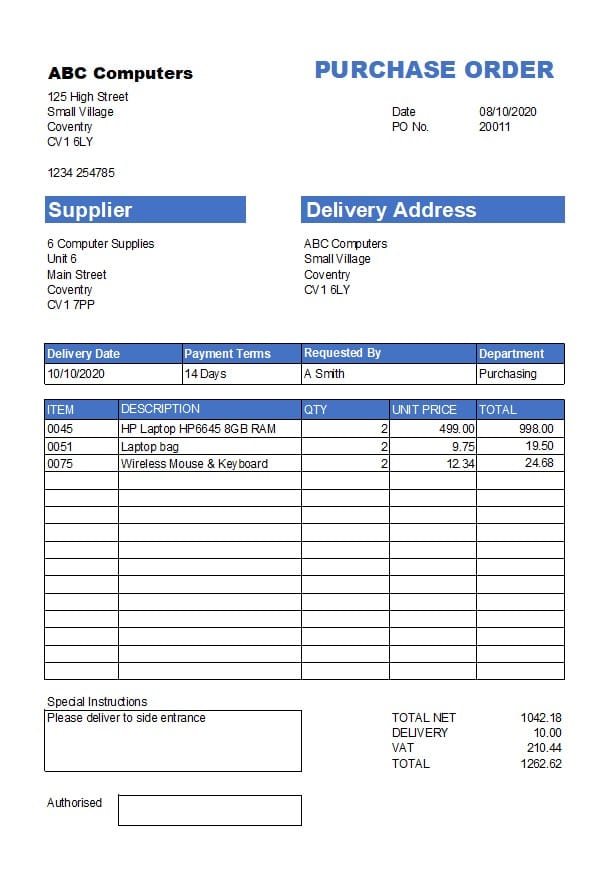
It shows the following information:
- 3 items of inventory are ordered, 2 of each.
- The shipment address is the same as the company address.
- Payment terms are 14 days.
- Instructions for delivery
- The total price for the purchases is £1262.62, including delivery and VAT.
Purchase Order PDF
There may be instances when you want to use a blank purchase order form PDF to print. It is helpful if you are visiting the supplier’s premises and want to complete the purchase order with them.
As in the instructions above, complete all your business details, including the delivery address, as in the instructions above. You can either delete the supplier and use this as a template for all orders or complete the supplier details. Delete the formulas in the bottom box for the totals, delivery and Net.
To print the form in Microsoft Excel to a PDF.
- File
- Save as or save a copy
- Name the file
- Select the Excel workbook and convert it to PDF using the drop-down menu.
The document is then available to print as a PDF.
Purchase Order Template Log
If you are running a purchase order system, it is worth keeping a log of all the PO’s and their status. The status might include goods received, invoices received, and completing the order.
The advantage of using this system is that you can easily track late deliveries, invoices not received, and whether the order is complete.
The search feature in Excel lets you search the entire document for a description, PO number, supplier, or other criteria.
We have produced a simple template available for free download at the end of this page.
Instructions
- Enter the details from the purchase order, either manually or by copying and pasting.
- When the goods are received, enter the date.
- When the invoice arrives, check it against the purchase order for any errors; if it is correct, enter the invoice number.
- If the order is complete, enter a ‘y’ in the last column.
Below is an example of a completed Purchase Order Log.
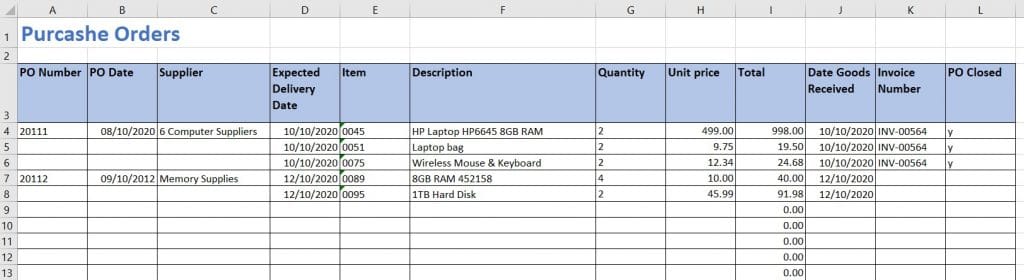
Two purchase orders were entered; the first is complete, and the second is awaiting an invoice.
Purchase Order Templates Download
By downloading our free templates, you agree to our licence agreement, allowing you to use the templates for your own personal or business use only. You may not share, distribute, or resell the templates to anyone else in any way.


FAQ
Is the purchase order template free to download?
Yes, the template is free to download in both Excel and Word formats. No sign-up is required. You can add your business name, logo, and contact details.
Can I customise the purchase order template for my business?
Yes. The column headings, line items, and payment terms can all be edited to match your business. You can also add your own purchase order numbering sequence.
Does the purchase order template work in Google Docs or Google Sheets?
Yes. The Word version can be opened and edited in Google Docs, and the Excel version can be opened in Google Sheets. Both work well for customisation and printing.
Do I need a separate purchase order template if I use accounting software?
Most accounting software packages, including Xero, QuickBooks, and Sage, have built-in purchase order functionality that automatically links to your supplier invoices and stock records. A standalone template is best suited to businesses that manage purchasing manually or only need to raise purchase orders occasionally.
Purchase Order Form Template Conclusion
Purchase orders form an agreement between the buyer and seller. The buyer will have a purchasing process that may include authorisation, approved suppliers, and payment details.
It sets out the company details, price, shipping details and quantities.
A purchase order log will keep track of all orders, the delivery date and if the order is complete.
Return from purchase order forms to Purchase Orders.
See all our Excel bookkeeping templates.
Last updated March 2026
