How to Complete a VAT Return: A Plain-English Guide for Small Businesses
Completing a VAT return is something every VAT-registered business in the UK needs to do at the end of each VAT period. The return tells HMRC how much output tax you have charged customers on your sales and how much input tax you have paid on business purchases — and calculates whether you owe HMRC money or are due a refund.
This guide explains how to complete a VAT return step by step, what the nine boxes mean, how VAT return periods work, and what to do if you make a mistake or miss a deadline. Whether you have just registered for VAT or want a clearer understanding of the quarterly process, you will find a plain-English explanation here.
At a Glance
Disclosure: This content may contain affiliate links, which means if you click on them, I may get a commission (without any extra cost to you).
- VAT returns are submitted quarterly — the total VAT owed is due one month and seven days after the end of each accounting period
- All VAT-registered businesses must use MTD-compatible software — the old HMRC VAT portal is closed
- Output VAT is the VAT you charge customers; input VAT is the VAT you pay on purchases
- Box 5 is the net VAT owed to HMRC or reclaimable — the difference between output and input tax
- If input VAT exceeds output VAT, HMRC will refund the difference
- Penalties apply for late submission and late payment under a points-based system
- Businesses that import goods or use the reverse charge need to account for these separately on the return
- Always check GOV.UK for the latest VAT rules and deadlines
What is a VAT Return?
A VAT return is a form submitted to HMRC every quarter showing your output VAT (the VAT you charged customers on business sales), your input VAT (the VAT you paid on business purchases and expenses), and the difference between the two. The total value of your sales and purchases, excluding VAT, is also reported.
If your output VAT is higher than your input VAT, you pay the difference to HMRC. If your input tax is higher, for example, after a large purchase or a quiet trading period, HMRC will refund you.
You must submit a return even if you have nothing to pay or reclaim. This is called a nil return, and the same deadlines apply.
Output VAT explained:
Output VAT is the VAT you charge customers on your taxable sales. For example, if you sell a product for £120 including 20% VAT, the output tax is £20. The total value of the sale, excluding VAT, is £100, which goes into Box 6 of your return. You collect this on behalf of HMRC and pay it over when you file the return.
Input VAT explained:
Input VAT is the VAT you pay on qualifying business purchases and expenses. You can reclaim VAT through your VAT return, reducing the amount you owe HMRC. To reclaim VAT, you must hold a valid VAT invoice from the supplier showing their VAT number, the net amount, and the VAT charged. The value of the purchase excluding VAT goes into Box 7.
VAT Return Periods and Deadlines
Most businesses file quarterly returns. The deadline for completing a VAT return and paying any VAT owed is one calendar month and seven days after the end of each accounting period.
HMRC assigns VAT-registered businesses to one of three stagger groups on registration. Your stagger group determines when your accounting period ends each quarter.
| Stagger group | Quarter end months | Return and payment deadline |
| Group 1 | March, June, September, December | 7 May, 7 August, 7 November, 7 February |
| Group 2 | April, July, October, January | 7 June, 7 September, 7 December, 7 March |
| Group 3 | May, August, November, February | 7 July, 7 October, 7 January, 7 April |
Check your VAT online account to confirm your stagger group and your next VAT return deadline. If a deadline falls on a weekend or bank holiday, the previous working day applies. Always allow time for payment to reach HMRC. Same-day Faster Payments are usually fine, but CHAPS and BACS transfers can take longer.
Tip: Set a recurring calendar reminder one week before each VAT deadline — not just on the day. This gives you time to check figures, correct any errors, and ensure payment reaches HMRC on time.
Making Tax Digital for VAT
Since April 2022, all VAT businesses must keep digital VAT records and submit returns using HMRC-recognised, MTD-compatible software. Completing a VAT return through the old HMRC VAT portal is no longer possible; it closed in November 2022.
You must use software such as Sage UK, Xero or QuickBooks, or bridging software if you keep records in a spreadsheet, to submit directly to HMRC via the MTD API. For new registrations, HMRC automatically enrols you in MTD for VAT.
Accounting Software Best Deals

XERO – 90% Discount for 6 Months – Cloud accounting, unlimited users, bank feeds, MTD compatible

QuickBooks – 90% off for 7 Months – Sole-Traders, easy to use, MTD-compatible

Tide – Free with Tide Bank Account – All your banking and accounts in one place, MTD compatible
The Nine Boxes on a VAT Return
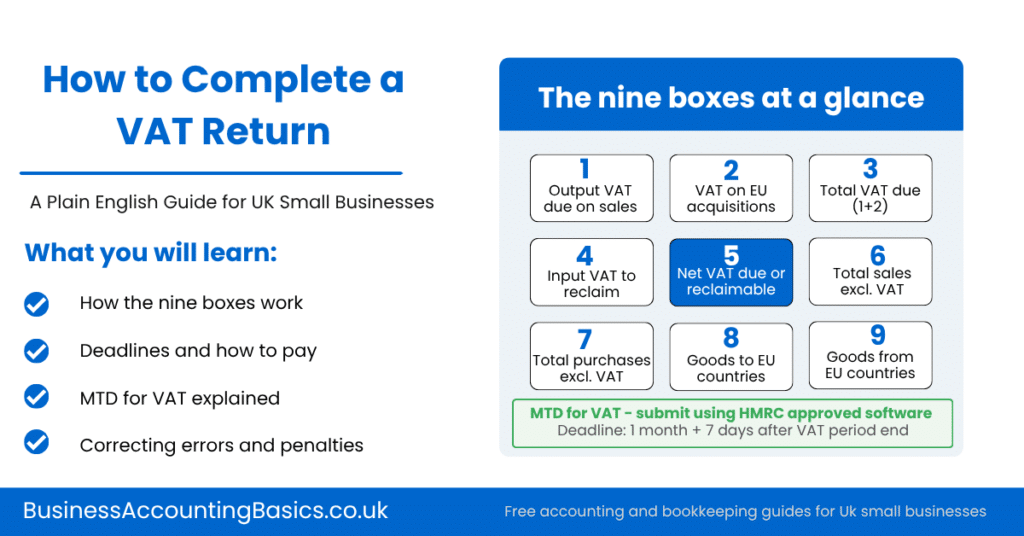
A VAT return has nine boxes. If you use accounting software, most of these are populated automatically from your records. You should check the figures before submitting rather than entering them manually. Below are the VAT return boxes explained:
| What it shows | Notes | |
| Box 1 | Output VAT payable on sales | The total output VAT charged on taxable sales in the period. Your software calculates this from your sales invoices. Include VAT on any reverse charge supplies you have accounted for. |
| Box 2 | VAT on acquisitions from EU member states | Relevant only for goods acquired via Northern Ireland. Most GB businesses enter 0. |
| Box 3 | Total VAT due | Box 1 plus Box 2. The total VAT you owe before deducting input tax. Calculated automatically. |
| Box 4 | Input VAT to reclaim | The total VAT reclaimed on business purchases and expenses. You must hold a valid VAT invoice for each claim. Calculated by your software from purchase records. |
| Box 5 | Net VAT payable or reclaimable | The difference between Box 3 and Box 4. If Box 3 is higher, you pay the amount to HMRC. If Box 4 is higher, HMRC refunds you. Always a positive figure. |
| Box 6 | Total value of sales excluding VAT | The total value of all sales in the period excluding VAT. Include zero-rated and exempt sales. Exclude sales outside the scope of UK VAT. |
| Box 7 | Total value of purchases excluding VAT | The total value of all purchases and expenses excluding VAT. Include zero-rated purchases. |
| Box 8 | Total value of goods to EU countries | Goods dispatched to EU member states via Northern Ireland only. Most GB businesses enter 0. |
| Box 9 | Total value of goods from EU countries | Goods acquired from Northern Ireland from EU only. Most GB businesses enter 0. |
Tip: The key figure to check before completing a VAT return submission is Box 5 — the net VAT due or reclaimable. If it looks unexpectedly high or low, review your output VAT in Box 1 and your input VAT in Box 4 before submitting. A large unexplained difference usually means a transaction has been coded to the wrong VAT rate or a purchase invoice is missing.
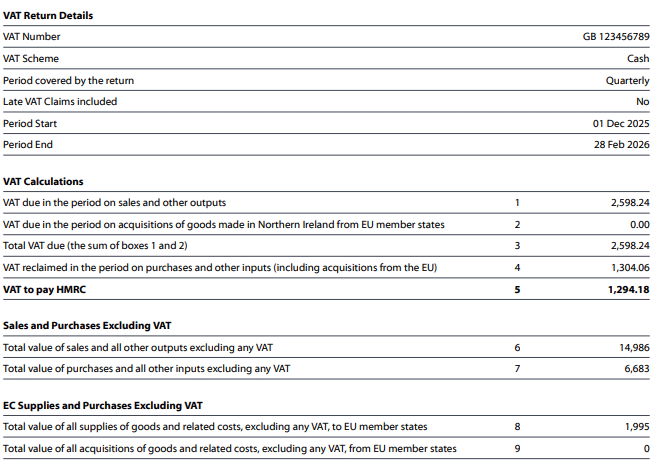
Example VAT Return
Below is an example of a VAT return for a business using the cash scheme in Xero.
How to Complete a VAT Return: Step by Step
The steps below apply to completing a VAT return under MTD using accounting software. The exact process varies slightly by package, but the sequence is the same.
- Make sure all transactions for the quarter are recorded. All sales invoices, purchase invoices, expense receipts, and bank transactions for the VAT period should be in your software before you start.
- Reconcile your bank account for the period. This confirms your records match your bank statement and catches any missing or duplicated entries.
- Check your output tax figures. Review your sales for the period and confirm the correct VAT rate has been applied to each transaction. Common errors include applying the standard rate to zero-rated goods or forgetting to account for VAT on goods taken for personal use.
- Check your input tax figures. Confirm that you hold a valid VAT invoice for every purchase for which you are reclaiming VAT. Check that VAT has not been claimed on non-qualifying expenses such as business entertainment or the purchase of a car for mixed use.
- Review the total value of sales (Box 6) and total value of purchases (Box 7) excluding VAT. These should match your profit and loss figures for the period.
- Open the VAT return in your software and review all nine boxes. Check Box 5 — the net VAT figure — makes sense given your trading for the period.
- Submit the return directly to HMRC through your software. Most packages have a Submit VAT Return button that connects to the HMRC MTD API and files your return on your behalf.
- Save the HMRC confirmation reference. This confirms the return was received and is your proof of submission.
- Pay any VAT owed by the deadline. See the payment section below for the available methods.
For full guidance on completing a VAT return and the GOV.UK submission process, see: gov.uk/send-vat-return

Paying Your VAT Bill
The payment deadline is the same as the submission deadline — one month and seven days after the end of your VAT period. HMRC must receive the payment by this date. The VAT owed is shown in Box 5 of your return.
You will need your nine-digit VAT registration number as the payment reference. Payment options include:
- Direct Debit — set up through your VAT online account. HMRC collects automatically after you submit, removing the risk of a late payment.
- Faster Payments — same day or next day via online banking. Use HMRC bank details from GOV.UK and your VAT number as the reference.
- BACS — allow three working days for payment to reach HMRC.
- Corporate credit card — available on the government website, but a transaction fee applies.
- CHAPS — same day, but check your bank cut-off time.
Tip: If you pay by Direct Debit, HMRC collects the payment 3 working days after your return submission deadline. Make sure funds are available in your account from the submission date, not just from the payment date, as HMRC collect a few days after you file.
When HMRC Owes You a VAT Refund
If your input tax (Box 4) is higher than your output tax (Box 3), HMRC owes you a refund. This is common when you have had significant business expenditure in the period, sell zero-rated goods, or are in the early stages of trading.
HMRC typically pays VAT refunds within 30 days of receiving the return. If they delay beyond 30 days, they must pay interest on the repayment. If HMRC carries out a compliance check, the 30-day clock may pause while the check is underway.
The total value of zero-rated sales (excluding VAT, which is nil) should still be included in Box 6. This is one of the reasons Box 6 may be higher than you expect, even on a repayment return.

Import VAT and Postponed VAT Accounting
If your business imports goods into the UK from outside Great Britain, you may need import VAT accounting. How this works depends on whether you use postponed VAT accounting.
Postponed VAT accounting
Postponed VAT accounting (PVA) allows UK VAT businesses to account for VAT on imports on their VAT return rather than paying it at the point of import. This is the default method for most UK businesses importing goods.
Under PVA, the VAT on your imports is declared in Box 1 of your return for the quarter in which the goods arrive. You then reclaim the same amount in Box 4 — so if your business is fully taxable, the net effect on Box 5 is usually zero. The total value of goods imported, excluding VAT, is entered in Box 7.
Your import VAT statement from HMRC — available monthly via the Customs Declaration Service — shows the total value of import VAT declared in each period. Always reconcile this against your return figures before submitting.
Note on import VAT: If you do not use postponed VAT accounting, import VAT is charged and paid at the border. You can still reclaim this through Box 4 of your VAT return using the C79 certificate as evidence. Check GOV.UK for the current rules on import VAT and postponed VAT accounting.
Reverse Charge Transactions
A reverse charge transaction shifts the responsibility for accounting for VAT from the supplier to the customer. Rather than the supplier charging VAT on their invoice, the customer self-accounts for the VAT on their own return.
The most common situations where UK small businesses encounter the reverse charge are:
- Services received from overseas suppliers — if you buy digital services, consultancy, or other services from a supplier outside the UK, you may need to apply the reverse charge
- Construction Industry Scheme (CIS) domestic reverse charge — applies to VAT-registered construction businesses supplying or receiving certain construction services
On a reverse charge transaction, you add the output tax to Box 1 and the input tax to Box 4. The net effect on Box 5 is usually nil if you are fully taxable. The total value of the supply excluding VAT goes into Box 6 (if you are the supplier) or Box 7 (if you are the customer).
Warning: Getting the reverse charge wrong is a common VAT error. If you receive services from overseas businesses or work in the construction industry, check GOV.UK for the current reverse charge rules, or ask your accountant to confirm how to account for these on your return.
Other VAT Schemes
There are special VAT accounting schemes available that change how you calculate or report VAT. The most common are:
Flat Rate Scheme
Under the flat rate scheme, instead of calculating output and input VAT separately, you pay a fixed percentage of your gross (VAT-inclusive) turnover. The total value of sales excluding VAT still goes in Box 6. Best suited to businesses with low expenses. Available to businesses with a taxable turnover below £150,000.
Cash Accounting Scheme
Under the cash accounting scheme, you account for output VAT when you receive payment from customers rather than when you issue an invoice, and reclaim input VAT when you pay your suppliers rather than when you receive their invoice. Helpful for businesses with slow-paying customers. Available to businesses with a taxable turnover below £1.35 million.
Annual Accounting Scheme
Instead of filing four quarterly returns, you file one return per year. You make advance payments on account during the year and settle the balance when you file. Available to businesses with a taxable turnover below £1.35 million.
This guide covers the standard quarterly method. If you use one of these schemes, the way you complete some of the nine boxes differs. Check GOV.UK for scheme-specific guidance, or speak to your accountant.
Correcting Errors
If you discover a mistake after completing and submitting a VAT return, what you do depends on the size of the error.
- Errors of £10,000 or less: Adjust on your next return.
- Errors between £10,000 and £50,000: You can adjust on your next return if the total VAT error is less than 1% of your Box 6 turnover figure. If it exceeds this, notify HMRC separately.
- Errors over £50,000 or deliberate errors: Notify HMRC directly
Warning: Do not leave errors uncorrected. HMRC can and does check VAT returns, and an uncorrected error that repeatedly reduces your VAT liability can result in penalties and interest on top of the underpaid VAT.
Late Submission and Late Payment Penalties
HMRC introduced a points-based penalty system for VAT from 1 January 2023.
Late submission penalties
You receive one penalty point for each late VAT return. Once you reach the threshold for your filing frequency, you receive a £200 fixed penalty plus a further £200 for each subsequent late submission.
| Filing frequency | Penalty point threshold |
| Quarterly (standard) | 4 points |
| Monthly | 5 points |
| Annual | 2 points |
Points expire after 24 months of on-time submissions. Once you reach the threshold, points reset after a period of compliance — for quarterly filers, this means four consecutive on-time returns.
Late payment penalties and interest
Interest is payable from the date the payment is overdue until it is paid in full. Interest is calculated at 4% plus the Bank of England base rate.
Late payment penalties are calculated on the VAT outstanding and depend on how late you pay:
- Up to 15 days late — no penalty if you pay or agree a payment plan with HMRC
- 16 to 30 days late — 3% of the VAT outstanding at day 15
- 31 or more days late — 3% at day 15 plus 3% of what is outstanding at day 30
Tip: If you cannot pay on time, contact HMRC before the deadline to arrange a Time to Pay agreement. Contacting HMRC proactively always produces a better outcome than waiting for them to chase you.
VAT Record Keeping
Under MTD for VAT, you must keep digital VAT records. These must include:
- Copies of all sales invoices — the source records for your output figures
- A supplier invoice showing their VAT number, net amount and VAT charged — without valid evidence, you cannot recover the VAT
- Your VAT control account — a summary of output VAT and input VAT for each accounting period, linking your records to your return
- Records of any adjustments made to a return
Keep VAT records for at least six years. Under MTD for VAT, there must be a digital link between your records and your VAT return — you cannot manually re-key figures from a spreadsheet into a submission.
Using Accounting Software for Completing a VAT Return
MTD-compatible accounting software makes how to complete a VAT return significantly more straightforward. Once your invoices and purchases are recorded and your bank is reconciled, the software automatically calculates your nine return boxes and submits them directly to HMRC.
The three most widely used packages for VAT returns in the UK are Sage UK, Xero or QuickBooks. All three are fully HMRC-recognised and handle MTD VAT submissions on all their main paid plans.
Tip: Using MTD-compatible accounting software now means your records are always in the right digital format for completing a VAT return. The software handles submissions automatically and keeps a full audit trail for HMRC if they ever ask to review your records.
Frequently Asked Questions
How often do I need to complete a VAT return?
Most VAT-registered businesses complete a VAT return quarterly — four times a year. Some businesses apply to file monthly returns, which is useful if you regularly reclaim VAT on large purchases. The Annual Accounting Scheme allows one return per year for eligible businesses.
What if I have no VAT to pay or reclaim?
You must still submit a nil return on time. Failing to submit a nil VAT return earns a penalty point under the points-based system, the same as a missed return with a balance.
Can I still complete a VAT return through the HMRC website?
No. The HMRC VAT portal closed in November 2022. All VAT-registered businesses must complete a VAT return submission using MTD-compatible software or HMRC-approved bridging software. Paper returns are only permitted in very limited circumstances — digital exclusion due to age, disability, or remoteness.
What VAT can I not reclaim?
You cannot claim VAT on certain expenses even if you hold a valid invoice. Common examples include: Business entertainment — VAT on entertaining clients or suppliers is not reclaimable. Cars — input VAT on the purchase of a car is blocked unless the car is used exclusively for business, with no private use. Personal expenses — only business-related purchases qualify. Speak to your accountant if you are unsure whether a particular expense qualifies.
What is the VAT threshold?
You must register for VAT if your VAT taxable turnover exceeds £90,000 in any rolling 12-month period. You can also register voluntarily below this threshold. Once registered, all VAT obligations, including quarterly returns, apply regardless of turnover.

Summary
Completing a VAT return means reporting your output VAT on sales and input VAT on purchases to HMRC every quarter. The deadline for submission and payment is one month and seven days after the VAT period ends. All VAT businesses must use Making Tax Digital-compatible software, as the HMRC VAT portal is closed.
A VAT return has nine boxes, most of which are filled automatically by accounting software. Box 5 shows the VAT due or reclaimable. If input VAT exceeds output VAT, HMRC refunds the difference. Special rules apply to imports and reverse-charge transactions; check GOV.UK or consult an accountant.
To reclaim VAT on purchases, you need a VAT invoice. Keep digital records for at least six years. Late submissions and payments can lead to penalties, so stay up to date on VAT rules and deadlines.
Related Pages on Business Accounting Basics
VAT Registration Guide — how to register for VAT and what to expect
Making Tax Digital for VAT — full guide to MTD VAT requirements
Best Accounting Software — compare Xero, QuickBooks, Sage and more for VAT returns
Free Accounting Software — free and low-cost options for MTD-compatible VAT submissions
Self-Employed Bookkeeping — bookkeeping basics for sole traders and the self-employed
Last updated: March 2026