

Journal Entry in Accounting – Examples and Free Word or PDF Template
Learn how to record a journal entry in accounting with simple double-entry bookkeeping examples, and download our free Word or PDF template to record your own journal transactions.
A journal entry in accounting helps businesses record adjustments, correct errors and transfer amounts between accounts using double-entry bookkeeping.
In this guide, we’ll explain when to use journal entries, how to record debits and credits, and work through practical examples. You can also download our free journal entry template in Word or PDF format.
Journal Entry Definition
A journal entry records a financial transaction or adjustment in a business’s accounting records. Each entry includes the date, the accounts involved, the debit and credit amounts, and a description of the transaction.
Disclosure: This content may contain affiliate links, which means if you click on them, I may get a commission (without any extra cost to you).
Businesses record journal entries in the general ledger. Under double-entry bookkeeping, every journal entry must balance, so the total debits must equal the total credits.
Journal entries help businesses maintain accurate accounting records and prepare financial statements, including the balance sheet and profit and loss account.
How do I create an Accounting Journal Entry?
There are two ways of creating journal entries in modern accounting software. They are:
Journal Entry by Accounting Transaction
Posting a business transaction in your accounting software creates journal entries that include debits and credits. This journal entry updates your books and tracks your financial activity. The transactions might consist of sales invoices, purchase invoices, credit notes, and payments.

The journal entry ensures that your books are accurate and up-to-date, which is essential for efficient bookkeeping. The journal entry provides a valuable record of your financial activity that can be used for tax purposes or other financial reporting.
Overall, journal entries are essential to accounting and bookkeeping and help keep your finances organised and streamlined.
Here is an accounts payable journal entry example; the entry is in relation to a bill received for website hosting for the business:


Manual Journal Entries
When you need to make an adjusting entry to your accounts, you’ll create a manual journal entry. This might be an accrual, prepayment, or correction. Regardless of the reason, journal entries help keep your finances in order and up to date.

The above image shows the entry form in Xero; most accounting packages look similar.

Double Entry Accounting System
The double entry accounting system is one of the most important foundations of modern accounting. This system records transactions in at least two accounts, each receiving a “debit” and a “credit.” The debits are always equal to the credits, and this balance keeps the books in order.
This system provides a clear audit trail because it documents all transactions. In addition, the double entry system makes it easy to post accounting journals. This process involves recording transactions to the correct accounts and ensuring that the debits and credits are equal.
Accounting software uses double-entry bookkeeping; for example, you paid £ 150 for an insurance policy from your cash account. The double entry would be to debit the cash account in the balance sheet and credit insurance in the profit and loss account.
T-Accounts
T-accounts are the basis of each account in the general ledger. They show the account name and a list of the debits and credits. They are used in a journal entry to help decide if the journal entry is a debit or credit. Below is an example of a T-account.

What are the Financial Statements?
The general ledger lists accounts and is used to produce the financial statements. The three primary statements are the balance sheet, income statement, and cash flow statement.
A balance sheet lists all the assets and liabilities of a company at a specific point in time. The income statement shows the revenue and expenses of a company over a period of time. The cash flow statement shows the cash inflows and outflows of a company.
These reports are essential for understanding the financial health of a company. They can help businesses make informed decisions about investing, borrowing, and other financial activities.

The Accounting Cycle
The accounting cycle is a step-by-step process that a business will use to produce the accounts. This process includes recording business transactions, classifying them into the appropriate accounts, reviewing the general ledger accounts, making adjustments and then preparing the period reports.

The accounting cycle is vital because it ensures financial information is accurate and up to date. This process provides a valuable record of a company’s financial activity.
Format of Journal Entries
A journal entry requires the journal number, transaction date, account codes, description, debit amount, and credit amount. The information is entered into a form to keep a transaction record.
In a journal, the debit and credit amounts must be equal as you move a value from one account code to another. You can make multiple journal entries in one form; this is especially useful at year-end when you have many journals to complete.
There are a few things to keep in mind when creating journal entries:
- Make sure that you post the journal entry to the correct account.
- Ensure it has the correct date to post in the correct accounting period
- Double-check that the figures are accurate.
- Sign and date the journal entry.
- Use proper accounting terminology.
General Accounting Journal Entry Examples
Prepayment Journal Entry Example
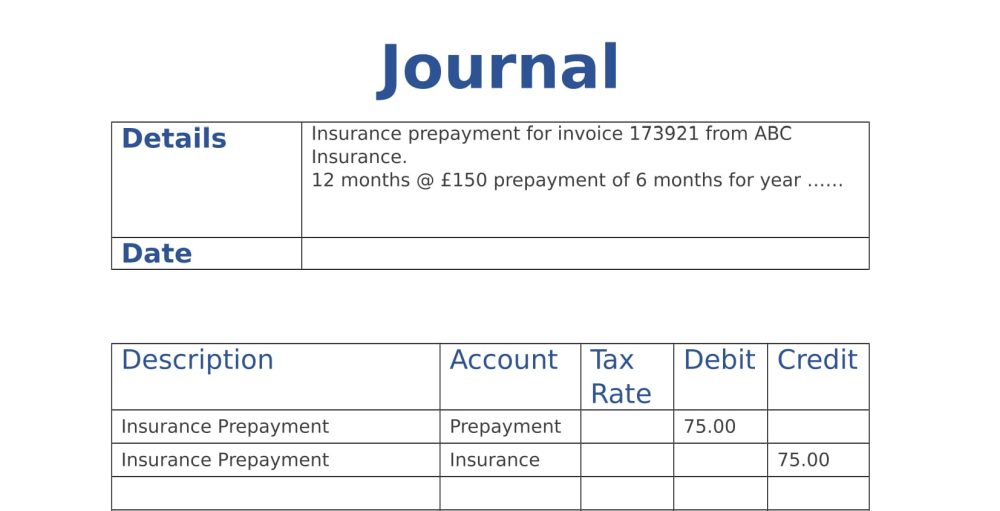
During the year, a business purchases 12 months of insurance for £150, but only six months relate to the current year. A prepayment for 6 months will need to be journaled to correct the figures for the year.
Here is what the original insurance entry to the accounts would have been:
| Debit | Credit | |
|---|---|---|
| Insurance | £150 | |
| Bank | £150 |
The journal entry in accounting form would look like this.
Accrued Expense
Accruals are adjustments for sales for which no sales invoice has been issued to the customer, or expenses for which no invoice has yet been received from the supplier. These adjustments ensure the final accounts reflect accurate figures for the financial year.
Examples of accruals journals are
a) Sales were made during the month, but a sales invoice of £1000 has not been issued; a journal is required to correct the accounts.
| Debit | Credit | |
|---|---|---|
| Accruals | £1000 | |
| Sales | £1000 |
b) Goods to the value of £60 have been received and sold to a customer (cost of sale); at the period end, the purchase invoice has not been received.
| Debit | Credit | |
|---|---|---|
| Cost of Sales | £60 | |
| Accruals | £60 |
Reversing Journals
IA reversing journal cancels an earlier journal by swapping its debits and credits.
Businesses often reverse accruals at the start of the next accounting period, then record the actual invoice when it arrives. This prevents them from counting the same income or expense twice. Many accounting packages let you schedule the reversal.
Prepayments work differently. Transfer the prepaid amount back to the expense account as the period it covers passes. In the insurance example, the remaining £75 becomes an expense in the following year.
Recurring Journals
One journal type often used in accounting is the recurring journal. This type of journal records regular transactions, such as monthly rent payments or weekly payroll expenses. Recurring journals help track expenses and ensure all transactions are accounted for.
Adjusting Entries
There are several reasons a business might need an adjusting entry, including:
- Incorrect amount posted
- Posted to the wrong account on the general ledger
- year-end adjustments
- Depreciation of fixed assets
How to track Journal Entries
You can normally do this with your accounting software if you need to track entries to find a problem. There are several ways of tracking them;
- Search the business transaction to confirm where the double entry appears in the general ledger.
- Search through the journal entries.
- Look at specific accounts on the general ledger between 2 dates.
General Journal Entry Form
We have designed a general journal entry form that you can download as either a Word document or PDF. Both are free to download and easy to use.
By downloading our free templates, you agree to our licence agreement, allowing you to use the templates for your own personal or business use only. You may not share, distribute, or resell the templates to anyone else in any way.

Xero Accounting Software
Spend less time entering transactions into spreadsheets. Xero connects to your bank, helps you manage invoices and expenses, and supports Making Tax Digital.
- Send invoices
- Connect your bank
- Capture receipts
- MTD ready


Our Other Useful Templates
T-Account
Cash Book
Sales Invoices
Accounting Journal Entries Conclusion
Journal entries help you record adjustments, correct errors and keep your accounts accurate.
Include the date, account names or codes, a clear description and the amounts. Check that total debits equal total credits and keep supporting calculations or documents with the journal.
