Making Tax Digital for Sole Traders: Complete Guide for 2026 and Beyond
Key Takeaways
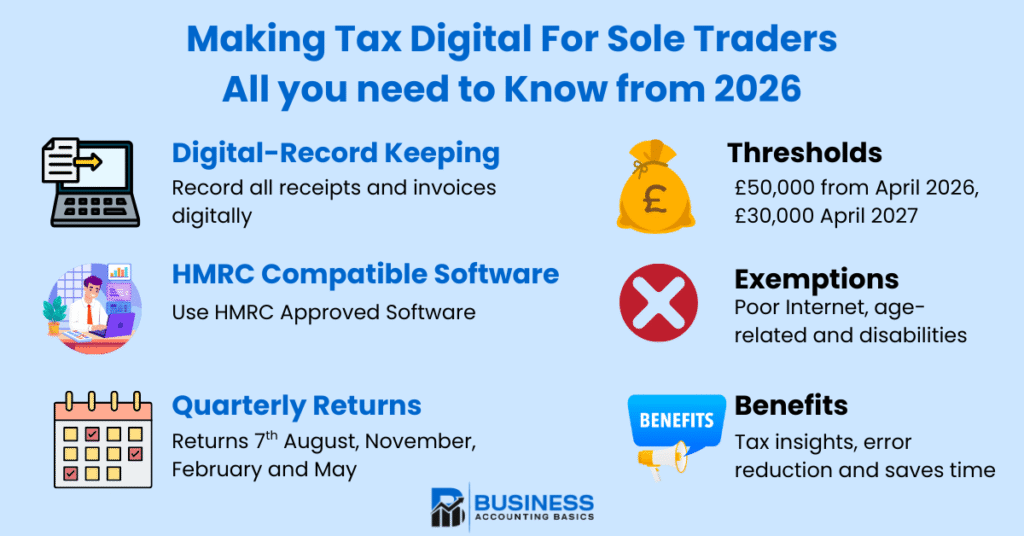
- From 6 April 2026, sole traders with annual business income over £50,000 must comply with Making Tax Digital for Income Tax.
- MTD requires digital record-keeping and quarterly updates submitted using HMRC-approved software, rather than annual self-assessment returns.
- Income thresholds will decrease to £30,000 from April 2027 and possibly to £20,000 from April 2028, bringing more sole traders into scope.
- Quarterly updates are due on the 7th of August, November, February, and May, with a final declaration by 31 January.
- Early preparation, including digital records and software selection, is essential for smooth compliance.
If you’re a sole trader or landlord with rental income in the UK, major changes are coming to how you report your income tax. From April 2026, many sole traders will need to abandon their traditional self-assessment tax return process and move to a new digital system called Making Tax Digital for Income Tax. This isn’t just a minor adjustment—it’s a complete transformation of how you’ll manage your tax affairs.
The shift affects how you maintain digital records, when you submit information to HMRC, and what accounting software you’ll need. With income thresholds starting at £50,000 and decreasing over time, millions of sole traders will eventually need to adapt. The good news? You have time to prepare, and understanding the requirements now will make the transition much smoother.
Whether you’re already above the threshold or approaching it, this guide covers everything you need to know about preparing for making tax digital obligations, from choosing compatible software to understanding quarterly returns.
What is Making Tax Digital for Sole Traders
Making Tax Digital is HMRC’s initiative to modernise how self-employed individuals report their income tax and business finances. Rather than submitting a single annual tax return, MTD for income tax requires sole traders to maintain digital records throughout the tax year and submit quarterly updates using HMRC-recognised accounting software.
This system builds on the existing Making Tax Digital for VAT framework, which has been mandatory for VAT-registered businesses since April 2019. However, the income tax version will affect far more people, as many sole traders earning above the income threshold don’t reach the VAT threshold of £85,000.

Under MTD for income tax, the traditional self-assessment return process changes significantly. Instead of gathering all your business income and expense information once per year, you’ll need to submit separate quarterly updates for each income source. This means if you have both self-employment income and rental income, you’ll submit separate quarterly updates for each.
The system aims to reduce the tax gap—currently £5 billion annually in unpaid tax from self-employed individuals—by requiring more frequent, accurate digital reporting. HMRC believes that regular digital submissions will catch errors earlier and improve overall tax compliance across smaller businesses.
Who Must Comply and When
The rollout of Making Tax Digital for sole traders follows a phased approach based on your total qualifying income. Understanding these thresholds and timing is crucial for planning your compliance strategy.
From 6 April 2026, sole traders and landlords with gross income exceeding £50,000 annually must begin using MTD for income tax. This affects an estimated 780,000 individuals based on current tax returns. Your qualifying income includes your gross income from self-employment and any property income before expenses are deducted.
The threshold for sole trader income is reduced to £ 30,000 from 6 April 2027, bringing approximately 970,000 additional people into the system. A further reduction to £20,000 may take effect from 6 April 2028, capturing even more small businesses under the digital reporting requirements.
HMRC determines your eligibility based on previous tax years. For the 2026 start date, they’ll use your 2024-25 tax return to assess whether your total annual income exceeded £50,000. This gives you clear visibility of when you’ll need to comply, allowing adequate preparation time.
Importantly, the thresholds consider only business or property income. Employment income, pensions, dividends, and savings interest don’t count toward the qualifying income calculation. However, if you have multiple income sources, including these, they’ll still need to be reported in your final digital tax return.
Exemptions from MTD Digital Tax Return
Not everyone above the threshold must comply with MTD obligations. Several exemptions exist, mirroring those that apply to MTD for VAT since April 2019.
Automatic exemptions include individuals who are digitally excluded—those without reliable internet access or living in areas with poor connectivity. Age-related exemptions may apply for older people who can demonstrate genuine difficulty adapting to digital systems.
Religious beliefs can also provide grounds for exemption if your faith prohibits computer use or electronic communications. This requires demonstrating that digital reporting conflicts with fundamental religious principles.
Disability-related exemptions exist where physical or mental health conditions make digital record-keeping unreasonable or impractical. This includes conditions affecting motor skills, vision, or cognitive abilities that prevent effective use of accounting software.
To apply for an exemption, contact HMRC directly with evidence supporting your circumstances. The process mirrors VAT exemption procedures, and successful applicants can continue using paper records and traditional assessment return methods.
How Making Tax Digital Works
Making tax digital for income tax fundamentally changes the reporting cycle for sole traders. Instead of the familiar annual tax return process, you’ll follow a quarterly schedule with digital submissions throughout the tax year.
The new system requires three types of submissions: quarterly updates, a final declaration, and any additional returns for other taxable income. Each quarterly update covers three months and must include summary information about your business income and expenses for that quarter.
You must submit separate quarterly updates for each income source. If you operate multiple businesses or have both self-employment and rental income, each requires its own quarterly submission. This granular reporting gives HMRC better visibility into different income streams throughout the year.
After the tax year ends, you’ll submit a final declaration that consolidates all quarterly information and includes any adjustments, allowances, or corrections. This final submission replaces the traditional tax return for your business and property income.
Quarterly Update Schedule
The quarterly schedule follows fixed dates regardless of when your tax year starts. Each quarter covers specific date ranges with submissions due by the 7th of the following month:
- Q1: 6 April to 5 July – submission due 7 August
- Q2: 6 July to 5 October – submission due 7 November
- Q3: 6 October to 5 January – submission due 7 February
- Q4: 6 January to 5 April – submission due 7 May
Your final declaration, including all adjustments and calculations, must be submitted by 31 January following the end of the tax year, maintaining the familiar deadline.
This schedule means you’ll interact with HMRC’s systems five times per year instead of once. Each submission builds on the previous one, creating a cumulative picture of your annual business performance and helping with tax planning throughout the year.
Digital Record Keeping Requirements
Under MTD for income tax, you must maintain all business records digitally using approved software. This represents a significant change for many, who currently use paper records or basic spreadsheets for their finances.
Your mtd MTD-compatible software must capture all business transactions, including income from customers, business expenses, and any accounting adjustments. The software needs to maintain detailed records that support the summary figures you submit in quarterly updates.
Physical receipts and invoices can still be collected, but you must input the information into your digital system. Some software allows photo capture of receipts with automatic data extraction, streamlining the recording of income.
Bank statements integration is crucial for effective digital record-keeping. Many sole traders benefit from maintaining a dedicated business bank account that connects directly with their software, automatically importing transaction data and reducing manual entry.

Preparing for Making Tax Digital for income tax
Successful preparation for Making Tax Digital for Income Tax requires systematic planning, especially given the complexity of transitioning from traditional tax return assessment methods. Starting early gives you time to implement systems properly and become comfortable with new processes.
First, verify whether MTD applies to you by calculating your total qualifying income from the previous tax year. Include all business income and rental income before expenses. If you’re approaching the threshold, consider that income growth might bring you into scope before the mandatory dates.
HMRC provides an online service to check your eligibility and sign up voluntarily before the mandatory dates. Early voluntary sign-up lets you test systems and processes while traditional methods remain available as backups.
Create a timeline for preparation activities. This should include researching MTD-compatible software, transitioning from current record-keeping methods, setting up digital systems, and potentially training yourself or your team on new processes.
Consider your current financial structure. If you mix business and personal transactions in the same bank account, now is an excellent time to separate them. A dedicated business bank account makes digital record-keeping much simpler and more accurate.
Choosing MTD for Income Tax-Compatible Software
Selecting the right compatible software is perhaps the most critical decision in preparation. Your software must appear on HMRC’s approved list and provide all necessary functionality for submissions and record keeping.
Free software options exist, including Sage UK, which is particularly suitable for straightforward sole trader operations with limited transaction volumes. These typically provide basic income and expense tracking with quarterly reporting capabilities, meeting minimum MTD obligations without ongoing subscription costs.
Paid software like Sage UK, Xero or QuickBooks offers enhanced features like automated bank statement reconciliation, comprehensive reporting, invoice creation, and integration with other business tools. For sole traders with complex operations or higher transaction volumes, these features often justify the monthly subscription costs.
Accounting Software Best Deals

Sage UK – 90% for 6 Months – FREE plan for Sole-Traders, AI tools for bookkeeping automation
XERO – 90% Discount for 6 Months – Cloud accounting, unlimited users, smart bank feeds

QuickBooks – 90% Discount for 7 Months – Invoicing, expense tracking, payroll, financial reports
QuickBooks MTD Compatible Software
QuickBooks is a popular accounting software designed to simplify financial management for the self-employed. It offers a user-friendly platform tailored to the needs of small businesses, helping keep digital records, track income and expenses, and prepare quarterly updates required under Making Tax Digital for Income Tax.
With features like automated bank feeds, invoicing, and real-time financial reporting, QuickBooks enables self-employed individuals to manage their finances efficiently while staying compliant with HMRC’s digital record-keeping and reporting requirements. Whether you’re new to accounting software or looking to upgrade your current system, QuickBooks provides a comprehensive solution that supports smooth tax digital compliance and better business insights.

Xero MTD Compatible Software
Xero is a cloud-based software designed to simplify financial management for the self-employed and small businesses. It offers a user-friendly platform that helps you maintain digital records, track your business income and expenses, and prepare the quarterly updates required under Making Tax Digital for Income Tax.
With features like automated bank feeds, invoicing, and real-time financial reporting, Xero enables you to stay compliant with HMRC’s digital record-keeping and reporting requirements while gaining valuable insights into your finances. Whether you’re new to using software or looking to upgrade your current system, Xero provides a comprehensive solution to support smooth tax digital compliance and better business management.
When evaluating options, consider factors beyond basic compliance. Look for software that supports tax planning through profit-and-loss reporting, cash flow forecasting, and expense categorisation. These features help you understand your business finances better while meeting Making Tax Digital obligations.

Bridging Software
Bridging software may be necessary if you want to continue using existing accounting systems that aren’t MTD-compatible. This software connects your current system to HMRC’s digital services, though it adds complexity and potential additional costs.
Setting Up Digital Systems for Income Tax
Transitioning to digital records requires more than just choosing software. You need to establish reliable processes for capturing business information and maintaining accurate records throughout the tax year.
Start by migrating existing business data into your chosen software. This includes customer information, supplier details, and historical transaction data to support comparative reporting and business planning.
Establish procedures for regular data entry or automation. Many sole traders benefit from weekly reconciliation routines, ensuring that all business transactions are recorded promptly and bank accounts balance correctly.
Training is essential, whether you manage the system yourself or work with an accountant. Most software providers offer tutorials, webinars, or support resources to help users become proficient with MTD-specific features, such as quarterly reporting and digital submissions.
Consider backup procedures for your digital records. Cloud-based software typically handles this automatically, but understanding how to retrieve historical data and ensure business continuity is essential for long-term tax compliance.
Benefits of Making Tax Digital for Sole Traders
While the transition to Making Tax Digital requires effort and potentially additional costs, many sole traders discover significant benefits that improve their overall business management and tax planning.
Quarterly reporting provides much better visibility into your business profits throughout the year. Instead of discovering your tax bill in January, you’ll have regular updates on your income and potential tax liability, enabling better cash flow planning and tax planning strategies.
Digital record-keeping typically reduces the time spent on annual accounts preparation. With transactions recorded throughout the year and quarterly submissions already completed, your final declaration becomes much more straightforward, potentially reducing accountant fees.
The software required for MTD compliance often provides business insights beyond basic tax reporting. Many sole traders find that regular profit and loss statements, expense categorisation, and cash flow reports help them make better business decisions throughout the year.
Error reduction is another significant advantage. Digital systems with bank account integration automatically match transactions, reducing data entry mistakes and missed business expenses. Submissions throughout the year also create opportunities to identify and correct errors before the final tax calculation.
Real-time financial information supports better business planning. You can track which months are most profitable, identify seasonal patterns, and make informed decisions about business investments or expenses based on current performance data.

Challenges and Considerations
Despite the benefits, making tax digital for income tax presents genuine challenges that sole traders should understand and prepare for. Being aware of these issues helps plan mitigation strategies and set realistic expectations.
Software costs represent an ongoing business expense that many sole traders haven’t previously faced. While free options exist, most businesses eventually require paid software with additional features, creating monthly or annual subscription costs that must be factored into finances.
The increased submission frequency requires more disciplined record-keeping throughout the year. Under traditional tax returns, many sole traders could compile records annually. MTD demands regular attention to finances and consistent data entry or reconciliation processes.
Learning new digital tools takes time and may require an investment in training. For sole traders accustomed to paper records or simple spreadsheets, transitioning to comprehensive accounting software represents a significant change in daily business operations.
Internet connectivity becomes critical for tax compliance. Rural sole traders or those with unreliable connections may face challenges with quarterly reporting deadlines. Having backup internet access or arrangements for submission becomes a business continuity consideration.
The complexity of Making Tax Digital may drive some sole traders toward professional tax adviser support, increasing compliance costs. While software handles technical submission requirements, understanding the rules and optimising tax positions often benefits from professional guidance.
Getting Support and Further Information
HMRC provides extensive resources to help sole traders prepare for the Making Tax Digital implementation. Their website includes detailed guidance documents, software compatibility lists, and frequently updated information about requirements and deadlines.
The gov.uk MTD section offers step-by-step preparation guides and access to online services for checking eligibility and voluntary early adoption. HMRC also operates dedicated support lines for MTD-related questions and technical issues.
Professional support from accountants or tax advisers can be invaluable during transition and ongoing compliance. Many accounting practices now offer Making Tax Digital-specific services, from initial setup and software selection to ongoing quarterly submissions and tax planning.
Software vendors typically provide training resources, user guides, and customer support to help sole traders become proficient with their systems. Many offer free trials or demonstrations that let you evaluate functionality before committing to a subscription.
Industry associations and peer networks can provide practical insights from other sole traders who have already implemented MTD systems. These informal support networks often share real-world experiences and practical tips not found in official guidance.
Consider joining online forums or local business groups where MTD experiences are discussed. Learning from others’ implementations can help avoid common pitfalls and identify best practices for your specific business type or industry.
Frequently Asked Questions
Do I need to submit quarterly updates if my income varies significantly throughout the year?
Yes, quarterly updates are mandatory regardless of income fluctuations during the year. The updates are cumulative, allowing you to adjust previous quarters’ figures if needed. This actually helps smooth out variations and provides better cash flow planning throughout the tax year.
Can I still use my existing accountant under Making Tax Digital?
Absolutely. You can authorise your accountant to submit quarterly updates and final declarations on your behalf. Many accountants are already adapting their services to include MTD compliance. However, you’ll still need to maintain digital records using compatible software, which your accountant can help you set up.
What happens if I miss a quarterly update deadline?
Missing quarterly deadlines can result in penalties from HMRC, similar to late Self Assessment submissions. Penalties typically start at £100 for late submission and can increase based on how late the submission is. It’s essential to set up reminders and ensure your software or accountant handles submissions on time.
Will I still need to file a traditional tax return under MTD?
Under MTD, the traditional Self Assessment return is replaced by quarterly updates plus a final declaration. However, if you have other income, such as employment, pensions, or dividends, it will be included in your final declaration. The process becomes more streamlined as your business income is already reported quarterly.
Can I opt out of Making Tax Digital if I find it too complicated?
MTD is mandatory for sole traders above the thresholds, but exemptions exist for those who are digitally excluded or for whom digital reporting is not reasonable or practical. You can apply for an exemption through HMRC, but you’ll need to demonstrate why digital compliance is not feasible for your specific circumstances.
Further Reading
A complete guide on MTD for Sole Traders is available on HMRC.