


Petty cash is simply a small pot of money kept in the office to pay for everyday minor expenses — things like stamps, milk, parking, or a pack of printer paper. Instead of putting every small purchase through your business bank account, you keep a bit of cash on hand and record what you spend it on.
This guide explains everything you need to know in plain English, from how much to start with, to how to fill in a voucher, to what to do at the end of the month. You do not need any accounting experience to follow it.
Free Petty Cash Template – No sign-up needed
We have created two free templates to make managing petty cash simple, even if you have never done it before.
What is Petty Cash
Petty cash is a small amount of money a business keeps on hand for minor, day-to-day expenses. The word “petty” simply means small — it has nothing to do with the importance of the system.
Disclosure: This content may contain affiliate links, which means if you click on them, I may get a commission (without any extra cost to you).
Most small businesses keep their petty cash in a locked tin or cash box, stored in a safe place, such as a drawer or cabinet. One person (usually the business owner or office manager) is responsible for looking after it. Every time money is taken out, a petty cash voucher is filled in and kept in the tin. At the end of the month, the vouchers and the cash should add up to the original amount — this is called reconciliation.
Petty cash sits on your balance sheet as a current asset, just like your bank account, because it is real money belonging to the business.
How Much Should You Start With?
There is no single right answer — the amount depends on how many small cash purchases your business makes. As a starting point for most small businesses, £50 to £150 is usually enough.
Think about what you typically spend in cash each month. If it is mainly stamps and the occasional coffee, £50 is fine. If you have several staff making small purchases regularly, £100–£150 is more practical. You can always adjust once you have been running the system for a month or two.
The key principle is to keep it small enough that losing it would not be a serious problem, but large enough that you do not have to top it up constantly.

What Can Petty Cash Be Used For?
Before you start, it is worth writing a short list of what petty cash can and cannot be used for in your business. This prevents misuse and makes things clear for anyone else who has access to the tin.
Typical examples of acceptable petty cash expenses for a small UK business include:
- Postage stamps and small courier charges
- Office stationery (pens, paper, printer paper)
- Cleaning supplies (washing up liquid, bin bags)
- Staff tea, coffee, and milk
- Small tools or replacement parts under a set limit
- Parking charges for a business visit
- Window cleaning or minor maintenance
- A newspaper or trade magazine
You should also decide on a maximum amount per transaction — for example, nothing over £20 should come from petty cash. Anything above your limit should go through the business bank account instead.
Petty Cash Vouchers Explained
A petty cash voucher (sometimes called a petty cash slip or receipt) is a small form that gets filled in every single time money is taken from the tin. It acts as the proof that the money was spent on a legitimate business expense.
Think of vouchers as the paper trail for your petty cash. Without them, you have no way of knowing where the money went, and your reconciliation at the end of the month will not balance.
Each voucher records the following:
- Date — when the money was taken out
- Voucher number — a sequential number so you can refer back to each one easily
- Description — what the money was spent on (be specific: “stamps for client invoices” is better than just “postage”)
- Amount — the exact amount taken
- Approved by — the signature of the person authorising the payment
- Received by — the signature of the person taking the cash
Always attach the receipt to the back of the voucher. Place both in the tin where the cash came from. That way, everything stays together until the end of the month.
Free Petty Cash Voucher Template
We have created a free petty cash voucher template for you to download. The template fits four vouchers per page, which you can either print and fill in by hand or complete on screen before printing. It is designed to be simple enough for someone with no bookkeeping experience.
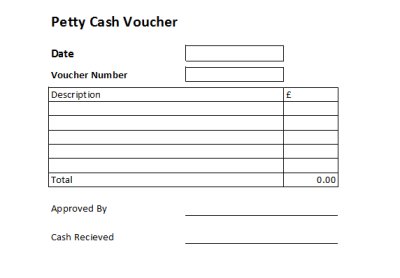
👉 Example of a completed voucher:
A member of staff is given £20 to buy stamps. They spend £12.80 and bring back £7.20 in change. On the voucher, you record:
• Cash advance: £20.00
• Change returned: −£7.20
• Amount spent: £12.80
Attach the post office receipt to the back of the voucher and place it in the tin alongside the £7.20 change.
Petty Cash Log Explained
A petty cash log (also called a petty cash book or register) is where you record every transaction in one place. Think of it as the running total for your petty cash tin. Each entry corresponds to a voucher in the tin.
The log lets you see at a glance how much has been spent, on what, and how much cash should still be in the tin. At the end of the month, the balance on the log should match the physical cash remaining. If it does not, you have a discrepancy to investigate.
A good petty cash log records:
- The opening balance (the starting amount in the tin)
- Each payment out, with the date, voucher number, description, and amount
- Any money paid back into the tin (change returned, or a top-up)
- A running balance so you can always see the current total

Free Petty Cash Log Template (Excel)
Our free download of the Excel petty cash log template does all the calculations for you automatically. You just enter the date, description, and amount for each transaction, and the spreadsheet works out the running balance. It is an alternative to keeping a handwritten petty cash book, and most people find it much easier.
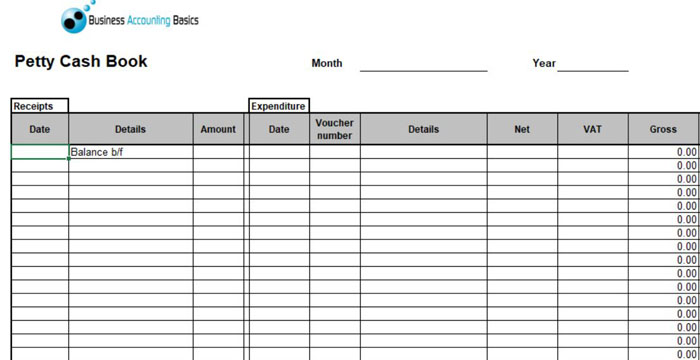
The template works in Microsoft Excel and most other spreadsheet programmes. It includes columns for income (money put in) and expenditure (money paid out), and automatically calculates the balance.
Worked Example: Petty Cash Step by Step
Here is a simple example of how a petty cash system works in practice for a small business with a starting fund of £100.
| Date | Voucher No. | Description | Money In | Money Out | Balance |
|---|---|---|---|---|---|
| 1 Mar | — | Opening balance (cash withdrawn from bank) | £100.00 | — | £100.00 |
| 3 Mar | 001 | Postage stamps | — | £12.80 | £87.20 |
| 7 Mar | 002 | Milk and coffee for office | — | £8.45 | £78.75 |
| 12 Mar | 003 | Printer paper (1 ream) | — | £6.99 | £71.76 |
| 18 Mar | 004 | Parking — client meeting | — | £3.50 | £68.26 |
| 25 Mar | 005 | Window cleaning | — | £15.00 | £53.26 |
| 31 Mar | — | End of month balance | — | — | £53.26 |
At the end of March, you count the cash in the tin. If it comes to £53.26, your petty cash balances. You then top it back up to £100 by withdrawing £46.74 from your bank account and recording this in the log.
How to Reconcile Petty Cash
Reconciliation simply means checking that the money in the tin matches what your records say it should be. Do this at least once a month — ideally at the end of each month before you top the fund back up.
Follow these steps:
- Count the physical cash in the tin.
- Add up all the vouchers in the tin (total money spent this period).
- The cash plus the voucher total should equal the opening balance for the period.
- If they match, your petty cash balances. If they do not, investigate immediately — check whether a voucher is missing, an amount was entered incorrectly, or change was not returned properly.
- Record the period’s total expenses in your bookkeeping system.
Running monthly reconciliations is much easier than trying to untangle months of missing entries all at once.
When and How to Top Up the Fund
A good rule of thumb is to replenish the fund when it falls to around 25% of its starting amount. So if you started with £100, top it up once the balance drops below £25. This way, you always have a working float and never run out.
To top up, follow these steps:
- Add up all the vouchers in the tin to get the total spent since the last top-up.
- Withdraw exactly that amount from your business bank account in cash.
- Record the top-up as income in your petty cash log (e.g. “Replenishment from bank — £76.74”).
- Your tin should now be back to its original float amount.
- File the vouchers away and start fresh for the next period.
Petty Cash in Accounting Software
Your petty cash log and Excel template handle the day-to-day recording, but at the end of each month, you also need to get the figures into your accounting software. This is what keeps your balance sheet accurate and ensures the expenses show up in the right place on your profit and loss account.
If you are not using accounting software yet, this is one of the areas where it can genuinely save you time. Sage UK, Xero, and QuickBooks all handle petty cash well and are the three packages we recommend for small UK businesses.
How Petty Cash Appears on the Balance Sheet
Petty cash is a current asset on your balance sheet, sitting alongside your bank balance. It represents real money that belongs to the business. When you first set up the fund by withdrawing cash from the bank, you are simply moving money from one asset (bank) to another (petty cash) — your total assets do not change.
When you spend from petty cash, the expenses reduce the value of the petty cash asset and appear as costs on your profit and loss account. After you top up the fund, the petty cash asset returns to its original level.
How Petty Cash Expenses Are Recorded
Each month, after reconciling your petty cash log, you post the expenses into your accounting software by reducing the petty cash balance and adding the expenses to the P&L (double entry bookkeeping). Each line item in the log is allocated to the correct expense category — for example, postage goes under “postage and stationery,” parking under “travel,” and cleaning supplies under “cleaning.” This is important for your accounts to be meaningful and for tax purposes.
Do not worry if the term “journal entry” sounds daunting — in modern software like Xero, Sage, and QuickBooks, you rarely need to create a manual journal. The software guides you through the process with simple forms.
Accounting Software Best Deals

XERO – 80% Discount for 6 Months – Cloud accounting, unlimited users, bank feeds, MTD compatible

QuickBooks – 90% off for 7 Months – Sole traders, easy to use, MTD-compatible

Tide – Free with Tide Bank Account – All your banking and accounts in one place, MTD compatible
A Note on VAT
If your business is VAT registered, you can reclaim the VAT on petty cash expenses in the same way as any other business purchase — as long as you have a valid VAT receipt. Make sure you record the VAT separately when entering expenses in your software. For very small amounts (under £25 including VAT, such as car park tickets), HMRC allows simplified receipts, but it is still good practice to keep all receipts.
Keeping Petty Cash Secure
Even small amounts of cash can go missing if you do not have the right controls in place. Here are some simple measures for a small business:
- Keep the cash in a locked tin or cash box. You can buy one cheaply from Amazon or a stationery shop. Only one person should hold the key.
- Never leave the tin open or accessible to everyone. Even in a small office, limit access to the designated person (often called the custodian).
- Always complete a voucher before handing over the cash — not after.
- Always get a receipt and attach it to the voucher. If someone cannot produce a receipt, note the reason.
- Do not mix personal money with petty cash. If someone pays for something out of their own pocket, reimburse them through an expense claim instead.
Alternatives to Petty Cash
Many small businesses are moving away from cash entirely, and there are good alternatives available:
Prepaid Business Cards
You load a card with a set amount (say £100) and give it to a member of staff. They use it for small purchases, and every transaction is automatically recorded in your online banking. There is no cash to count, no tin to manage, and the records are instant. This is probably the most popular modern alternative.
Business Debit Cards
A business debit card linked directly to your company bank account achieves a similar result. You can set spending limits on the card and monitor transactions in real time. The trade-off is that it is connected to your main account rather than a fixed float, so slightly less controlled than a prepaid option.
Employee Expense Claims
Another option is to let staff pay for small items themselves and reclaim the cost through a formal business expense claim. This works well for occasional purchases but is not ideal if staff are regularly expected to pay out of their own pocket.
Petty Cash System FAQ
Do I need to keep receipts for petty cash?
Yes, wherever possible. HMRC expects you to have records of all business expenses, including small ones. A receipt attached to a completed voucher is the ideal record.
Is petty cash taxable?
Petty cash itself is not taxable — it is just money you have taken from your bank account and moved into a tin. However, the expenses you pay with it are business expenses, which means they are deductible for tax purposes as long as they are genuinely for the business.
What is the difference between petty cash and a float?
A float is cash kept at a till or point of sale to give change to customers. Petty cash is money set aside specifically to pay for small business expenses. They are both small amounts of cash held on the premises, but they serve different purposes and should be kept separate.
What is the imprest system?
The imprest system is simply the most common way of running petty cash. You set a fixed amount (the imprest amount, say £100), spend from it during the month, and top it back up to exactly £100 at the end. The top-up amount always equals the total spent, so the fund stays at a constant level.
