


An accounts payable ledger is a record of all the invoices a company has received and the amount of money it owes to each vendor (supplier). It is a vital subsidiary account because it helps a business track its expenses and plan for future payments. Following a few basic procedures is critical to maintaining an accurate accounts payable ledger.

This article explains what an accounts payable ledger is, its procedures, and provides a link to a free Excel template.
I started my accounting career working in a University finance department as a purchase ledger clerk. The role included checking transactions, reviewing statements, making payments, obtaining payment approvals, answering queries, and filing.
Disclosure: This content may contain affiliate links, which means if you click on them, I may get a commission (without any extra cost to you).
Accounts Payable Definition
Accounts payable is the money your business owes to suppliers or vendors for goods or services you’ve received but haven’t paid for yet. It’s listed as a short-term liability on your balance sheet and represents bills that need to be paid soon to keep your business in good standing.
Some businesses may call it a purchase ledger or a creditors’ ledger.
Accounts Payable Subsidiary Ledger
The accounts payable subsidiary ledger is a log of vendor accounts and the list of bills and credit notes received. It’s part of the general ledger.
The Advantages of Accounts Payable Subsidiary Ledger
Maintaining an accounts payable subsidiary ledger offers several advantages. First, it helps a company track its expenses and stay within its budget. With an up-to-date record of what it owes to vendors, a business can avoid spending more than it can afford.
Additionally, the accounts payable subsidiary ledger can help a company prepare its financial statements. The balance sheet, in particular, will be more accurate if it includes an accurate figure for the accounts payable ledger.
You can also use the accounts payable subsidiary ledger to prepare cash flow statements by entering future vendor payments.

Accounts Payable Account Cycle
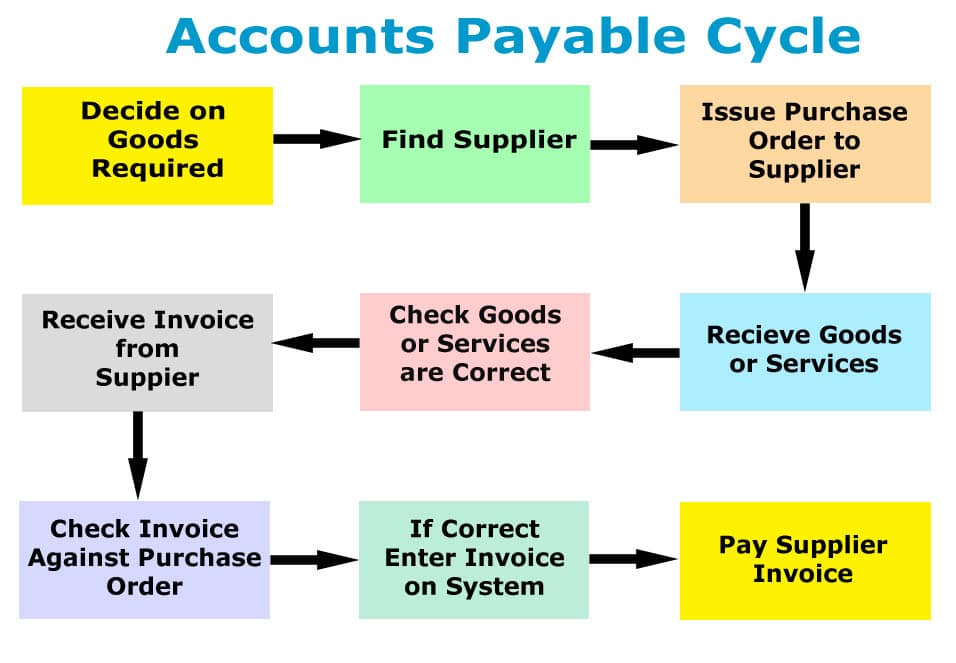
Below is the accounts payable ledger cycle, from purchasing goods or services to paying the invoice. Each section of the process is explained in more detail below.
Accounts Payable Ledger Procedures
The size of your business will determine the systems you will need to put in place. A small self-employed person will likely know the invoices coming in and can keep the process simple. In a large organisation, invoices may need to be matched to purchase orders and signed off by a manager.

- Decide on the goods or services to order from a supplier. If you have a stock control system in place, it will notify you when stock needs reordering.
- Find a supplier; it is worth getting several quotations to ensure the best price. Open a credit account with a supplier and agree on terms; you may need to complete a credit application form. If you need references, check whether they are willing to provide them.
- Purchase goods from the vendor: either verbally, by issuing a purchase order, or by the supplier issuing a quotation. If you provide a purchase order, ensure that it includes all the details: purchase order number, order date, full description, quantity, amount and delivery date.
- Goods or services received from the vendor.
- Ensure the goods, quantities, and conditions match what you ordered.
- When you receive a purchase invoice or bill from the vendor, ensure that all the details are correct; if anything is wrong, sort it out immediately with the vendor.
- Match the invoice to the purchase order and get authorisation from a manager if required.
- Record the invoice in accounting software or a manual system. File the vendor invoices in a pending folder, ready for payment.
- When the invoice is due, pay it. It helps to pay invoices in batches and set payment dates. File the invoice in the paid folder.
- When you get an account statement, match the total to the vendor account payable ledger balance.
- Finally, once all the transactions are entered into the accounts, you may prepare financial statements.
Accounts Payable Ledger Journal Entry
Every account transaction is a double entry, so it’s also posted to another if you post an item in one account. An example journal posting of an invoice for 87.00 for stationery is:
| Debit | Expense Account | 87.00 | |
| Credit | Accounts Payable | 87.00 |
When you pay the invoice, the journal entry will be as follows:
| Debit | Accounts Payable | 87.00 | |
| Credit | Bank | 87.00 |
Accounts Payable Ledger Template
If you use an accounting package like Sage UK, QuickBooks or Xero, one of the reports will be an aged payable report, which lists all the outstanding bills by the customer and due dates.
Accounting Software Best Deals

XERO – 80% Discount for 6 Months – Cloud accounting, unlimited users, bank feeds, MTD compatible

QuickBooks – 90% off for 7 Months – Sole traders, easy to use, MTD-compatible

Tide – Free with Tide Bank Account – All your banking and accounts in one place, MTD compatible
If you use a manual system, our spreadsheet will help keep track of outstanding amounts. The accounts payable template lets you list all invoices, including the date, reference, credit terms, and amount. The report shows when invoices are due and the total amount of unpaid invoices for a set period.
Find complete details and instructions at accounts payable template.
Accounts Payable Ledger Template Example
Below is an example of the accounts payable ledger template.

Accounts Payable Ledger Conclusion
The accounts payable ledger is a subsidiary ledger of the general ledger. The accounts payable ledger contains all the transactions for accounts payable, such as invoices and payments. When you post an item to the accounts payable ledger, you debit another account for the same amount, such as your bank account. It ensures that every transaction is a double entry.
Accounts Payable Ledger: Useful Links
Accounts Receivable Ledger
Financial statements
General Ledger
