


If you’re new to bookkeeping, T accounts are one of the best places to start. Shaped like the letter “T”, they’re a simple visual tool used in double-entry bookkeeping to show exactly how each transaction affects your accounts — debits on the left, credits on the right.
Whether you’re a small business owner managing your own books, a student learning accounting, or a bookkeeper tracking transactions, T-accounts help you see at a glance how money moves through your business. This page explains how they work, with free Excel and PDF T-account templates to download and use straight away.

At a Glance: T Account Templates
- A T account is a visual bookkeeping tool — debits on the left, credits on the right
- Every transaction in double-entry bookkeeping affects at least two T accounts
- Each account in your general ledger (assets, liabilities, income, expenses) has its own T account
- T accounts help you check that debits and credits balance before posting to your accounts
- Free to download — Excel template (10 T accounts) and printable PDF template (10 T accounts), no email address required
What are T Accounts?
A T-account is a visual tool used to record and track transactions for an individual account in the general ledger. The name comes from its shape — a horizontal line across the top, with a vertical line down the middle, forming a “T”.
Disclosure: This content may contain affiliate links, which means if you click on them, I may get a commission (without any extra cost to you).
Each account in your bookkeeping system has its own T account — whether that’s your bank account, sales, rent expenses, or a loan. The left side always shows debits, and the right side always shows credits.
T accounts are used across all types of accounts:
- Asset accounts (e.g. cash, equipment)
- Liability accounts (e.g. loans, accounts payable)
- Equity accounts
- Income accounts (e.g. sales)
- Expense accounts (e.g. wages, rent)
They’re particularly useful when you’re learning double-entry bookkeeping or want to work through a transaction manually before posting it to your accounting software. By recording each side of a transaction in the relevant T-accounts, you can immediately see whether your debits and credits balance.
T-Account Format
When you set out a T-account, you show the balance as it changes with each transaction. You do this by using a T-account with debits on the left and credits on the right.

What is the General Ledger
The general ledger is a book that records all the company’s financial activity. It includes accounts for things like sales, expenses, and assets. The general ledger is also known as the journal of original entry because it is where all the business transactions are first recorded. The general ledger is a list of financial transactions in a specific order. The list has two columns: the left side lists credits, and the right side lists debits.
Double Entry Bookkeeping
Double-entry bookkeeping is the foundation of accurate accounting. It means that every financial transaction affects at least two accounts—one side is a debit, and the other is a credit. This system helps keep your books balanced and ensures nothing is missed.
To make this easier to understand, accountants use T accounts. These are simple visual tools shaped like a “T” that show debits on the left and credits on the right. They help you see how a transaction moves money between accounts.
T accounts make it easy to break down and double-check transactions, which is especially helpful if you’re learning or doing your own bookkeeping.

T Accounts and Financial Statements
T accounts help you track where money is coming from and where it’s going. But their real value shows when it’s time to prepare your financial statements, like the income statement and balance sheet.
The Income Statement
The income statement shows how much profit your business made over a period. It includes:
- Revenue accounts (like Sales)
- Expense accounts (like Rent, Wages, or Depreciation)
T-accounts help you total the debits and credits for each account. The final balances are then used to calculate your net profit or loss.
Balance Sheet
The balance sheet shows what your business owns and owes. It includes:
- Assets (like Cash or Equipment)
- Liabilities (like Loans or Accounts Payable)
- Equity (owner’s value in the business)
For example, if you post a payment to a liability account, such as a loan, the T-account helps you track how much remains owed.
Why T Accounts Matter
- They organise your transactions before preparing financial reports.
- They show a clear breakdown of each account and its contribution to your financial results.
- They make it easier to spot errors and ensure debits and credits are balanced.
T-accounts are like the working notes behind your financial statements—they may not be printed in the final report, but they help ensure the numbers are right.
T-Account PDF
Our T-account template PDF is a valuable resource for anyone looking to better understand their finances. The T-account template includes 10 Ts on one page. Plus, our T account PDF is free to download and use!


T-Account Excel
We created an Excel template with 10 T-accounts on a single page. It will help you understand the totals on each side of the T-account.
It is beneficial if you are looking to complete a journal transaction and see how it will affect the general ledger accounts.
At the top of the spreadsheet, the total debits and credits for all the accounts are shown. This will help check for any changes in the balance.

T Account Template Examples
The first of our examples is for paying rent.
2 T-accounts are needed: an expense account in the income statement for the rent and an asset account on the balance sheet for the bank. The entries will look like this:

The transactions show a debit balance of 500 for rent and a credit balance of 500 for the bank.
The second example we will look at is the purchase of fixed assets for 750.00 on credit. The two accounts are fixed assets and accounts payable. The entries would look like this:

Journal Entries
T-accounts help you understand how money flows in and out of each account. They’re especially useful when creating journal entries, as they give a clear visual of how each transaction affects your business’s finances.
If you set up the t-accounts for the journal entries, start by posting the original balances. Then, post the adjusting balances, and you will be able to see how each of the accounts changes.
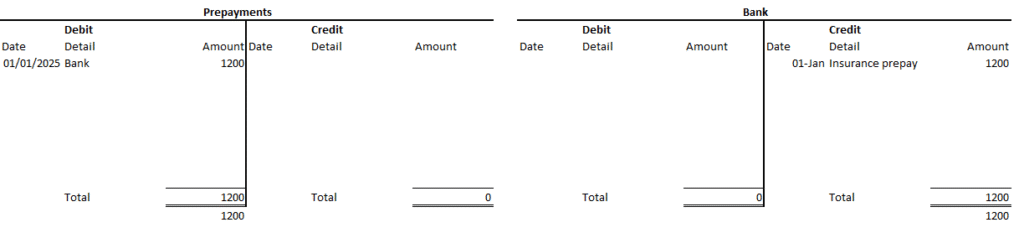
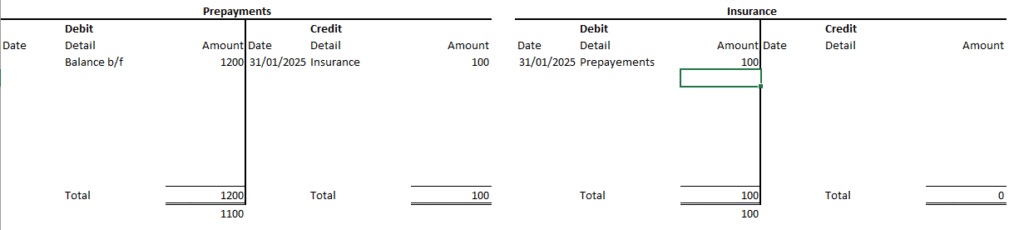
An example is for an Insurance prepayment.
You pay £1,200 on 1st January for 12 months of insurance. The T-account for the insurance prepayment will look like this:
Each month, you move £100 from Prepaid Insurance to Insurance Expense.
More templates
If you’re looking for more helpful business accounting resources, check out our other free templates! We have a variety of templates available, including cash book, balance sheet, accounts payable, accounts receivable and cash flow statement template. Plus, all of our templates are free in Excel, and you don’t need to provide an email address, so they’re easy to download and use with full instructions!
Frequently Asked Questions (FAQS)
What is a T-account used for?
A T-account is a simple visual tool used in double entry bookkeeping to show how a transaction affects a specific ledger account. It looks like a T. Debts are recorded on the left side and credits on the right. T-accounts are widely used by students and bookkeepers to understand and check the effects of transactions before posting them to the ledger.
Are the T account templates free to download?
Yes, all T account templates on this page are free to download. They are available in Excel and PDF formats and require no sign-up. All our bookkeeping templates are free.
Do I need to understand double entry bookkeeping to use T accounts?
A basic understanding of debits and credits helps, but the templates include labels and examples to guide you. If you are new to double entry bookkeeping, our beginner bookkeeping guide explains the key principles in plain English.
Can I use T account templates in Google Sheets?
Yes. The Excel versions can be opened in Google Sheets. The basic layout and formulas will work in Google Sheets, though some minor formatting differences may appear.
Can I Use These Templates for Real Bookkeeping?
Yes! These templates are great for small businesses, students, or anyone wanting to practice manual bookkeeping.
Download the T Account Template
By downloading our free templates, you agree to our licence agreement, allowing you to use the templates for your own personal or business use only. You may not share, distribute, or resell the templates to anyone else in any way.


Conclusion on T-account Template
T accounts are a helpful tool for understanding the basics of double-entry bookkeeping. They make it easier to see how each transaction affects your accounts, helping you stay accurate and organised.
Whether you’re a small business owner, student, or learning accounting, our free T-account templates can save time and reduce errors.
Download the templates above and start practising today—bookkeeping doesn’t have to be complicated!
Last updated March 2026
Disclaimer: This template is provided for general bookkeeping purposes and is not a substitute for professional tax advice. Check that it suits your circumstances and review current HMRC requirements before submitting information.
