What Is an Expense Account? Examples and How to Record Expenses
Learn how to choose the right expense account, record debits and credits, and see where your business costs appear on the profit and loss statement. Includes common Xero expense codes and worked examples.
An expense account is a category in your bookkeeping records for a particular type of business cost, such as rent, stationery or advertising. Using separate accounts helps you see where your money goes and spot changes in spending from one month to the next.
You might also hear “expense account” used for an arrangement where an employer covers work-related costs, such as travel. This guide focuses on the bookkeeping meaning. You’ll see how to choose the right account, record expenses using debits and credits, and apply common Xero expense codes to everyday purchases.

The Expense Account – At a Glance
- Expense accounts group business costs such as rent, stationery and advertising.
- Debits increase an expense. Credits reduce it, for example, when a supplier refunds a purchase.
- Expense account codes help you choose the right category when recording a bill or bank transaction.
- Your profit and loss statement shows expense totals for the period, so you can see where costs have risen or fallen.
What is an Expense Account?
An expense account is an account in your general ledger that records a particular type of business cost. For example, you might use separate accounts for rent, stationery and advertising. When you buy printer paper, you record it in the stationery account alongside your other stationery purchases.
Disclosure: This content may contain affiliate links, which means if you click on them, I may get a commission (without any extra cost to you).
Each expense account shows the individual entries that make up its total. If stationery costs rise on your profit and loss statement, you can open the account to see which purchases contributed to the increase.
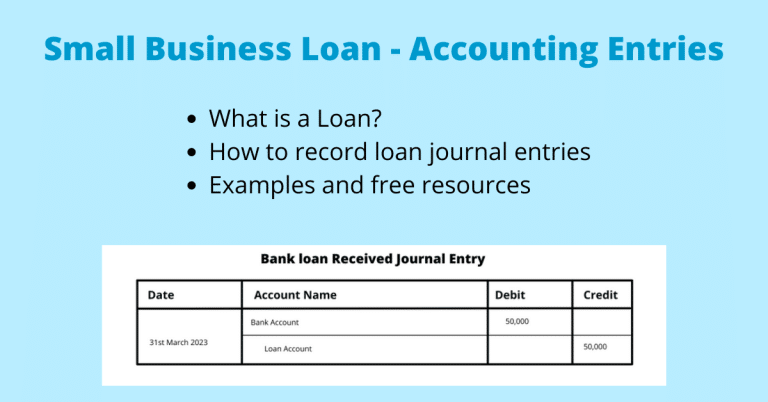
A payment from your bank can also cover something other than an expense. For example, when you repay a business loan, the principal reduces the amount you owe. Any interest is recorded separately as an expense.
Is an Expense Account a Debit or a Credit?
An expense account normally has a debit balance. A debit increases the expense, and a credit reduces it. For example, you debit the stationery account when you buy printer paper and credit it if the supplier refunds part of the purchase.
In double-entry bookkeeping, the total debits and credits for each transaction must match. If you pay £45 for stationery from your business bank account, you debit Stationery by £45 to record the cost and credit Bank by £45 to record the money leaving your account.
Expense Accounts List and Xero Codes
An expense account code, also called a nominal code, identifies an expense category in your chart of accounts. When you enter a bill or categorise a bank transaction in Xero, choose the account that matches what you bought. For example, you could use 461 – Printing & Stationery for the £45 printer paper purchase above. That puts it alongside your other stationery costs on the profit and loss statement.
| Example Xero code | Expense account | What to record |
|---|---|---|
| 400 | Advertising & Marketing | Online adverts, flyers and other promotions |
| 401 | Audit & Accountancy Fees | Bookkeeping, accounts preparation and audit fees |
| 404 | Bank Fees | Business bank account and transaction fees |
| 416 | Depreciation Expense | The depreciation charge for equipment or other fixed assets |
| 449 | Motor Vehicle Expenses | Fuel, servicing and repairs for business vehicles |
| 461 | Printing & Stationery | Printer paper, envelopes and ink |
| 463 | IT Software and Consumables | Software subscriptions and computer consumables |
| 469 | Rent | Rent for business premises |
These codes are examples from a UK Xero chart of accounts. Your business may use different codes or account names, especially if you’ve customised or imported your accounts. Check the account name and description in your own Xero organisation before choosing a code. Read our chart of accounts guide.
What Are Operating Expenses?
Operating expenses are the ongoing costs of running a business, such as office rent, stationery, accountancy fees and advertising. They include general and administrative expenses as well as selling expenses, such as marketing.
On a profit and loss statement, the business deducts cost of sales from turnover to calculate gross profit. It then deducts operating expenses to calculate operating profit. In the ABC Computing example below, the report groups its operating expenses under Administrative Costs.
For more examples, see our guide to general and administrative expenses.
Expense Account Examples
These examples show how to record a purchase you pay for immediately, a supplier bill you pay later and a partial refund. Assume the business uses accrual accounting and hasn’t registered for VAT.
1. Pay £45 for Stationery
You buy £45 of printer paper and pay from your business bank account. Debit Printing & Stationery by £45 to record the expense and credit Bank by £45 to record the payment.
2. Record a £100 Supplier Bill and Pay It Later
You receive a £100 bill for cleaning services the supplier has already provided. Record the expense when you enter the bill. When you pay it, clear the amount you owe the supplier.
| Transaction | Debit | Credit |
|---|---|---|
| Enter the supplier bill | Cleaning £100 | Accounts Payable £100 |
| Pay the supplier | Accounts Payable £100 | Bank £100 |
The cleaning expense stays at £100. The payment reduces the amount you owe the supplier to £0.
3. Receive a £15 Stationery Refund
You return some of the printer paper, and the supplier refunds £15 to your business bank account. Debit Bank by £15 to record the money received and credit Printing & Stationery by £15 to reduce the original expense.
What the Stationery Expense Account Looks Like
| Date | Details | Debit | Credit | Running balance |
|---|---|---|---|---|
| 3 November | Printer paper purchase | £45 | £45 | |
| 10 November | Supplier refund | £15 | £30 |
If these are the only stationery entries for the month, your profit and loss statement shows a £30 stationery expense.
Where Expense Accounts Appear on the Profit and Loss Statement
A profit and loss statement, also called an income statement, shows the income a business earned and the expenses it recorded during a period. In the example below, ABC Computing shows its expenses under Cost of Sales and Administrative Costs.
- Cost of sales includes purchases and direct wages. Deducting £16,500 in cost of sales from £30,000 in turnover leaves a gross profit of £13,500.
- Administrative costs include advertising, rent, and printing and stationery. Deducting £10,000 in administrative costs from gross profit leaves a net profit of £3,500.
The £5,150 shown for Printing & Stationery is the total for that expense account for the year. The general ledger shows the individual transactions that make up the total.

How to Record Expenses in Accounting Software or Excel
Good expense management starts with recording business expenses under consistent categories and keeping the supporting receipts. Record the date, supplier, amount and expense category for each purchase. Keep the receipt or supplier invoice so it’s easy to check the entry later.
Recording Expenses in Accounting Software
The QuickBooks example below shows how I recorded a £23.99 web hosting expense using receipt capture.
- Preview the receipt. Photograph the receipt in the QuickBooks mobile app and select Create expense from receipt.
- Review and categorise. Check the amount, date, expense category and payment account before saving. I used Advertising and Marketing for this example. A business with a separate Website Costs account might use that category instead.
- Save the expense. QuickBooks keeps the receipt attached to the transaction, so you can open it again when checking the accounts.
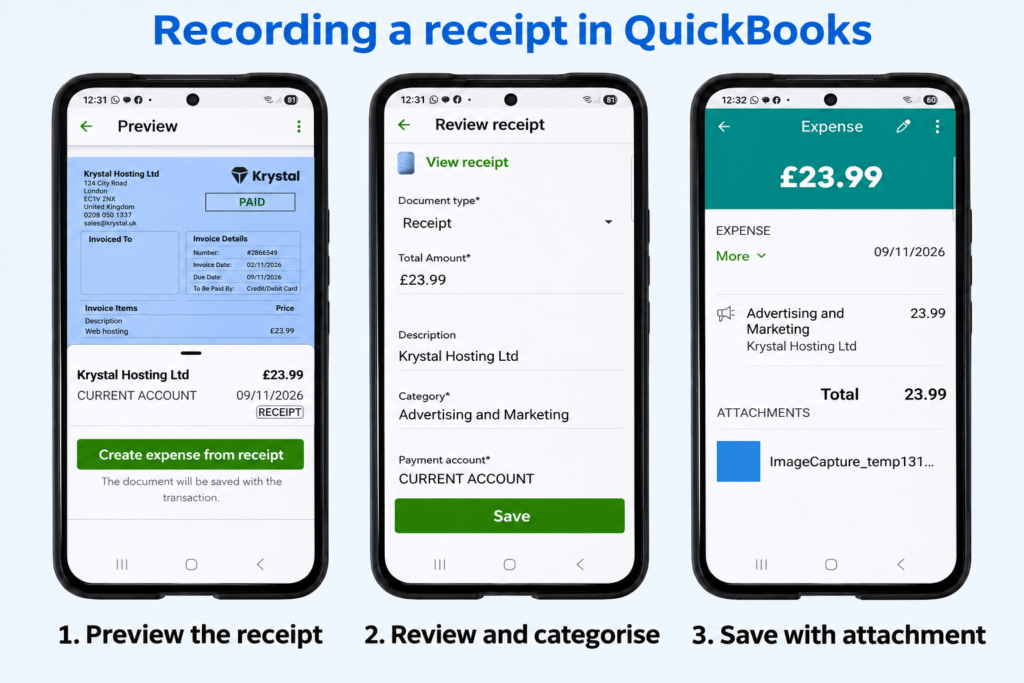
If the payment later appears in the bank feed, match it to the expense already recorded. This keeps the cost from appearing twice in the accounts.

Recording Expenses in Excel
For simple bookkeeping, enter each payment on a separate row in a cash book. Include the date, supplier, description, amount and expense category. If receipts are stored in a folder, add a reference or filename to the spreadsheet so each entry can be matched to its receipt.

Our free Excel cash book template groups payments by category, making it easier to see how much the business spent on costs such as rent, stationery and advertising.