how To Start Bookkeeping for a small Business
A beginner’s step-by-step guide to recording your income and expenses, staying organised, and keeping HMRC happy – in plain English
Written by Angela Boxwell, MAAT
Starting a business is exciting — but once the first invoices start coming in (and the bills start going out), it quickly becomes clear that you need some kind of system for keeping track of your money. That system is bookkeeping, and the good news is that you don’t need to be an accountant to do it properly.
This beginner’s guide will walk you through everything you need to know to start bookkeeping for your small business, from choosing a method to keeping your records in order and preparing for Making Tax Digital.
What Is Bookkeeping and Why Does It Matter?
Bookkeeping is simply the process of recording all the money coming into and going out of your business. Every sale, every purchase, every payment — all of it gets written down in an organised way so that you always know where you stand financially.
Good bookkeeping helps you to:
- Know whether your business is making a profit
- Pay the right amount of tax — no more, no less
- Complete your self-assessment tax return quickly and accurately
- Spot problems early, such as unpaid invoices or rising costs
- Apply for a loan or mortgage more easily (lenders like to see organised accounts)
- Stay compliant with HMRC requirements, including Making Tax Digital
Many small businesses fail in their first few years, and poor financial management is a major reason. Staying on top of your bookkeeping from day one puts you in a much stronger position to succeed.
💡 Tip: Bookkeeping and accounting are not the same thing. Bookkeeping is the day-to-day recording of transactions. Accounting is the analysis and interpretation of those records. As a small business owner, your job is the bookkeeping — an accountant (or accounting software) takes it from there if needed.
Step 1: Separate Your Business and Personal Finances
This is the single most important thing you can do when you start a business. Open a dedicated business bank account and use it only for business transactions — income in, expenses out.
Why does this matter so much?
- It keeps your records clean. You won’t waste hours trying to remember whether a payment was personal or business.
- It makes tax time much easier. Your bank statement becomes a reliable record of business activity.
- It’s a legal requirement for limited companies. A limited company is a separate legal entity, so mixing finances is not allowed.
- It improves your professional image. Clients and suppliers pay into a business account, not a personal one.

Even if you’re a sole trader, having a separate bank account makes your bookkeeping far simpler and your accounts much more accurate.
Step 2: Choose Your Bookkeeping Method
There are two main ways to record your income and expenses. You need to pick one and stick to it.
Cash Basis Accounting
For cash basis accounting, you record income when the money arrives in your bank account, and expenses when they leave it. This is the simpler method and is suitable for most small businesses and sole traders. HMRC allows most self-employed people to use cash basis accounting.
Accruals (Traditional) Accounting
In accruals accounting, you record income when it’s earned (even if the customer hasn’t paid yet) and expenses when they’re incurred (even if you haven’t paid the invoice). This gives a more accurate picture of financial performance and is required for limited companies and larger businesses.
💡 Which should you choose? If you’re a sole trader or small business just starting out, the cash basis is almost always the right choice. It’s straightforward, less confusing, and HMRC accepts it for self-assessment. Our free cashbook template is designed around the cash basis method.
Step 3: Set Up Your Income and Expense Categories
Rather than recording every transaction as just “money in” or “money out,” you need to organise them into categories. This makes it much easier to understand where your money is coming from and where it’s going — and to complete your tax return correctly.
Common income categories
- Sales/service income
- Interest received
- Other income (grants, refunds, etc.)
Common expense categories
- Office costs (stationery, postage, software)
- Travel and motor expenses
- Advertising and marketing
- Premises costs (rent, utilities)
- Phone and broadband
- Professional fees (accountant, solicitor)
- Cost of goods sold
- Bank charges
- Wages and salaries (if you have employees)
- Equipment and tools
- Insurance
You don’t need dozens of categories — just enough to give you a clear picture and match what HMRC asks for on your self-assessment return. Our free cashbook template includes five income categories and thirteen expense categories, which cover the needs of most small businesses.
Step 4: Record Every Transaction
Once your categories are set up, it’s time to record your transactions. The golden rule is: record everything, no matter how small. A £2.50 parking fee is a legitimate business expense just like a £2,500 supplier invoice.
What to record for every transaction
- Date — when the money was received or paid
- Description — what it was for
- Amount — how much
- Category — which income or expense category it belongs to
- Payment method — bank transfer, card, cash
How often should you record?
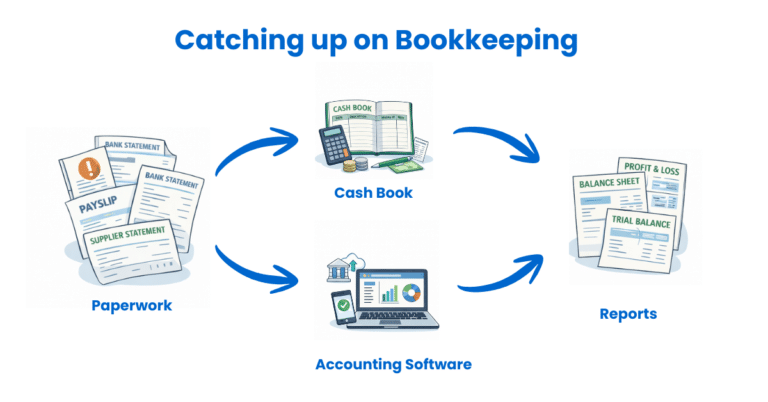
Ideally, update your books at least weekly. Some business owners prefer to do it daily, others monthly — but the longer you leave it, the harder it becomes. Transactions get forgotten, receipts go missing, and mistakes creep in. A little and often is always better than a big annual catch-up.
⚠️ Important: HMRC requires you to keep your business records for at least five years after the 31 January submission deadline for the relevant tax year. If you’re VAT-registered, this extends to six years.
Step 5: Keep Your Receipts and Records
Every entry in your bookkeeping records should be backed up by a receipt, invoice, or other document. If HMRC ever asks to see your records, you need to be able to prove that your entries are correct.
What to keep
- Sales invoices you’ve sent to customers
- Purchase invoices and receipts from suppliers
- Bank statements
- Payroll records (if you employ staff)
- VAT records (if you’re VAT-registered)
- Mileage records (if you claim vehicle costs)
Go paperless
You don’t need to keep paper copies. HMRC accepts digital records, so scan or photograph your receipts as soon as you receive them and store them electronically. Free apps like Dext, AutoEntry, or even your phone’s camera can make this quick and painless. Accounting software packages such as Sage UK, Xero or QuickBooks also include built-in receipt capture.
💡 Tip: Create a simple folder structure on your computer or in cloud storage — one folder per year, with subfolders for each month. Store your receipts there as you go, and you’ll never spend hours hunting for a six-month-old fuel receipt again.
Step 6: Reconcile Your Records with Your Bank
Bank reconciliation is the process of verifying that your bookkeeping records match your bank statement. It’s one of the most valuable habits you can build as a small business owner.
Every month (or more often if you’re busy), compare your cashbook or accounting software entries to your bank statement line by line. If there’s a discrepancy, investigate it. Common causes include:
- A transaction you forgot to record
- A duplicate entry
- A bank error (rare, but it does happen)
- Timing differences (a cheque not yet cleared, for example)
Regular reconciliation means you catch mistakes early and always know exactly how much money is in your business. It also makes your year-end figures far more reliable. We have a free bank reconciliation template available to help you with this process.

Step 7: Review Your Finances Regularly
Once your bookkeeping is up to date, use it. Look at your figures at least once a month and ask yourself:
- Is my income growing, holding steady, or declining?
- What are my biggest expenses — and are they justified?
- Am I making a profit? Is my profit margin improving?
- Do I have enough cash to cover my upcoming bills?
- Are there any customers who owe me money and haven’t paid?
Your bookkeeping records are the story of your business’s financial health. Reading that story regularly is how you make better decisions — whether that’s pricing, investing in new equipment, or knowing when to chase an overdue invoice.
💡 Tip: A simple profit and loss summary at the end of each month gives you a clear view of how your business is performing. Our free profit and loss template makes this straightforward, even if you’ve never produced one before.
Our Free Cashbook Template
If you’re just starting out and you’re not ready to commit to accounting software, our free Excel cashbook template is the perfect place to begin. It’s been downloaded over 38,000 times and is used by sole traders, small businesses, and charities across the UK.

What’s included
- Monthly worksheets to record your income and expenses
- Five income categories and thirteen expense categories (extended version)
- Automatic running totals so you can always see your balance
- A total page showing your profit and loss, month by month, and for the full year
- Full instructions and a worked example based on a real small business
Which version is right for me?
We offer three versions to suit different needs:
- Standard cashbook — ideal if you have fewer transactions and want to keep things simple
- Extended cashbook — up to 95 transaction lines per month, with more detailed categories (also free)
- Self-employed cashbook — runs from 6 April to 5 April to match the UK tax year, making your self-assessment figures easy to pull together
All templates work with Microsoft Excel and Google Sheets and include step-by-step instructions to get started immediately.
📥 Download Your Free Cashbook Template
No sign-up required. Just download, follow the instructions, and start recording your transactions today.
Accounting Software for Small Businesses
A spreadsheet is a great starting point, but as your business grows — or if you want to save time from day one — accounting software is well worth considering. It automates many of the tasks you’d otherwise do by hand, reduces the risk of errors, and keeps everything in one place.
Key benefits of accounting software
- Bank feeds — transactions are imported automatically from your bank account, so you don’t have to type them in manually
- Automatic calculations — profit and loss, VAT returns, and other reports are generated in seconds
- Invoice management — create, send, and track invoices from within the software
- Real-time reporting — see how your business is performing at any time, on any device
- MTD compliance — most packages are already approved for Making Tax Digital (more on that below)
- Collaboration — share access with your accountant or bookkeeper so they can help without needing to chase paperwork
Which software should I choose?
The right software depends on your business type, budget, and level of self-service. Here’s a quick overview of the most popular options for UK small businesses:
| Software | Best For | Key Features | Starting Price |
|---|---|---|---|
| Sage UK | Growing businesses & those wanting UK support | Invoicing, MTD VAT, payroll, cash flow forecasting | Free version for sole traders, or from £7 |
| Xero | Small businesses want automation, collaboration and scalability | Bank feeds, invoicing, payroll, MTD VAT, extensive app integrations | From approx. £16/month |
| QuickBooks Online | Small to medium businesses needing scalability | Invoicing, expense tracking, payroll, MTD VAT, mileage tracking | From approx. £10/month |
| FreeAgent | UK freelancers, contractors & sole traders | Self-assessment support, invoicing, MTD VAT — free with NatWest/RBS accounts | Free (with NatWest/RBS or Mettle) or £19/month |
| Zoho Books | Startups and businesses with a tight budget | Invoicing, expense tracking, MTD VAT, 40+ app integrations | Free (under £35k revenue) |
We’ve reviewed and tested all of these packages in detail. Visit our accounting software guide for a full breakdown of features, pricing, and our recommendations for different types of businesses.
Accounting Software Best Deals
Sage UK – 90% Discount for 6 Months – FREE plan for Sole-Traders, AI tools for bookkeeping automation
XERO – 90% Discount for 6 Months + Amazon Gift Card – Cloud accounting, unlimited users, smart bank feeds

QuickBooks – 90% Discount for 7 Months – Invoicing, expense tracking, payroll, financial reports
Making Tax Digital (MTD): What You Need to Know
If you haven’t heard of Making Tax Digital yet, now is the time to get familiar with it. MTD is a government initiative that requires businesses to keep digital financial records and submit tax updates to HMRC using approved software — rather than filing a single annual paper or online return.
Why MTD matters for your bookkeeping
Making Tax Digital is changing the way small businesses interact with HMRC. The goal is to make tax reporting more accurate, more efficient, and less stressful — by spreading updates throughout the year rather than leaving everything to January. For many business owners, that’s actually good news. No more year-end panic.
MTD timeline at a glance
- April 2019 – MTD for VAT became mandatory for VAT-registered businesses above the £90,000 threshold.
- April 2022 – MTD for VAT extended to all VAT-registered businesses, regardless of turnover.
- April 2026 – MTD for Income Tax (MTD ITSA) becomes mandatory for self-employed people and landlords with gross income over £50,000 per year. Quarterly digital updates to HMRC will be required instead of a single annual return.
- April 2027 – MTD for Income Tax extended to those with gross income over £30,000.
- April 2028 (planned) – MTD for Income Tax may extend to those earning over £20,000 — bringing even more sole traders into scope.
What MTD for Income Tax means in practice
Under MTD for Income Tax, instead of one annual self-assessment return, you’ll need to:
- Keep your business records digitally throughout the year
- Submit a quarterly update of your income and expenses to HMRC using compatible software — due on 7 August, 7 November, 7 February, and 7 May
- Submit a final declaration by 31 January, replacing the traditional self-assessment tax return
Do I need special software for MTD?
Yes. You must use HMRC-recognised software to submit your updates. You cannot submit directly from a standard Excel spreadsheet. Your options are:
- Full accounting software (Xero, QuickBooks, Sage, FreeAgent, Zoho Books) — these handle both record-keeping and submission in one place
- Bridging software — if you want to keep using your spreadsheets, bridging tools like Anna Money or My Tax Digital link your Excel data to HMRC’s portal
💡 Start preparing now. Even if MTD doesn’t apply to you yet, digitising your bookkeeping now will make the transition straightforward when it does. Most of the accounting software options above are already fully MTD-compliant.
We have a full guide to Making Tax Digital on this site, including software recommendations, quarterly deadlines, and tips for making the switch as smoothly as possible. See our Making Tax Digital guide for small businesses.
FAQ on how to start bookkeeping for a small business
Do I need an accountant if I do my own bookkeeping?
Not necessarily — but many small business owners find it helpful to have an accountant review their figures and prepare their year-end accounts, especially at first. Good bookkeeping throughout the year means your accountant’s job is easier (and their bill is lower).
How long do I need to keep my business records?
HMRC requires you to keep your business records for at least five years after the 31 January self-assessment deadline for the relevant tax year. For VAT-registered businesses, records must be kept for six years.
Can I do my bookkeeping on my phone?
Yes — most cloud-based accounting software packages have mobile apps that let you capture receipts, send invoices, and review your finances on the go.
Do I need to register for VAT?
You must register for VAT once your taxable turnover reaches the VAT threshold, which is currently £90,000 in a rolling 12-month period.