


Free MTD Spreadsheet Template for Income Tax
A free Excel MTD spreadsheet template for sole traders to record income and expenses, track quarterly figures and prepare for Making Tax Digital for Income Tax.
Our free MTD spreadsheet template is designed for sole traders who want to continue using Excel for their bookkeeping while meeting the record-keeping requirements of Making Tax Digital for Income Tax.
The spreadsheet lets you record income and expense transactions throughout the tax year, organise them into account categories, and automatically calculate monthly, quarterly, and annual totals.
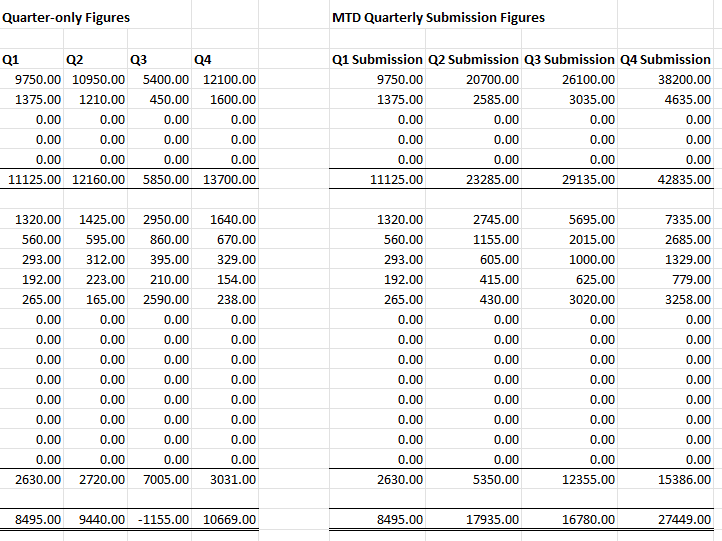
It also provides separate quarterly figures and cumulative MTD figures, making it easier to find the information you need for each quarterly update.
Disclosure: This content may contain affiliate links, which means if you click on them, I may get a commission (without any extra cost to you).
Disclosure: This content may contain affiliate links, which means if you click on them, I may get a commission (without any extra cost to you).
The template itself does not submit information directly to HMRC. To send your quarterly updates, you will need compatible software or bridging software that connects your spreadsheet to HMRC. HMRC confirms that businesses can continue using spreadsheets for their digital records as long as they use compatible software to submit the required information.
Can You Use Excel for Making Tax Digital?
Yes. You don’t have to move all your bookkeeping to full accounting software just because you need to use Making Tax Digital.
You can keep your business records in an Excel spreadsheet, as long as you also use compatible software to send your quarterly updates and complete the required submissions to HMRC. Your digital records should include the date, amount and category for each income and expense transaction, and this template is set up to record those details.
This can work particularly well for a self-employed person or small sole trader with straightforward income and expenses who already feels comfortable using Excel.
If your business has many transactions, VAT, employees, several income streams, or more complicated bookkeeping requirements, full accounting software may be easier to manage.
How the MTD Spreadsheet Template Works
The workbook contains a separate worksheet for each accounting period from 6 April to 5 April.
For each transaction, you enter the:
- date
- customer or supplier
- reference
- amount
- account category
The spreadsheet then allocates the transaction to the correct income or expense column and updates the running bank balance.

You can set your own account names before you start entering transactions. Once you have used an account name, you should not rename it because existing transactions may no longer match the account and could be excluded from the totals.
The Totals worksheet brings all 12 periods together so you can see your monthly income, expenses, profit or loss and full-year figures in one place.
Quarterly Figures and MTD Updates
The spreadsheet shows both individual quarter totals and cumulative MTD figures.
This distinction is important. HMRC quarterly updates are cumulative. For example, the second quarterly update covers the period from 6 April to 5 October, not just the three months from July to October.
The standard quarterly update deadlines are:
Q1: 7 August
Q2: 7 November
Q3: 7 February
Q4: 7 May
HMRC describes quarterly updates as summaries of your business income and expenses, not tax returns.
How Do You Submit the Spreadsheet to HMRC?
Excel cannot send your figures directly to HMRC, so you need compatible bridging software.
One option is aligned.tax, which is HMRC-recognised software designed for people who keep their records in spreadsheets. Individuals can currently use it for free to file their own MTD Income Tax quarterly updates. You upload an XLSX file, review how the figures have been mapped and then submit the quarterly update to HMRC.
aligned.tax supports spreadsheet layouts containing either summary totals or more detailed category breakdowns, so it should work well alongside this template. Its year-end filing feature is currently shown as coming soon for self-assessment.
Is a Spreadsheet Right for Your Business?
A spreadsheet can be a good option if you have a straightforward self-employment business, relatively few transactions and prefer to stay in control of your own bookkeeping.
Accounting software may be worth considering if you want automatic bank feeds, invoicing, receipt capture, VAT features or easier access for your accountant.
The important point is to choose a system you can keep up to date and use consistently throughout the tax year.
Prefer full accounting software? See our guide to the best accounting software for self-employed businesses, or explore the current Xero offer below.

Need help using the template?
See the MTD spreadsheet instructions and worked example for a step-by-step guide to setting up the workbook, entering transactions, choosing account codes and understanding the quarterly and cumulative totals.
Download the Free MTD Template
By downloading the free template, you agree to our licence agreement, allowing you to use the templates for your own personal or business use only. You may not share, distribute, or resell the templates to anyone else in any way.

