Making Tax Digital for Income Tax (MTD ITSA) Explained
Find out who must use Making Tax Digital for Income Tax, when the rules apply and how sole traders and landlords can meet HMRC’s digital record-keeping and reporting requirements.
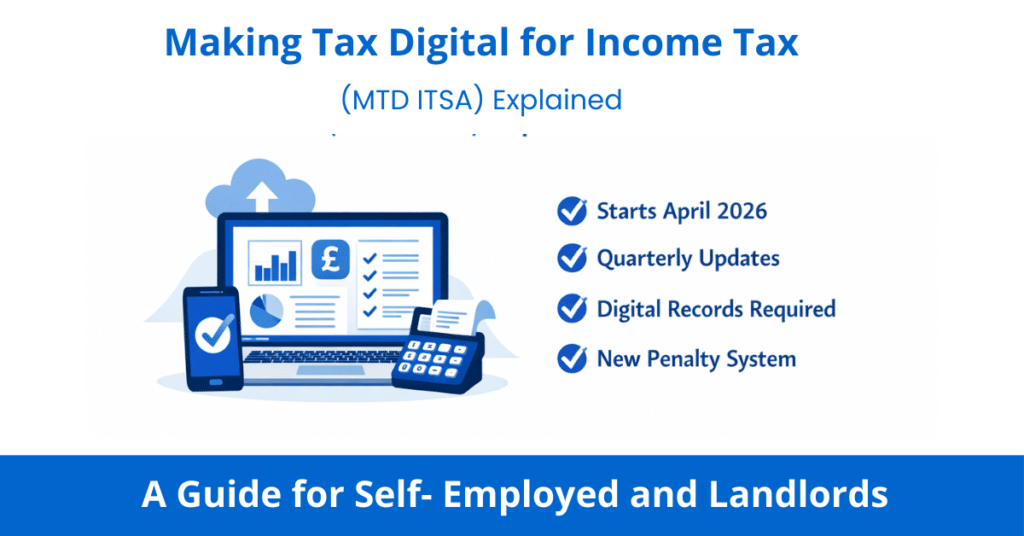
Making Tax Digital for Income Tax (MTD ITSA) requires qualifying sole traders and landlords to keep digital records, send quarterly updates and submit an annual tax return using compatible software. The rules started on 6 April 2026 for people with qualifying income over £50,000 in 2024/25. Lower thresholds apply from April 2027 and April 2028.
Check when you must join, confirm your sign-up status and arrange suitable software. The sections below explain the deadlines, digital records and annual return you need to complete.
Making Tax Digital for Income Tax (MTD ITSA) — Quick Summary
- In force from 6 April 2026 for sole traders and landlords with qualifying income over £50,000 in 2024/25
- Digital records required, kept in HMRC-compatible software
- 4 quarterly updates submitted to HMRC per year
- Submit quarterly updates during the year and your tax return by 31 January using compatible software.
Tax payment dates are unchanged
You can use standard tax-year periods or calendar-quarter periods for quarterly updates. Choose before sending your first update for the tax year; you cannot change periods during that year. Both options have the same deadlines.
Disclosure: This content may contain affiliate links, which means if you click on them, I may get a commission (without any extra cost to you).
What is Making Tax Digital for Income Tax?
MTD changes how you report income under Self Assessment. You keep digital business records and send HMRC quarterly summaries through compatible software. You still complete an annual tax return after the tax year ends.
Keeping your bookkeeping up to date throughout the year makes it easier to prepare quarterly updates and your annual return. MTD has been mandatory since 6 April 2026 for the first group of qualifying sole traders and landlords.
The good news is that the actual amount of tax you pay, and when you pay it, stays the same. MTD only changes how and how often you report your income and expenses.
Who Does MTD for Income Tax Affect?
MTD for Income Tax applies to sole traders and landlords. It is being introduced in three phases based on your gross income — that’s your income before you deduct any expenses:
Start Date | Who is Affected | Income Threshold |
|---|---|---|
April 2026 | Sole Traders & Landlords | Qualifying income over £50,000 in 2024/25 |
April 2027 | Sole Traders & Landlords | Qualifying income over £30,000 in 2025/26 |
April 2028 | Sole Traders & Landlords | Qualifying income over £20,000 in 2026/27 |
⚠️ Important: It’s your GROSS income that counts — not your profit
For example, a self-employed plumber with £55,000 turnover and £20,000 expenses has £35,000 profit, but £55,000 qualifying income. If those figures relate to 2024/25, the plumber must use MTD from 6 April 2026, unless an exemption applies.
HMRC uses your 2024/25 Self Assessment return to assess whether you must use MTD from April 2026.

Who Doesn’t Need to Worry Yet?
MTD for Income Tax does not apply to everyone right away. You don’t need to do anything differently at the moment if:
- Your qualifying income in 2024/25 was £50,000 or less, so you do not have to join from April 2026 on that basis. Check your 2025/26 income against the £30,000 threshold for April 2027, and your 2026/27 income against £20,000 for April 2028.
- You are employed and pay tax only through PAYE; MTD ITSA does not affect PAYE employees
- You are a partner in a partnership — partnerships are not included in the current MTD rollout, and a separate timetable is expected to be announced by HMRC
- You run a limited company — MTD for Income Tax applies to individuals, not companies
- You only have investment income, such as dividends, savings interest, or capital gains — this income is not in scope for MTD ITSA
- You are retired and receive only pension income
📌 A Note on Partnerships
If you are in a business partnership, MTD for Income Tax does not currently apply to you — HMRC has confirmed that partnerships will be brought into MTD at a later date, but no firm timetable has been set. Individual partners will still need to consider their own income from other sources (e.g. sole trader work or rental income) against the thresholds above.
Keep an eye on HMRC updates if you run a partnership, as the rules are expected to change in future years.
Why Is HMRC Introducing MTD?
The UK tax gap, the difference between tax owed and tax actually collected runs to billions of pounds each year. HMRC estimates that a significant share of this isn’t deliberate evasion, but avoidable errors: transposed figures, forgotten expenses, and records reconstructed in a January rush from a pile of receipts.
MTD is designed to fix that. Digital records maintained throughout the year are more accurate than annual returns compiled from memory. Regular quarterly updates mean errors are spotted sooner rather than sitting undetected for twelve months. And because your software tracks income and expenses in real time, you get a running estimate of your tax bill throughout the year — no more January surprises.
The broader goal is to modernise a tax system that still relies heavily on processes designed for the paper age, bringing the UK in line with tax authorities in most other comparable countries that have already moved to more frequent digital reporting.
💡 Worth knowing: The quarterly updates sound like more work, but if you use accounting software with a live bank feed, each submission takes minutes — your transactions have already been captured and categorised automatically throughout the quarter.
What Income Counts Towards the Threshold?
Qualifying income is your combined gross self-employment and property income before you deduct expenses. Add the relevant income from all your sole trader businesses and property. HMRC uses 2024/25 income for the April 2026 start, 2025/26 income for April 2027 and 2026/27 income for April 2028.
👉 Example of ITSA Threshold:
For example, if you receive £27,000 from self-employment and £25,000 in rental income, your qualifying income is £52,000
Income from other sources does not count towards the MTD qualifying-income threshold. This includes PAYE employment income, dividends, pensions and your share of partnership profits as an individual partner.

What Actually Changes Under MTD?
Here’s what your new reporting year will look like once you’re in MTD:
1. Digital Record-Keeping (from Day One)
Keep digital records of your business income and expenses from the start of your first MTD tax year. You can use accounting software or a spreadsheet connected to compatible bridging software. Paper records alone do not meet the digital record-keeping requirement; keep the supporting receipts, invoices and bank records too.
2. Quarterly Updates (Four Times a Year)
Send a quarterly update for each sole trader business and property business through compatible software, even if there is nothing to report. The deadlines are 7 August, 7 November, 7 February and 7 May. A property business may include several properties; you do not normally send an update for each property.
Keep your records accurate and up to date. If you find an error, correct your digital records so your next cumulative update includes the correction. After the fourth update, you may need to resend it before completing your annual return.
What Does a Quarterly Update Actually Include?
A quarterly update generally reports summary figures for income and expense categories for the tax year so far. You do not send individual receipts or invoices with each update, and the update is not a tax return.
HMRC calls these interim cumulative updates, meaning each submission replaces the previous totals for the tax year.
Example
For the 2026/27 tax year, the cumulative reporting periods and deadlines are:
| Update deadline | Standard periods | Optional calendar periods |
|---|---|---|
| First: 7 August 2026 | 6 April–5 July 2026 | 1 April–30 June 2026 |
| Second: 7 November 2026 | 6 April–5 October 2026 | 1 April–30 September 2026 |
| Third: 7 February 2027 | 6 April 2026–5 January 2027 | 1 April–31 December 2026 |
| Fourth: 7 May 2027 | 6 April 2026–5 April 2027 | 1 April 2026–31 March 2027 |
This means each update effectively replaces the previous one with more complete information.
You normally correct earlier figures in your next cumulative update rather than resubmitting each earlier quarter separately. Check and submit the updated totals through your software.
Quarterly updates do not calculate your final tax bill. After the tax year ends, make any required tax adjustments, check your other income and complete your annual return.
3. Annual Tax Return (Once a Year)
You still submit one annual tax return through compatible software, sometimes called the Final Declaration. Include your business figures and any other income you need to report, such as employment income, savings interest and dividends. Submit all required quarterly updates first. For 2026/27, the annual return deadline is 31 January 2028. Pay any balancing payment and first payment on account due by that date.
⚠️ Important: HMRC’s Filing Service is Changing
MTD users must submit their annual tax return through compatible software rather than HMRC’s standard online Self Assessment filing service. Check that your software arrangements cover both quarterly updates and the annual return, including all the income sources you need to report.
Digital Records — What Exactly Do You Need to Record?
HMRC requires you to record specific information for every business transaction. It’s not enough to just have a bank statement; each record in your MTD software must include:
What to Record | Example |
|---|---|
Date | Date when the income was received or expenses incurred |
Amount | The gross amount |
Category | The type of income or expense — e.g. travel, materials, professional fees, sales income |
Most MTD-compatible software makes this easy: you photograph a receipt, import your bank transactions, and assign each one a category. The software does the heavy work.
💡 What About Mixed-Use Expenses?
If you use something for both business and personal purposes, like your mobile phone, you only record the business portion as an expense. For example, if you use your phone 60% for business, you’d record 60% of the bill as a business expense. Check that your records and software use the correct business proportion, and keep a note of how you worked it out.
MTD Penalties – What Happens If You Don’t Comply?
HMRC’s new late-submission and late-payment rules apply when you join MTD. The old rules still apply to your 2025/26 Self Assessment return due on 31 January 2027.
Late Quarterly Updates and Annual Returns
HMRC will not issue penalty points for late quarterly updates relating to 2026/27. You must still keep digital records and submit those updates before completing your annual return. This concession does not cover a late annual return.
Outside that quarterly-update concession, a missed submission deadline normally earns one penalty point. HMRC gives no more than one point for the same deadline, even if you have several businesses. For taxpayers required to use MTD, reaching four points triggers a £200 penalty. Further missed deadlines trigger another £200 while you remain at the threshold.
Below the threshold, points normally expire 24 months after the missed deadline. At the threshold, you must meet HMRC’s conditions to clear them, including 12 months of on-time submissions and submitting outstanding returns from the previous 24 months.
Late Payment Penalties
For 2026/27, the normal first late-payment penalty is 3% of tax still unpaid at day 15. If you remain unpaid at day 31, HMRC also charges 3% of the amount outstanding at day 30. A further penalty accrues daily from day 31 at an annual rate of 10%.
First-year concession: when you first enter the new late-payment regime, you normally have 30 days to pay in full or contact HMRC to arrange a payment plan before penalties apply. After that first year, the initial period is 15 days. The concession does not restart if you already used it as a voluntary MTD participant. HMRC charges late-payment interest from the first day the tax is overdue.
For 2027/28, the two 3% rates rise to 4%; the daily penalty continues at an annual rate of 10%. These late-payment penalties do not apply to payments on account, although late-payment interest can apply. See HMRC’s MTD penalty guidance for the detailed rules and payment-plan conditions.
Penalties for Inaccuracies
HMRC can also charge penalties for inaccurate tax returns. The amount depends on whether the error was careless or deliberate, the tax involved and how you disclose and correct it. Keep accurate records and correct errors promptly; correcting a mistake does not automatically remove a penalty.
Which Software Should You Use for MTD?
You’ll need software officially recognised by HMRC for MTD. The most popular options for self-employed people in the UK are Sage UK, Xero, and QuickBooks. Here’s a quick comparison:
MTD Software Comparison
Comparing MTD-Ready Accounting Software
All three are HMRC-recognised and compatible with Making Tax Digital for Income Tax from April 2026. Use this table to compare features before choosing.
not Self-Employed plan
MTD-compliant
per income stream
per income stream
per income stream
Sage UK
Sage is a well-established UK brand and a strong choice for freelancers and contractors. Sage offers a free starter plan for sole traders. It handles both your quarterly MTD submissions and your year-end final declaration in one place, so you don’t need separate tools. If you already use Sage for VAT, upgrading to include MTD for Income Tax is straightforward.
Sage also has a mobile app, making it easy to log receipts and expenses on the go — ideal if you work across multiple sites or clients.
Visit Sage UKXero
Xero is one of the most popular accounting platforms in the UK and is fully MTD-ready. Their entry-level plan (Xero Ignite, from around £16/month) is designed for sole traders with basic needs and includes MTD quarterly submissions and Hubdoc for capturing receipts by photo. It’s a clean, user-friendly system that’s great for new accounting software users.
If you have multiple income streams — for example, you’re both a sole trader and a landlord — Xero handles separate quarterly updates for each business, plus a single Final Declaration.
Visit XeroQuickBooks
QuickBooks (the full version, not QuickBooks Self-Employed) is MTD-compatible and is a powerful option for growing businesses with more complex needs. Note: If you currently use QuickBooks Self-Employed, this product is not MTD-compatible — you’ll need to upgrade or switch to a different product before your mandate date.
QuickBooks also offers handy features like automatic mileage tracking, snap-and-store receipts, and real-time tax estimates, useful for planning.
Visit QuickBooksAccounting Software Best Deals

XERO – 90% Discount for 6 Months – Cloud accounting, unlimited users, bank feeds, MTD compatible

QuickBooks – 90% off for 7 Months – Sole traders, easy to use, MTD-compatible

Tide – Free with Tide Bank Account – All your banking and accounts in one place, MTD compatible
💡 Not Sure Which to Choose?
HMRC has an official software finder tool on GOV.UK where you can filter by your needs and budget. If you work with an accountant or bookkeeper, ask them which software they prefer — it’s often easier if you’re both using the same system.
What About Spreadsheets?
You can keep digital records in Excel or another suitable spreadsheet and use compatible bridging software to send your quarterly updates to HMRC. Maintain digital links when transferring data between software products. Some bridging products also support the annual tax return; others need a separate compatible tax-return tool. Check that your chosen combination covers all your reporting needs.
An all-in-one accounting package can handle records, quarterly updates and the annual return in one system. A spreadsheet with suitable bridging software may suit a straightforward business. Our free MTD spreadsheet template helps organise your records and totals; follow the MTD spreadsheet instructions for a worked example. The spreadsheet does not submit information to HMRC on its own.
What You Need to Do — Step by Step
Step 1: Check If and When You Need to Join
Check your combined gross self-employment and property income on the relevant tax return: over £50,000 in 2024/25 means joining from 6 April 2026; over £30,000 in 2025/26 means 6 April 2027; and over £20,000 in 2026/27 means 6 April 2028. Check whether an exemption applies.
Step 2: Choose Your MTD Software
Research your options and pick a software package that suits your business. Use free trials before committing. If you have an accountant, involve them in this decision.
Step 3: Check Your HMRC Sign-Up Status
HMRC began signing up some taxpayers automatically from September 2026 where its records showed they had to use MTD from April 2026 but had not signed up. HMRC contacts you after signing you up. Check your status in your HMRC online account; if you need to join and have not been signed up, you or your agent can sign up for MTD.
Automatic sign-up does not set up your software or digital records. Check the business and property income sources on your account, connect and authorise compatible software, and catch up on records and any overdue updates. Follow HMRC’s next steps after automatic sign-up.
Step 4: Start Keeping Digital Records
Keep digital income and expense records from the start of your first MTD tax year. For the April 2026 group, this means records from 6 April 2026, or the relevant calendar-period start if you use that option. If you are setting up late, bring those records up to date now.
Step 5: Submit Your Quarterly Updates
For 2026/27 joiners, the first update was due on 7 August 2026 and the second is due on 7 November 2026. Submit any overdue update and use the schedule above for the remaining deadlines. You must send all required updates before completing your annual return.
What a Tax Year Looks Like Under MTD ITSA
For someone using standard tax-year periods in 2026/27, the reporting and payment cycle is:
| Deadline | What You Do | What HMRC Receives | Is Tax Paid? |
|---|---|---|---|
| 6 April 2026 | Start keeping digital records from 6 April | Nothing yet | ❌ No |
| 31 July 2026 | Second payment on account for 2025/26, if required | Payment | ✅ Yes (if tax due) |
| 7 August 2026 | Submit first quarterly update | Year-to-date totals (6 April–5 July 2026) | ❌ No |
| 7 November 2026 | Submit second quarterly update | Year-to-date totals (6 April–5 October 2026) | ❌ No |
| 31 January 2027 | File the 2025/26 Self Assessment return; pay any balancing payment and first payment on account due | 2025/26 return and payment | ✅ Yes (if tax due) |
| 7 February 2027 | Submit third quarterly update | Year-to-date totals (6 April 2026–5 January 2027) | ❌ No |
| 7 May 2027 | Submit fourth quarterly update | Full-year totals (6 April 2026–5 April 2027) | ❌ No |
| 31 January 2028 | Submit the 2026/27 annual tax return; pay the balancing payment and first payment on account, if required | Final confirmed figures | ✅ Yes (if tax due) |
⚠️ Important: Quarterly updates do not mean paying tax four times a year. Payment dates remain 31 January and 31 July.
Who is Exempt From MTD?
Some people can apply for an exemption from Making Tax Digital. HMRC may grant an exemption if:
- You cannot use digital tools due to age, disability, or a health condition
- You have no internet access and cannot reasonably get it
- You have a religious objection to using computers
- You are in bankruptcy proceedings
If you think you qualify for an exemption, contact HMRC promptly and follow its application process. Do not assume that you are exempt without checking the rules.
Common Questions About MTD for Income Tax
Does MTD change when I pay my tax?
No. Your tax payment dates stay the same — 31 January for the balancing payment and your first payment on account, and 31 July for your second payment on account. MTD only changes how you report your income, not when you pay.
What if I have more than one business?
Send separate quarterly updates for each sole trader business and property business, rather than each individual property. You still submit one annual tax return covering all the income you need to report.
Can my accountant do all of this for me?
Yes. An authorised accountant or tax agent can submit quarterly updates and your annual tax return on your behalf using compatible software. Authorise them to act for you with HMRC and arrange access to your records and software. You remain responsible for accurate records and returns.
Is Making Tax Digital ITSA the same as MTD for VAT?
No. MTD for VAT already applies to VAT-registered businesses, while MTD ITSA applies to self-employment and property income.
Summary on Making Tax Digital ITSA
MTD for Income Tax changes how sole traders and landlords keep records and report income to HMRC. Check your joining date and sign-up status, then use software that supports your quarterly updates and annual return. The main steps are:
- Check the relevant income year: over £50,000 in 2024/25 for April 2026, £30,000 in 2025/26 for April 2027 or £20,000 in 2026/27 for April 2028
- Choose an HMRC-compatible software package like Sage, Xero, or QuickBooks
- Check whether HMRC has signed you up automatically; sign up yourself or through your agent if you still need to join
- Keep digital records from the start of your MTD tax year
- Submit your quarterly updates on time — four times a year
- Submit your annual tax return through compatible software by 31 January after the tax year ends
If you already need to use MTD, check that your records and submissions are up to date now. If you join in a later year, choose your software and start organising your records before your joining date. Your accountant or bookkeeper can help you plan the next steps.
Related Pages on Business Accounting Basics
- What is Self Assessment? A Guide for the Self-Employed
- Sole Trader Bookkeeping — Keeping Records the Right Way
- VAT Registration — Do You Need to Register?
- Best Accounting Software for Small Businesses UK