Self Assessment Tax Return Explained (UK Guide for the Self-Employed & Landlords)
A Plain-English Guide for the Self-Employed, Landlords and Anyone with Untaxed Income
If you’re self-employed, a landlord, or earn income that isn’t taxed at source, you’ll almost certainly need to complete a Self Assessment tax return each year. The idea can feel daunting, especially the first time, but once you understand what’s involved, it’s a lot more straightforward than it seems. This guide walks you through everything you need to know in plain English, with practical tips to help you get it right and avoid costly penalties.
⚠️ Does This Page Apply to You? — Check Here First
From April 2026, Making Tax Digital for Income Tax (MTD ITSA) gradually replacing the annual Self Assessment for some taxpayers. If your gross income from self-employment and/or rental property is over £50,000, you will move to the new MTD system from 6 April 2026, and the way you report to HMRC will change significantly.
If that’s you, the Self Assessment information on this page still applies for your 2024/25 tax return (due 31 January 2026) — but for 2025/26 onwards you’ll need to use MTD-compatible software and submit quarterly updates instead of an annual return.
Self Assessment Tax Return — At a Glance
Self Assessment — Quick Summary
- Used to report income that hasn’t been taxed at source, such as self-employment, rental income, or savings
- Online filing deadline: 31 January each year (for the previous tax year)
- Paper filing deadline: 31 October each year – paper return forms
- Tax payment deadline: 31 January — the same day as the online return
- Late filing penalty: £100 automatic fine — even if you owe no tax
From April 2026: MTD for Income Tax begins to replace Self Assessment for some taxpayers
What is Self Assessment?
Self Assessment is HMRC’s system for collecting tax from people whose income isn’t automatically taxed through PAYE. When you’re employed, your employer deducts income tax and National Insurance from your wages before you receive them — you don’t need to do anything. But when you’re self-employed, a landlord, or have other untaxed income, HMRC has no way of knowing how much you’ve earned or what expenses you’ve had. Self-assessment is how you report that information and pay the right amount of tax.
Self Assessment exists because HMRC cannot automatically calculate tax where income is not reported by an employer or pension provider. The system places responsibility on the taxpayer to declare income accurately and pay the correct amount of tax each year.
Disclosure: This content may contain affiliate links, which means if you click on them, I may get a commission (without any extra cost to you).
You fill in a tax return each year covering the previous tax year (which runs from 6 April to 5 April), declare all your income and allowable expenses, and HMRC works out what you owe. You then pay it all by 31 January.
Who Needs to Complete a Self-Assessment Tax Return?
You need to file a Self Assessment tax return if any of the following apply to you during the tax year:
Who Needs to File | Why |
|---|---|
Self-employed sole trader | If your gross self-employed income is more than £1,000 in the tax year |
Partner in a business partnership | All partners must file a personal tax return, even if the partnership itself also files |
Company director | If you receive income not taxed through PAYE, such as dividends |
Landlord | If your gross rental income is more than £1,000 in the tax year, see our guide on landlord accounting. |
High earner | This has now been removed from HMRC (was £150,000) |
High Income Child Benefit | If you or your partner earns over £60,000 and one of you claims Child Benefit |
Savings or investment income | If you have untaxed income from savings interest, dividends, or capital gains above your allowances |
Foreign income | If you receive income from abroad that hasn’t been taxed in the UK |
HMRC has asked you to file | If HMRC sends you a notice to file, you must submit a return regardless of your income level |
If you’re not sure whether you need to file, HMRC has an online tool at GOV.UK – Check if you need to send a Self Assessment tax return; it asks a few simple questions and gives you a definitive answer.
💡 The £1,000 Trading Allowance
If your self-employed income is £1,000 or less in a tax year, you may not need to file a return at all. But if you have expenses that are higher than £1,000, it’s often worth filing anyway so you can claim the full deduction rather than the flat allowance. Similarly, there’s a £1,000 Property Allowance for landlords with small amounts of rental income.

Who Does NOT Need to Complete Self Assessment?
You normally do not need to file a Self Assessment return if:
- All your income is taxed through PAYE employment
- Your savings and dividend income fall within HMRC allowances
- You are self-employed but earn £1,000 or less (Trading Allowance)
- HMRC has not issued you with a notice to file
If HMRC previously required a return but your circumstances have changed, you must ask HMRC to withdraw the requirement — simply ignoring it can lead to penalties.
How to Register for Self Assessment
Before you can file your first tax return, you need to register with HMRC. You must register by 5 October in the second year of trading. So if you started self-employment or received rental income for the first time during the 2025/26 tax year (which runs to 5 April 2026), you need to register by 5 October 2026.
If You’re Self-Employed
Register online through the GOV.UK using form CWF1. You’ll need your National Insurance number and the date you started your business. HMRC will then send you a Unique Taxpayer Reference (UTR) — a 10-digit number you’ll need to file your return. Allow up to 10 working days to receive it, and longer if it arrives by post.
If You’re Not Self-Employed (Landlord, Company Director, etc.)
Register using form SA1, also available on the GOV.UK. The process is the same — you’ll receive a UTR once registered.
⚠️ Don’t leave registration to the last minute. If you register close to the 5 October deadline and your UTR hasn’t arrived by 31 January, you’ll still be expected to file on time. HMRC won’t waive penalties because your UTR was late — so register as early as possible, ideally as soon as you become self-employed.
What Income Do You Need to Declare?
Your Self Assessment return asks you to declare all your income for the tax year, not just your self-employed earnings. This includes:
- Self-employment income — your total turnover, minus allowable expenses
- Rental income from property — gross rent received, minus allowable landlord expenses
- Employment income — wages from a PAYE job (HMRC uses this to check your tax code is correct)
- Savings interest — if it exceeds your Personal Savings Allowance (£500 for higher rate taxpayers, £1,000 for basic rate)
- Dividend income — if it exceeds the Dividend Allowance (£500 from April 2024 onwards)
- Capital gains — if you’ve sold property, shares, or other assets and made a profit above the Annual Exempt Amount
- Foreign income — any income earned outside the UK
- Pension contributions — recorded so HMRC can give you tax relief if applicable
💡 Declare everything — even if tax has already been paid on it. Some people think they only need to declare income that hasn’t been taxed. But HMRC needs the full picture. For example, if you have a part-time PAYE job as well as a freelance business, you declare both. HMRC uses the total to make sure you’re in the right tax band and that your tax code is correct.
What Expenses Can You Claim?
As a self-employed person or landlord, you can deduct allowable expenses from your income before tax is calculated. This reduces your taxable profit — and therefore your tax bill. HMRC’s rule is that expenses must be ‘wholly and exclusively’ for business purposes. If an expense has both business and personal use, only the business proportion can be claimed.
Here are the most common allowable expenses for sole traders:
Type of Expense | Examples |
|---|---|
Office costs | Stationery, printer ink, postage, and a portion of your home broadband if you work from home |
Travel and mileage | Business mileage at HMRC’s approved rate (45p per mile for the first 10,000 miles), train fares, and parking for client visits |
Stock and materials | Goods you buy to resell, materials used in your trade |
Professional fees | Accountant fees, solicitor fees relating to your business, and business insurance |
Marketing and advertising | Your website, online ads, business cards, leaflets |
Equipment (capital allowances) | Laptops, tools, vehicles — claimed through annual investment allowance |
Staff costs | Wages, employer NI contributions, pension contributions for employees |
Premises costs | Rent and business rates for a commercial property, utility bills |
Use of home | A proportion of your rent/mortgage, heating, and electricity if you work from home or simplified expenses |
Training | Courses that improve your skills in your current work — not for a new career |
Simplified Expenses vs Actual Costs
For some costs — such as use of home, vehicle mileage, and working from home — HMRC lets you use flat-rate ‘simplified expenses’ instead of calculating the exact business proportion. For example, you can claim 45p per mile for business driving in a car (first 10,000 miles) rather than working out the actual running costs. Simplified expenses are easier to calculate and are often generous enough to be worth using for most sole traders. You can find HMRC’s current simplified expense rates on GOV.UK.
See our guide on allowable expenses for further details.
What You Cannot Claim
It’s worth being clear on what HMRC will not accept as an allowable business expense:
- Your own wages or drawings, as a sole trader, what you take out of the business, is not a deductible expense
- Personal clothing — even if you wear it for work (unless it’s a uniform or protective clothing)
- Entertainment costs — client lunches and entertainment are generally not allowable
- Parking fines — HMRC does not allow penalties to be claimed as expenses
- Your own income tax or National Insurance — these are not business expenses
Payments on Account — The Part Everyone Forgets
Once your Self Assessment tax bill for a year exceeds £1,000, HMRC doesn’t just want you to pay that bill in January — it also wants advance payments towards the following year. These are called ‘payments on account’, and they can take first-time filers completely by surprise.
Here’s how it works: HMRC assumes your income next year will be roughly the same as this year. So it asks for two payments, each equal to half your current year’s tax bill, to be paid in advance:
- First payment on account: 31 January (the same day as your tax return and balancing payment)
- Second payment on account: 31 July
📌 An Example of How Payments on Account Work
Imagine your 2025/26 Self Assessment bill comes to £4,000. On 31 January 2027, you pay:
- £4,000 — the actual bill for 2025/26 (balancing payment)
- £2,000 — the first payment on account for 2026/27
Total: £6,000 in one go.
Then on 31 July 2027, you pay the second payment on account of £2,000. If your 2026/27 bill turns out to be different, you’ll either get a refund or pay a ‘balancing payment’ the following January.
Can You Reduce Your Payments on Account?
Yes — if you expect to earn significantly less next year, you can apply to reduce your payments on account. You do this through your online HMRC account or by completing form SA303. However, if you reduce them too much and your actual bill is higher than expected, HMRC will charge interest on the shortfall, so only reduce them if you’re confident your income will be lower.
Start saving for tax from day one
The best habit you can build as a self-employed person is to set aside a percentage of every payment you receive into a separate savings pot — as soon as it arrives in your account. A rough guide is to save around 25–30% of your profit if you’re a basic-rate taxpayer, or 40–45% if you’re in the higher-rate band. This covers both your income tax and your National Insurance contributions. That way, January’s bill never comes as a shock.
How to Complete and Submit Your Tax Return
Step 1: Log In to HMRC Online Services
Go to GOV.UK and sign in to your Government Gateway account. You’ll need your UTR, your National Insurance number, and your Government Gateway user ID and password. If you’ve never set up online access, you’ll need to create a Government Gateway account first — this takes a few minutes, and you’ll need your UTR number.
Step 2: Check Which Supplementary Pages You Need
The Self Assessment return has a main form (SA100) plus additional supplementary pages depending on your income sources. The most common ones are:
- SA103 — for self-employment income (short version for simple businesses, full version if your turnover exceeds £85,000 or your accounts are more complex)
- SA105 — for UK property income (rental income)
- SA102 — for employment income from a PAYE job
- SA106 — for foreign income
- SA108 — for capital gains
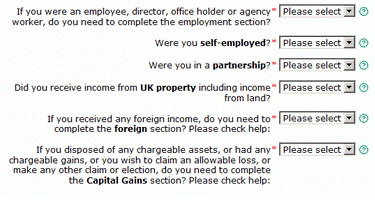
HMRC’s online system guides you through which pages you need based on your answers, so you don’t need to figure this out in advance — it asks the right questions as you go.
Step 3: Gather Your Records
Before you start, have the following to hand:
- Your UTR and National Insurance number
- All income figures — invoices, bank statements, rental income records, P60 from any PAYE employment
- All business expenses — receipts, mileage logs, bank statements
- Any tax already paid — payments on account made during the year, CIS deductions if you work in construction
- P45 or P60 from any employers
- Pension contribution statements
- Bank interest statements (from your bank or building society)
Step 4: Fill In Your Return
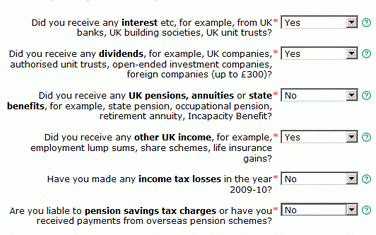
Work through the return section by section. HMRC’s online system calculates your tax automatically as you enter figures — so you can see your estimated bill building up in real time. If anything is unclear, HMRC has help text next to each question — click the question mark icons.
Step 5: Review Before You Submit
Before you hit submit, review the figures carefully. Check that your income total looks right, your expenses are sensible, and the final tax figure matches what you were expecting. Once submitted, you can amend your return online within 12 months of the filing deadline if you spot a mistake.
Step 6: Pay Your Tax Bill
Once submitted, your bill will appear in your HMRC online account. You can pay by bank transfer, debit card, or through your bank’s BACS facility. Make sure your payment arrives by midnight on 31 January. Bank transfers can take a day or two to clear, so don’t leave paying until the last possible moment.
💡 Tip: File early — even if you can’t pay yet. If you can’t afford to pay your full tax bill right now, you can still file your return on time to avoid the late filing penalty, and then contact HMRC to set up a payment plan (called a ‘Time to Pay’ arrangement). HMRC is generally willing to help if you contact them proactively before the deadline.
What a Self Assessment Year Looks Like
Time | What Happens |
|---|---|
April – April | You earn income and keep records |
6 April | New tax year begins |
6th April – 31st January | You can prepare and submit your return |
31st January | Filing deadline & tax payment due |
31st July | Second payment on account (if required) |

Self Assessment Penalties — What Happens If You Miss the Deadline?
HMRC is strict about Self Assessment deadlines. Late filing penalties and late payment penalties are separate; you can be charged both if you file late and pay late.
Penalties apply automatically, even if you owe no tax at all, and even if the reason for missing the deadline seems reasonable. Here’s what the fines look like:
- 1 Day late – Automatic £100 fixed penalty
- 3 Months late – £10 per day for up to 90 days (maximum £900 on top of the £100)
- 6 Months late – A further 5% of the tax owed, or £300 — whichever is higher
- 12 Months late – Another 5% of the tax owed, or £300 — whichever is higher
- Tax paid late – 5% surcharge on unpaid tax at 30 days, 6 months, and 12 months — plus daily interest
Interest and penalties are also charged on any unpaid tax from the day after the payment deadline until the date it’s paid. The current HMRC late-payment penalty is 5% plus interest, and you have 30 days to pay the penalty.
Can You Appeal a Penalty?
Yes, you can appeal to HMRC if you have a ‘reasonable excuse’ for missing the deadline. HMRC accepts a limited range of reasons, including serious illness, a bereavement close to the deadline, or a system failure on HMRC’s own website. ‘I forgot’, ‘my accountant was late’, and ‘I didn’t know’ are generally not accepted. You have 30 days from the penalty notice to appeal.
I didn’t receive a reminder’ is not a reasonable excuse. HMRC does not have to remind you of the filing deadline — it is your responsibility to know when your return is due. Don’t rely on HMRC to chase you. Once you’re registered for Self Assessment, the annual deadline applies every year, whether or not you get a letter.
Common Self-Assessment Mistakes to Avoid
- Forgetting payments on account is the most common shock for first-time filers. Remember that your January bill may be 150% of what you expected — your current year’s tax plus the first payment on account for next year.
- Not keeping records throughout the year, trying to reconstruct a year’s worth of income and expenses in January from memory and a pile of receipts, is stressful and leads to errors. Keep records as you go — even a simple spreadsheet updated monthly saves hours of pain come January.
- Claiming expenses that aren’t allowable. Claiming personal costs as business expenses — such as your regular clothing, personal phone bills, or home food shopping — is a common mistake that can trigger an HMRC enquiry. When in doubt, leave it out or ask an accountant.
- Not declaring all income, HMRC has access to data from banks, employers, and third-party platforms (including eBay, Etsy, Airbnb, and Uber). If you have undeclared income, there’s a good chance HMRC will find it. It’s always better to declare everything and pay the right tax than to face a compliance investigation later.
- Missing the registration deadline. If you become self-employed and forget to register by 5 October after your first year of trading, you can still register late — but you may face a penalty. Register as soon as you start earning untaxed income, not just before the filing deadline.
Top Tips for a Stress-Free Self Assessment
- File early — don’t wait until January. You can file your tax return from 6 April, the moment the new tax year starts. Filing early means you know your tax bill months in advance, giving you time to budget and save up. You don’t pay any earlier — the payment date is still 31 January — but you avoid the January rush and any last-minute panics.
- Keep a separate business bank account. Mixing personal and business money makes record-keeping a nightmare. A dedicated business account — even a free one — means your income and expenses are in one place, easy to reconcile at year’s end. Many sole traders use accounts from providers like Starling, Monzo Business, or Tide for this.
- Update your records monthly, not once a year. Set aside an hour each month to update your income and expenses. Categorise your transactions, photograph receipts, and reconcile your bank account. This turns year-end into a straightforward review rather than a major project.
- Use accounting software. Software like Sage UK, Xero or QuickBooks automates much of the bookkeeping work — importing bank transactions, categorising expenses, and producing summaries that make filling in your tax return much easier. Many also let you or your accountant file directly to HMRC. If you’re planning to join Making Tax Digital for Income Tax (mandatory from April 2026 for those earning over £50,000), you’ll need MTD-compatible software anyway — so it’s worth getting started now.
- Don’t ignore HMRC letters. If HMRC writes to you — whether about a penalty, a query, or a notice to file — act on it promptly. Ignoring letters doesn’t make them go away and often makes the situation worse. If you’re unsure what a letter means, seek advice from an accountant or tax adviser.
- Consider hiring an accountant. For many self-employed people, the cost of an accountant more than pays for itself. A good accountant will ensure you’re claiming all allowable expenses, avoid mistakes that trigger enquiries, and save you hours of stress. Many charge between £150 and £500 for a basic sole trader tax return, which is often deductible as a business expense itself.
Accounting Software Best Deals

Sage UK – 90% Discount for 6 Months – FREE plan for Sole-Traders, AI tools for bookkeeping automation

XERO – 95% Discount for 6 Months – Cloud accounting, unlimited users, smart bank feeds

QuickBooks – 90% Discount for 7 Months – Invoicing, expense tracking, payroll, financial reports
Common Questions About Self Assessment
Do I need to file a return if I made a loss?
Yes — and it’s especially worth doing so. If your business made a loss, filing a return lets HMRC officially record it. You can then carry that loss forward to reduce your tax bill in future profitable years, or in some cases, offset it against other income. If you don’t file, you lose the ability to use that loss.
What if I can’t afford to pay my tax bill?
Contact HMRC before the deadline to set up a Time to Pay arrangement. HMRC will typically agree a monthly payment plan if you explain your situation. Interest still applies on outstanding amounts, but you avoid the surcharges that come with ignoring the debt.
Can I amend my return after I’ve submitted it?
Yes. You can amend your Self Assessment return online up to 12 months after the original filing deadline. For example, for the 2025/26 return (due 31 January 2027), you can amend it online until 31 January 2028. After that deadline, you’d need to write to HMRC to request a correction.
What happens if HMRC opens an enquiry into my return?
HMRC has the right to open an enquiry into any Self Assessment return within 12 months of the filing date (longer if there are suspected errors or omissions). They may ask for supporting records, receipts, or bank statements. This is one reason why keeping good records for at least five years after the filing deadline is so important.
What’s the difference between Self Assessment and Making Tax Digital for Income Tax?
Self Assessment is the current system — one annual tax return, filed by 31 January. Making Tax Digital for Income Tax (MTD ITSA) is the new system replacing it from April 2026, starting with sole traders and landlords earning over £50,000. See the note at the top of this page and our dedicated MTD ITSA guide for the full picture.
Do I still need to complete a Self Assessment if tax has already been taken through PAYE?
Sometimes yes. High earners, company directors, or people with additional income may still need to file even if tax is deducted from wages.

Summary
Self-assessment doesn’t have to be stressful. The key is to stay on top of your records throughout the year, understand your deadlines, and not leave everything to January. Here’s a quick recap of the most important points:
- Register by 5 October if you’re newly self-employed or have untaxed income for the first time
- File your return online by 31 January — don’t wait for a reminder from HMRC
- Pay any tax owed by 31 January — the same deadline as the return
- Budget for payments on account if your bill exceeds £1,000 — January’s bill can be much higher than you expect
- Keep good records throughout the year — income, expenses, and receipts
- Claim all allowable expenses to reduce your tax bill legally
- File early if you can — you’ll know your bill months in advance and avoid the January rush
- Consider accounting software to make record-keeping and filing easier
If you’re already registered for Self Assessment and earning over £50,000 from self-employment or property, make sure you also read our guide to Making Tax Digital for Income Tax — it will affect how you report your income from April 2026 onwards.
Related Pages on Business Accounting Basics
- Making Tax Digital for Income Tax (MTD ITSA) — A Complete Guide
- Sole Trader Bookkeeping — Keeping Records the Right Way
- Allowable Business Expenses for the Self-Employed
- Payments on Account — What They Are and How to Budget for Them
- Best Accounting Software for Sole Traders UK
Last updated: February 2026 (reflecting latest HMRC guidance)