
A Guide to Sole Trader Accounting
Sole Trader Accounting refers to managing and reporting the financial transactions of a sole trader — essentially an individual who runs their own business.
While it might seem daunting, understanding accounting is crucial for maintaining a healthy financial position for your business. This guide aims to break down the complexities of sole trader accounting into easy-to-understand terms and steps, helping you keep track of your income, expenses, and your business’s profitability.

Setting up a Sole Trader Business
When starting a business as a sole trader, you’ll need to register your business with HMRC. You’ll also need to decide whether to use the cash or accrual accounting basis. We will walk you through the process.
The cash basis records income when it is received and expenses when they are paid, whereas the accrual basis records income when it is earned and expenses when they are incurred.

Registering with HMRC
When registering with HMRC as a sole trader, you must provide your business name, national insurance number and contact details, and the nature of your business. You’ll also have to inform HMRC of when you started trading.
You must register by the 5th of October to submit a self-assessment return for the tax year. An example is a business that starts trading on 1st September 2024. They must complete a self-assessment tax return for the year ending 5 April 2025 and register by 5 October 2025.
Once this is complete, HMRC will assign a Unique Taxpayer Reference (UTR) that must be included in all communications with them.
Sole Trader Bank Account
As a sole trader, you don’t have to open a separate bank account, but it’s strongly recommended. Using a dedicated business account makes it much easier to keep your personal and business finances separate. This helps you track income and expenses accurately and simplifies your bookkeeping. Most major banks offer business accounts designed for sole traders.
What Business Records do I need?
You must keep accurate records of sole trader income and expenditure when running a business. This will help you monitor your performance more accurately and aid cash flow forecasting.
You should keep all relevant documents, such as invoices, bank statements, receipts, emails, etc., for at least six years from the 31st January submission deadline for your tax return.
These documents can be kept in paper or digital format, but must include relevant details such as the date, the amount received or spent, and a brief transaction description.
Keeping Track of Sole Trader Business Expenses
It’s essential to record every business expense accurately and avoid mixing personal spending with business expenses. Business expenses include anything you pay for to help you earn income — for example, office supplies, travel costs, or equipment. Keeping clear records ensures your accounts stay accurate and makes it easier to claim allowable expenses. Tools like Sage UK which offer a free plan for sole traders, can help you easily track income and expenses and stay organised throughout the year.
It’s also important to remember that all business costs must be reasonable and necessary to run your business. HMRC will look at any excessive expenditure as a possible indication of tax avoidance.
Options for Sole Trader Accounting
Keeping track of your business transactions can be time-consuming and complex. Fortunately, a range of options is available for sole traders to help make the process easier and more efficient. The options are:
Ledger Book
A ledger book is the most traditional method of recording business transactions and is an easy way for sole traders to keep track of their accounts. Ledger books are available on Amazon and other stationery stores. They are made up of columns and rows, enabling you to record each transaction.
Excel Spreadsheet
Excel spreadsheets are an alternative to ledger books and can be used to organise your financial records. They offer the benefit of summarising transactions into a clear, concise overview. Many sole traders like using Excel because they are already familiar with it and can design spreadsheets tailored to their business needs.
Excel Bookkeeping Templates
Excel bookkeeping templates are available to download and provide the perfect way for a sole trader to keep their accounts in order. They are usually pre-formatted with columns and rows, ready for you to fill in as appropriate.
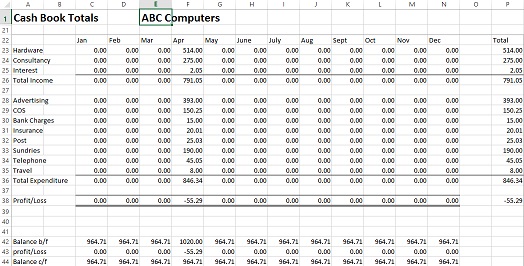
At Business Accounting Basics, we have a range of bookkeeping templates, including a cash book to record income and expenses.
Cloud Accounting Software
Cloud accounting software is an excellent tool for sole traders wanting to stay on top of their accounts. It eliminates the need to create reports or manually enter information into spreadsheets. Most online accounting software allows users to connect with their bank accounts so transactions are automatically imported, making it easier to reconcile accounts.
Read our guide on the top accounting software packages, QuickBooks vs. Xero. Here are our top cloud accounting software options:
Accounting Software Best Deals
Sage UK – 90% for 10 Months – FREE plan for Sole-Traders, AI tools for bookkeeping automation

QuickBooks – 90% Discount for 7 Months – Invoicing, expense tracking, payroll, financial reports
XERO – 90% Discount for 6 Months or FREE Trial – Cloud accounting, unlimited users, smart bank feeds
Sage UK
Sage UK offers a free plan in the UK designed to make bookkeeping simple and stress-free. You can easily track income, expenses, and taxes, helping you stay organised throughout the year. Its AI-powered tools automatically categorise transactions and provide valuable insights, saving time and reducing mistakes. Whether you’re just starting or growing your business, Sage helps you manage your finances with confidence.
QuickBooks
QuickBooks is one of the most comprehensive accounting software packages available, offering a sole trader plan that calculates taxes owed. It offers various income and expense-tracking features, as well as invoicing and reporting capabilities. QuickBooks allows users to connect their bank accounts so transactions are automatically imported, making account reconciliation easier.

Pricing
QuickBooks offers three packages: the self-employed package is available for £10.00 a month, the Simple-start for £14 a month and the Essentials package for £24 a month. All packages include ongoing free support.
Visit QuickBooksXero
Xero is another excellent online accounting software that includes all the features of QuickBooks but is more expensive. It also has a range of features for invoicing and tracking income and expenses. It has a user-friendly dashboard, lots of training videos, and integration with 3rd-party apps.

Pricing
Xero offers four packages: the Starter package for £15 a month, the Standard package for £30 a month, and the Premium package for £42 a month. The starter is restricted to 5 bills and 20 invoices.

FreeAgent
FreeAgent is a cloud-based accounting solution designed for small businesses and is excellent for freelancers. It offers easy invoicing, reporting and expense-tracking features. It also has a Bank Feeds feature, which imports bank statements and categorises them so you can easily reconcile accounts.
Pricing
FreeAgent offers a FREE version if you hold a business account with either NatWest, Royal Bank of Scotland or Ulster Bank NI. The plans available are either monthly £19 or annual £95pa.
Zoho Books
Zoho Books is an online bookkeeping software for small businesses. It offers a range of features, including invoicing, expense tracking and reporting. It also enables automatic bank feeds. One advantage of Zoho Books is the range of business apps available for growing businesses.
Pricing
Zoho Books offers a free package with revenue up to £35,000, a Standard for £10 per month, including up to 5,000 invoices and a Professional for £20 per month.
Professional Accountant/Bookkeeper
Finally, a professional accountant or bookkeeper can take on this task if you don’t have the time or inclination to manage your sole trader accounts. They can provide more detailed and accurate financial reports and offer guidance on tax savings.
So, as you can see, there are plenty of options for sole traders to help keep their accounting in order. Whether you use an Excel spreadsheet, bookkeeping template or online accounting software, it’s important to ensure that all records are kept up-to-date and secure.
What business costs can sole traders claim?
When running a business as a self-employed, there are certain allowable costs you can claim to reduce your taxable bill and take advantage of available tax reliefs. They include:
Advertising and Marketing
Any costs spent on advertising and marketing your business, such as website design and hosting fees or print materials like flyers and brochures.
Bank Charges
Any fees or charges incurred for business banking, such as overdraft fees or credit card payments.
Business Premises
This includes rent, maintenance and repairs to business premises.
Equipment
The cost of any equipment needed to run the business, such as computers, phones, furniture, etc.
Home Office Expense
If you use part of your home as a home office, you can claim home office expenses. There are two options: claiming a percentage of actual costs or using simplified expenses.
Insurance
Any insurance related to running the business, including public liability, professional indemnity and travel insurance.
Professional Fees
Any fees you have paid for professional advice, such as accountants or solicitors.
Staff Costs
As a sole trader, if you employ staff, their salaries and associated costs are allowable.
Subcontractors
The business cost of any contractors or freelancers you employ to help run your business.
Travel Expenses
Travelling costs for running your sole trader business include parking, fuel, train fares, and hotel stays. You can’t claim travel between your home and your regular place of work.
This is not a complete list, and as a small business owner, you must decide if the costs are necessary and reasonable. HMRC has the right to disallow any claims it deems excessive or unnecessary.
Sole Trader and VAT
As a sole trader, if your turnover in any 12 months either goes over or is expected to go over the threshold of £90,000 (from 2024), you must register for VAT. There are different VAT schemes available, and it is worth taking the time to decide the best scheme for your business.
Sole Trader and Making Tax Digital
As part of the government’s Making Tax Digital initiative, from April 2019, all VAT-registered businesses must use software to submit their returns digitally. This applies to both quarterly and annual VAT returns.
Making Tax Digital (MTD) is a government initiative that requires businesses and sole traders to keep digital records and submit tax information online using compatible software. For sole traders, MTD for Income Tax Self Assessment (MTD ITSA) will come into effect from April 2026. From this date, sole traders earning over £50,000 annually must follow the new digital rules, with those earning over £30,000 joining in April 2027. Using tools like Sage UK, which offers a free UK plan with built-in MTD compatibility, can help you stay compliant and make the transition to digital tax filing simple.
Annual Self-Assessment Tax Returns
A sole trader must complete an annual Self-Assessment tax return. This needs to be done by the 31st January each year. To complete the self-assessment tax return, you will need the following information:
- Business income and expenses, and evidence to support it
- Bank statements
- Pension contribution records
- Investment income records, such as dividend certificates from shares or interest certificates from savings accounts.
- Any other business-related income, such as rental income, royalties, etc.
- P60 for employment income
Once completed, you can submit the return online via HMRC. As part of the process, you will receive a calculation for tax; this is made up of the following:

Self-Employed Income Tax
Income tax is calculated using personal allowance, basic, higher, and additional rate bands. Your income, including business profits, will determine how much tax you will pay.
Class 4 National Insurance
Self-employed Class 4 NICs are payable on profits over a certain threshold, currently £12,570 pa for the 2025/26 tax year. You will pay 6% between £12,570 and £50,270 and 2% on profits over £50,270.
Class 2 National Insurance Contributions
If your profits are less than £6,845 you will also pay class 2 NI at £3.50 per week.
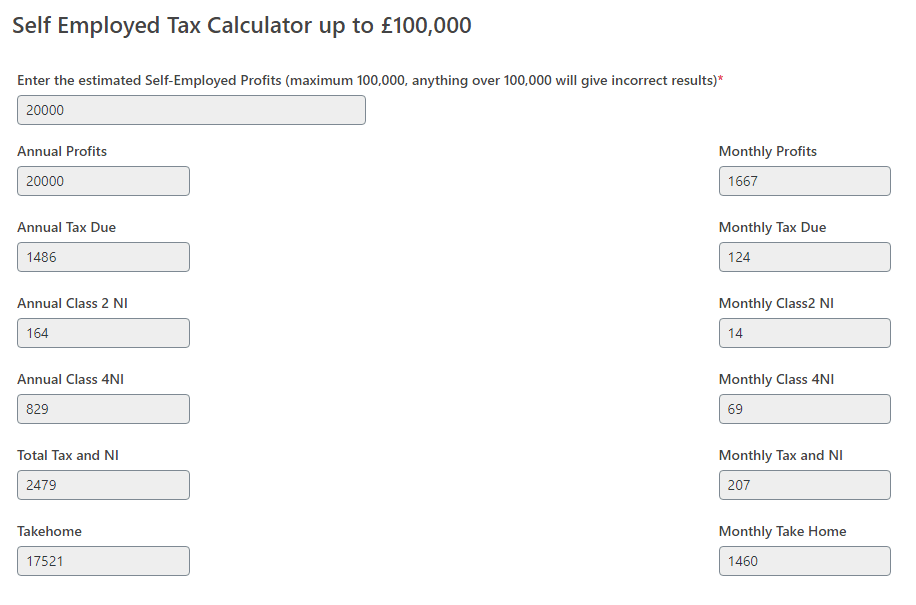
If you would like to calculate your self-employed income tax and National Insurance contributions, use our self-assessment tax calculator.
When do I Pay Tax as a Sole Trader?
You pay income tax and NI to HMRC, and there are two payment dates each year: 31st January and 31st July, depending on your annual income. The tax calculation will give you the amount for each instalment.
Sole Trader Accounts Conclusion
To sum it up, being a sole trader comes with a lot to think about. You’ve got to handle business expenses, understand your tax responsibilities, and ensure you follow the HMRC’s digital submission rules.
When it comes to expenses, things like advertising, bank charges, equipment, and professional fees can be claimed to lower your tax bill. Oh, and don’t forget, if your turnover exceeds £85,000, you must register for VAT.
