

In today’s fast-paced world, self-employed business owners and small businesses need efficient financial management. Accounting software can save you time, ensure accuracy, and provide valuable financial insights to help grow your business. But with so many options available, how do you choose the right one?
In this blog post, we’ll explore the best self-employed accounting software, discuss factors to consider when choosing, and even offer alternatives for those who prefer using Microsoft Excel. Choosing the right accounting software is crucial. If you find a better software provider later, you might waste time transferring your data and having to start over.
Key Takeaways
- Investing in quality accounting software can improve financial reporting and record accuracy.
- This article overviews the top 6 accounting solutions, each with unique features to meet individual needs.
- The future of Making Tax Digital
- Consider usability, functionality, cost and customer service when choosing a software package to maximise its benefits.
The Importance of Accounting Software for Self-Employed
Managing finances can be challenging for self-employed people, as it involves tracking income, expenses, taxes, and more. However, these tasks can be streamlined with the right software, saving precious time and ensuring greater accuracy.
Disclosure: This content may contain affiliate links, which means if you click on them, I may get a commission (without any extra cost to you).
Benefits of using small business accounting software include:
- Simplified tracking of income and expenses
- Streamlined tax return preparation
- Enhanced accuracy in financial records
- Time savings of up to 8 hours per month
- Submission of Self-Assessment tax return
By using software, individuals can effectively manage their finances and focus on growing their business.
For self-employed individuals, accounting software is a vital tool that aids in handling several financial aspects, such as:
- Bookkeeping
- Invoicing
- Purchase orders
- Account statements
- Inventory
- Self-Assessment reports
It provides features such as user access controls, data encryption, and regular backups to ensure the security of sensitive financial data, including bank accounts and bank transactions. Using accounting software, you can gain invaluable financial insights, such as sales fluctuations and assistance with self-assessment tax returns, to make informed decisions for your business’s success.
Investing in top-notch accounting software for your self-employed venture can enhance financial management, increase record accuracy, and free up time for business growth.
Making Tax Digital Software for Income Tax
The UK government has introduced some changes to accounting and taxation for small business owners and the self-employed. The Making Tax Digital (MTD) for income tax initiative requires businesses to comply with digital record-keeping standards for tax returns.
MTD for income tax means that instead of paper records, all transactions must be recorded electronically using software approved by HMRC. This digital tax system helps the government streamline income and expenditure records and keep track of taxes due.
HMRC have delayed it until 6th April 2026 for income over £50,000, 6th April 2027 for income over £30,000 and 6th April 2028 for income over £20,000. For income below £20,000, there is no planned date. You can sign up earlier to help HMRC test and develop the system. Most accounting software is MTD-ready, but it is worth checking before signing up.
Our Top Choice for Sole Traders
Sage UK Accounting Individual Free – for non-VAT sole traders
Sage’s Accounting Individual Free plan is explicitly designed for non-VAT registered sole traders and landlords.
- Completely free
- Track income and expenses
- Self-employed income tax summary
- Manual receipt entry
- Free mobile app
- HMRC-recognised and MTD-ready for Income Tax
If you want a trusted, MTD-compatible provider but don’t yet need full small business accounting, this is one of the strongest free options.
Visit Sage UK
6 Best Self-Employed Accounting Software Solutions UK
Here is a list of the 6 best accounting software solutions that might fit your business perfectly. It features:
- Sage UK
- QuickBooks
- Xero
- FreeAgent
- FreshBooks
- Zoho Books
Each solution offers unique features and capabilities to meet the diverse needs of self-employed individuals and small businesses. They are all cloud-based solutions offering up-to-date software and secure data.
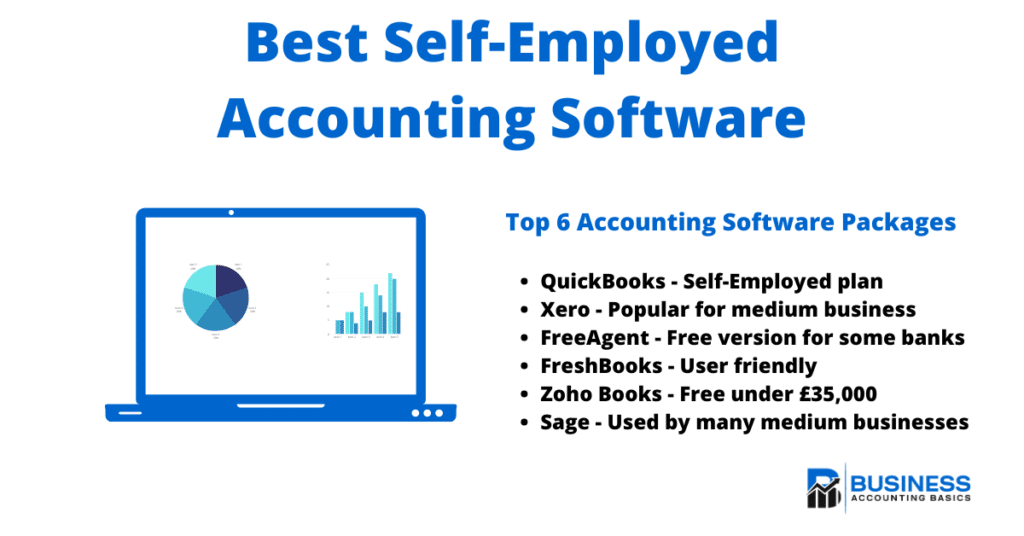
Of course, they all have different benefits and drawbacks. The top accounting software in the UK is Xero and QuickBooks. We have compared them side by side to make it easier for you to decide. So, let’s take a deeper look at what they are.
Accounting Software Best Deals
Sage UK – 90% off for 6 Months or FREE plan for Sole-Traders, MTD-compatible, AI bookkeeping tools
XERO – 90% Discount for 6 Months – Cloud accounting, unlimited users, bank feeds, MTD compatible

Tide – Free with Tide Bank Account – All your banking and accounts in one place, MTD compatible
Sage UK Cloud Accounting
Sage offers a reliable set of cloud accounting tools suitable for everyone from simple sole traders to growing small businesses.
Free Plan: Sage Accounting Individual (for non-VAT sole traders)
If you’re a non-VAT registered sole trader, Sage now provides an entirely free plan designed to help you keep digital records without the monthly subscription.
This free plan is ideal if you’re starting or moving from spreadsheets and want a trusted system without any cost.
Paid Plans: Sage Business Cloud Accounting
Sage Business Cloud Accounting offers more advanced features for businesses that need full accounting functionality.
Key features include:
- Co-Pilot to assist with transactions and reporting
- Batch transactions for faster data entry
- Invoicing and payment tracking
- Bank reconciliation
- Expense tracking
- Financial reporting
- VAT
Pricing
Accounting Start – from £18/month
Aimed at small businesses needing essential invoicing and bookkeeping tools.

Visit Sage UK for a free Sole Trader account.
QuickBooks Online – Great for Sole Traders

QuickBooks Self-Employed is a versatile accounting software designed specifically for self-employed individuals and sole traders. It offers a comprehensive suite of tools to efficiently manage business finances, from tracking income and expenses to preparing tax estimates and issuing invoices.
With its user-friendly interface and powerful features, QuickBooks Self-Employed allows users to separate personal and business transactions, snap receipts for easy uploads, and even track mileage for accurate deductions. This software is invaluable for self-employed business owners seeking to streamline their financial management and focus on growing their businesses.
QuickBooks Online offers:
- Invoicing
- Expense Tracking
- Track mileage
- CIS
- Separate personal and business transactions
- Invoicing on the go
- Snap receipts and bills to upload
- Tax estimates
- Making Tax Digital compatible software
These features make it suitable for sole traders and self-employed individuals.
QuickBooks Online Pricing
The QuickBooks self-employed base plan costs £10 per month (excluding VAT), making it one of the cheapest options. If you are VAT registered, the price is £16 per month.
Intuit QuickBooks Pricing
Sole Trader
- Prepare Self-Assessment Tax Returns
- Get Tax Estimates
- Send Invoices
- Track Mileage
- Separate Personal Expenses
- Manage Income & Expenses
- Free Onboarding Session
£10 Per Month
Simple Start
- Tax Estimates
- MTD VAT
- Invoices paid instantly
- Manage Income & Expenses
- Telephone Support
- Single User
- Track Mileage
- Estimates & Quotes
£16 Per Month
Essentials
- Everything in Simple Start
- Manage Bills
- Multi-Currency
- 3 Users
- Most Popular
- Cash Flow
- VAT Error Checker
- Track Employee Time
£33 Per Month
Plus
- Everything in Essentials
- Manage Stock
- Profitability for each Project
- Set Budgets
- 5 Users
£47 Per Month

QuickBooks Self-Employed is a powerful and feature-rich accounting software tailored for the self-employed, focusing on tax management support. While there may be a learning curve for some users, the benefits of using this software for tax planning and organisation make it a strong contender in the market.
Visit QuickBooksXero

Xero is a leading cloud-based accounting software that simplifies financial management for small businesses and self-employed individuals. With its intuitive interface and robust feature set, Xero empowers users to handle invoicing, expense tracking, and financial reporting efficiently.
It offers seamless integration with a wide range of apps, making it a versatile solution for businesses looking to streamline their operations. Xero’s commitment to innovation and user-friendly design ensures that managing your business finances is as straightforward and stress-free as possible, allowing you to focus on growth and success.
- Invoicing
- Online payments
- Expense tracking (2.50 per month per user)
- Project management (£5 per month after trial)
- Automated bookkeeping
- CIS Returns
- Making Tax Digital compatible software
It offers a clean interface and unlimited users, making it suitable for growing businesses.
Xero Pricing
However, with a starting price of £16 per month for 20 invoices, you may soon be on a higher plan at £33. Xero has a slightly higher base cost than some competitors, but it is worth considering if you plan to expand.
![Best Self-Employed Accounting Software for [year]](https://www.businessaccountingbasics.co.uk/wp-content/uploads/xero-pricing-4-1024x536.png "Best Self-Employed Accounting Software for [year]")
Xero’s basic plan is suitable for small-scale sole traders but may not be the best choice for them. The software is primarily designed for medium and large businesses, so its complexity may be overwhelming for those with limited accounting experience.
In summary, Xero is a robust accounting software with various advanced features and apps suitable for growing businesses. It may not be ideal for self-employed people seeking a more tailored solution. Its clean interface and unlimited users make it a strong option for those needing a scalable solution.

FreeAgent – Free Software for some

FreeAgent is a user-friendly accounting software that offers excellent features for self-employed individuals and small businesses. The best part is that some business bank accounts are free. As a bookkeeper, I have tried FreeAgent and helped a client run his business. It provides:
- Create invoices
- Online payments
- Cash flow forecasts
- Transaction approval
- Recurring expenses
- Vendor credits
- Landed cost
- Inventory management
- The ability to manage multiple projects with ease
FreeAgent Pricing
A free version is available if you bank with NatWest, Royal Bank of Scotland, or Ulster Bank, or use Mettle for 1 transaction per month.
FreeAgent is more expensive than other options, with pricing starting at £19 per month for sole traders and £29 per month for limited companies.
Despite its higher price, FreeAgent remains popular among self-employed individuals and small businesses seeking a user-friendly, feature-rich accounting software solution.
FreshBooks
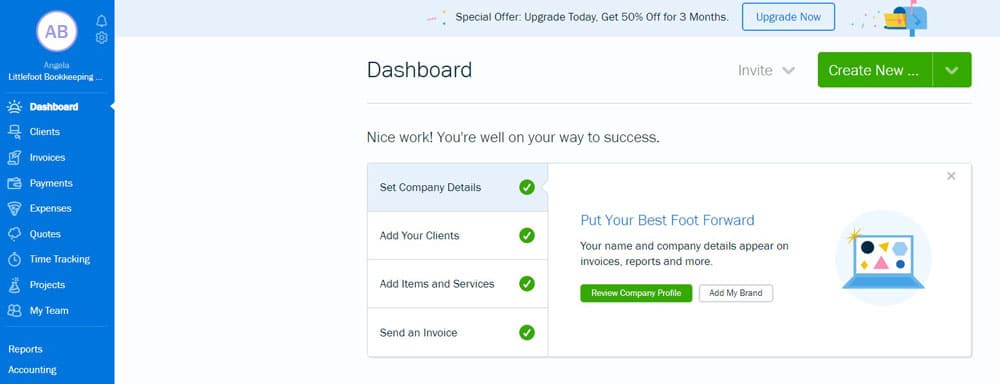
FreshBooks is a solution designed to meet the needs of self-employed accounting. It offers a user-friendly interface with minimal jargon, making it ideal for those with basic accounting requirements. Some of the key features offered by FreshBooks include:
- Invoice and estimate creation tools
- Time tracking – ideal for invoicing by the hour
- Mileage tracking – mobile app
- Making tax digital – VAT support
FreshBooks plans offer these features to help you manage your finances effectively.
FreshBooks integrates with popular applications such as PayPal and Zendesk, making it easy to streamline workflows. However, one drawback of FreshBooks is that it offers a range of additional features, such as time tracking, which may not be necessary for some users.
FreshBooks Pricing
FreshBooks starts at £12 a month for the ‘Lite’ package, with a limit of five billable clients; for 50 clients, it is £22 per month. However, if you are a business that invoices many clients, FreshBooks might not be the package for you.
FreshBooks is an excellent option for individuals looking for user-friendly accounting software with essential features and integrations. However, it may not be the best choice for those seeking a free or more budget-friendly option.
![Best Self-Employed Accounting Software for [year]](https://static.shareasale.com/image/52946/728x90-AUS.gif "Best Self-Employed Accounting Software for [year]")
Zoho Books
Zoho Books is a comprehensive accounting software offering essential features for small businesses and freelancers. It offers a free plan for businesses with less than £35,000 turnover, making it an attractive option for those just starting out or on a limited budget. Some of the key features of Zoho Books include:
- Customisable invoice templates
- Online payments
- Transaction approval
- Recurring expenses
- Vendor credits
- Inventory tracking
- Cash flow management
- Timesheet management
The Zoho Books user interface is straightforward and visually appealing, without unnecessary embellishments. One of the main advantages of Zoho Books is that it is suitable for businesses planning to expand, as it integrates with over 50 apps.
Zoho Books Pricing
Zoho Books offers a free plan with turnover below £35,000; the standard package is £10 per month, which is cheaper than most paid plans.
In conclusion, Zoho Books is an excellent option for small businesses and freelancers looking for comprehensive accounting software with a free plan. While there may be a learning curve due to its many features, the benefits of using this software to manage your finances outweigh any initial challenges.
Visit Zoho BooksFree Accounting Software
As a sole trader, you may seek free accounting software and tools to get started and keep costs down. Most have now removed free plans due to the increased costs of keeping current with legislation and overheads.
A few options are still available:
Sage UK – Offers a limited plan for Free
FreeAgent if you have a bank account with Natwest, Royal Bank of Scotland, Ulster Bank, or one monthly transaction with Mettle.
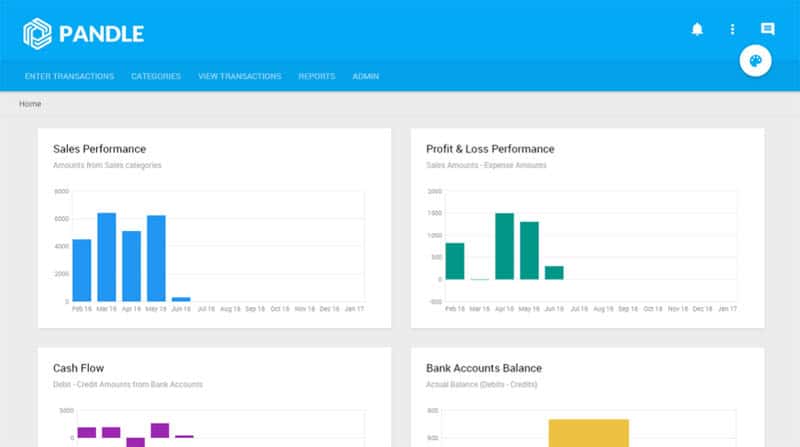
Pandle is another free option with limited capabilities, but it might be suitable for a small business.
Zoho Books also offers a free version with a turnover of up to £35,000.
QuickFile offers a free version for basic bookkeeping, with up to 1,000 general ledger transactions per year. This might sound like a lot, but with double entry bookkeeping, you can soon reach the 1,000 transactions.
Factors to Consider When Choosing Self-Employed Accounting Software
Choosing the right software requires careful consideration of several factors. Usability is crucial, as you want easy-to-navigate, easy-to-understand software, especially if you have limited accounting experience.

Functionality is another important factor, as you want to ensure the software offers essential features such as:
- Invoicing
- Recurring invoices
- Quotations
- Tracking payments
- Logging expenses
- Time tracking
- Cash flow forecasting
- Mileage
Cost, safety, expansibility, and customer service should also be considered when choosing an option. By carefully evaluating these factors, you can make an informed decision and select the best software for your business.
Integration Possibilities with Popular Apps
Many accounting packages offer integration with Apps to simplify processes and reduce the amount of data entry. Popular apps that can be integrated include:
Mailchimp integration with QuickBooks Online lets you see trends and send marketing emails. It also allows you to segment your customer base and tailor your communication to their specific needs. This integration is a powerful tool for boosting customer engagement and retention. It helps you to track customer behaviour, analyse their purchasing patterns, and then use this information to send targeted marketing emails.
PayPal or Stripe integration with QuickBooks or Xero speeds up the payment process and eliminates manual data entry. It allows you to process payments faster with less stress, making it easier for customers to pay their invoices online. Plus, PayPal supports over 100 currencies so that you can accept payments from all around the globe.
Dext Prepare is a powerful tool that works with your accounting software. This application collects and extracts data from your paperwork with an impressive 99% accuracy rate, then processes the information automatically to your software. This seamless integration minimises manual data entry, reduces errors, and saves valuable time.
By exploring and utilising these integration possibilities, you can streamline your workflows and improve efficiency, ultimately making the most of your solution.
Tips for Maximising the Benefits of Self-Employed Accounting Software
You can employ several strategies to fully exploit your software’s capabilities and achieve the best self-employed accounting. First, use free trials to ensure the software meets your needs. Research the features, test the software, and check for any discounts or promotions.
Customising your software can also help you maximise its benefits. Key features for customisation include:
- Invoice creation, adding logos and colours for branding
- Invoice tracking and automatic payment reminders
- Open Banking – downloading transactions from a business bank account
- Automatic bank account reconciliation
- Custom reports for monitoring business performance
- Customised quotes and invoices
- Expense Management – recording bills and recording payments
- The ability to customise credit terms and payment reminders
Lastly, keeping your software up to date with transactions and implementing financial processes is essential for maintaining accurate records and ensuring you have access to accurate reports. Following these tips can maximise the benefits and enhance your financial management.
Alternatives to Self-Employed Bookkeeping Software
Using Excel bookkeeping templates or paper records can be viable for those who prefer a hands-on approach or seek alternatives to self-employed bookkeeping software.
Bookkeeping templates can simplify the setup of a basic bookkeeping system while still providing the figures for the self-assessment tax return. However, it’s crucial to ensure the template you choose fits your business type and includes all the necessary reporting information.
For your convenience, we’ve designed a free template, the Cash Book, which includes recording Supplier Payments and Customer Receipts. You can download it from this link: Free Excel Cash Book Template.
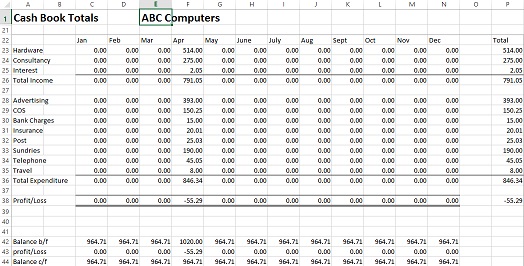
This user-friendly and straightforward template makes it an excellent choice for small businesses looking to kick-start their bookkeeping without the complexities of sophisticated software.
Best Accounting Software for Self-Employed – Summary
In this blog post, we have explored the best accounting software, discussed factors to consider when choosing the right software, including Making Tax Digital, and offered tips for maximising its benefits. We have also provided alternatives for those who prefer a more hands-on approach.
By carefully evaluating your needs and preferences, you can select the best financial management solution for your self-employed business, ensuring accurate records, streamlined workflows, and valuable financial insights to help your business grow.
Frequently Asked Questions
Do I need accounting software as a sole trader?
You don’t legally need accounting software, but it makes managing your business easier. It helps track income, expenses, invoices, and taxes. With Making Tax Digital, more sole traders will eventually need to keep digital records, so software is a good step to prepare.
Is there free accounting software for sole traders?
Yes. Some providers offer genuinely free options. The most notable is Sage Accounting Individual, a free plan for non-VAT registered sole traders that includes basic income and expense tracking and is MTD-ready. Other free options include Pandle, QuickFile, and FreeAgent (free only with certain bank accounts).
Do I need MTD-ready software right now?
If you’re VAT registered, yes — MTD for VAT is already mandatory.
If you’re not VAT registered, you’ll eventually need MTD-compatible software for Income Tax – 2026 for income over £50,000 and 2027 for income over £30,000. Choosing MTD-ready software now saves time later.
Last updated March 2026
