Making Tax Digital for Income Tax (MTD ITSA) Explained
A Plain-English Guide for the Self-Employed and Landlords
If you’re self-employed or a landlord, you may be wondering:
- Do I need to join Making Tax Digital?
- When does MTD ITSA start?
- Will I need to submit tax returns four times a year?
Making Tax Digital for Income Tax (MTD ITSA) is HMRC’s new system for reporting income digitally. This guide explains who it affects, when it starts, what quarterly updates involve, and how to prepare — in plain English.
Making Tax Digital for Income Tax (MTD ITSA) — Quick Summary
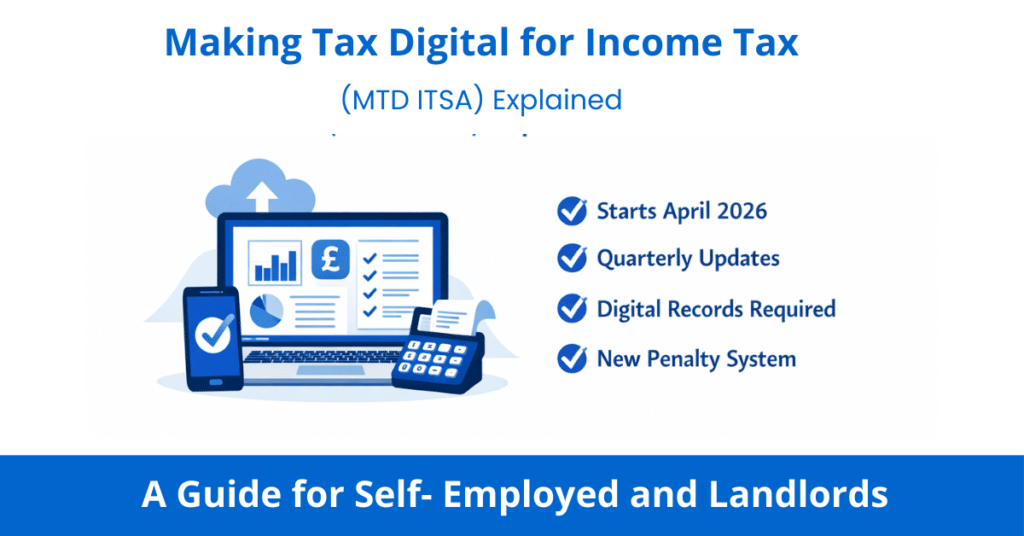
- Starts April 2026 for sole traders and landlords with gross income over £50,000
- Digital records required — kept in HMRC-approved software
- 4 quarterly updates submitted to HMRC per year
- 1 final declaration annually (replaces the Self Assessment tax return)
Tax payment dates are unchanged
In this guide, we have used the standard tax year 6th April – 5th April, but you can also use calendar periods (the deadlines are still the same).
Disclosure: This content may contain affiliate links, which means if you click on them, I may get a commission (without any extra cost to you).
What is Making Tax Digital for Income Tax?
Making Tax Digital for Income Tax is HMRC’s plan to move the UK tax system online. Instead of filing one big Self Assessment tax return each year, you’ll keep digital records throughout the year and send updates to HMRC every three months using approved software.
Think of it as moving from doing your tax once a year in a January panic to keeping on top of it little and often — similar to how many businesses already manage their bookkeeping for VAT. Making Tax Digital for Income Tax is confirmed HMRC policy and becomes mandatory from 6 April 2026 for eligible taxpayers.
The good news is that the actual amount of tax you pay, and when you pay it, stays the same. MTD only changes how and how often you report your income and expenses.
Who Does MTD for Income Tax Affect?
MTD for Income Tax applies to sole traders and landlords. It is being introduced in three phases based on your gross income — that’s your income before you deduct any expenses:
Start Date | Who is Affected | Income Threshold |
|---|---|---|
April 2026 | Sole Traders & Landlords | Gross Income over £50,000 |
April 2027 | Sole Traders & Landlords | Gross Income Over £30,000 |
Planned from April 2028 | Sole Traders & Landlords | Gross Income Over £20,000 |
⚠️ Important: It’s your GROSS income that counts — not your profit
For example, if you earn £55,000 as a self-employed plumber but have £20,000 of expenses, HMRC looks at your £55,000 turnover — not your £35,000 profit. So you would need to join MTD in April 2026.
HMRC will check your 2024/25 Self Assessment return to decide if you fall into the April 2026 group.

Who Doesn’t Need to Worry Yet?
MTD for Income Tax does not apply to everyone right away. You don’t need to do anything differently at the moment if:
- Your gross self-employment income and rental income combined is below £50,000 (you have until at least April 2027, possibly April 2028)
- You are employed and pay tax only through PAYE — MTD ITSA does not affect PAYE employees
- You are a partner in a partnership — partnerships are not included in the current MTD rollout, and a separate timetable is expected to be announced by HMRC
- You are a limited company — MTD for Income Tax only applies to individuals. Limited companies already have their own MTD for Corporation Tax consultation underway separately
- You only have investment income, such as dividends, savings interest, or capital gains — this income is not in scope for MTD ITSA
- You are retired and receive only pension income
📌 A Note on Partnerships
If you are in a business partnership, MTD for Income Tax does not currently apply to you — HMRC has confirmed that partnerships will be brought into MTD at a later date, but no firm timetable has been set. Individual partners will still need to consider their own income from other sources (e.g. sole trader work or rental income) against the thresholds above.
Keep an eye on HMRC updates if you run a partnership, as the rules are expected to change in future years.
Why Is HMRC Introducing MTD?
The UK tax gap — the difference between tax owed and tax actually collected — runs to billions of pounds each year. HMRC estimates that a significant share of this isn’t deliberate evasion, but avoidable errors: figures transposed, expenses forgotten, records reconstructed in a January rush from a pile of receipts.
MTD is designed to fix that. Digital records maintained throughout the year are more accurate than annual returns compiled from memory. Regular quarterly updates mean errors are spotted sooner rather than sitting undetected for twelve months. And because your software tracks income and expenses in real time, you get a running estimate of your tax bill throughout the year — no more January surprises.
The broader goal is to modernise a tax system that still relies heavily on processes designed for the paper age, bringing the UK in line with tax authorities in most other comparable countries that have already moved to more frequent digital reporting.
💡 Worth knowing: The quarterly updates sound like more work, but if you use accounting software with a live bank feed, each submission takes minutes — your transactions have already been captured and categorised automatically throughout the quarter.
What Income Counts Towards the Threshold?
Your qualifying income is the combined total of:
- Income from self-employment (your business turnover)
- Rental income from property (UK or overseas)
The following income does NOT count towards your MTD threshold:
- Wages from a PAYE job
- Dividends
- Pension income
- Savings interest
👉 Example of ITSA Threshold:
Sarah is a freelance designer earning £32,000 a year, and she also rents out a flat that brings in £14,000 in rent. Her combined qualifying income is £46,000 — which means she’ll need to join MTD in April 2027 when the threshold drops to £30,000.

What Actually Changes Under MTD?
Here’s what your new reporting year will look like once you’re in MTD:
1. Digital Record-Keeping (from Day One)
You can still keep your original paperwork — receipts, invoices, bank statements — but your records must also exist digitally within your MTD software. Paper-only records and manual spreadsheets will no longer meet HMRC’s requirements unless you use bridging software. This means recording things as you go — not at the end of the year.
2. Quarterly Updates (Four Times a Year)
Every three months, you’ll send a summary of your income and expenses to HMRC through your software. Even if there is nothing to report, you still need to send the update. The return dates are due by 7th August, 7th November, 7th February and 7th May.
These quarterly updates don’t need to be perfectly accurate — you can correct and adjust them right up until your final declaration. They’re essentially a running picture of your finances.
What Does a Quarterly Update Actually Include?
A quarterly update is a summary of your income and expenses for the tax year so far, not just the last three months.
HMRC refers to these as interim cumulative updates, meaning each submission replaces the previous totals for the tax year.
Example
If your first year in MTD starts on 6 April:
| Update | Covers income and expenses from |
|---|---|
| First update (7th August) | 6 April – 5 July |
| Second update (7th November) | 6 April – 5 October |
| Third update (7th February) | 6 April – 5 January |
| Fourth update (7th May) | 6 April – 5 April |
This means each update effectively replaces the previous one with more complete information.
You don’t need to resubmit earlier quarters separately — your software automatically sends the updated year-to-date totals to HMRC.
Quarterly updates are summaries only. Adjustments such as accounting corrections or final tax calculations are normally completed when you submit your Final Declaration.
3. Final Declaration (Once a Year)
After the tax year ends, you’ll submit a Final Declaration — this replaces the old Self Assessment tax return. It covers all your income sources (including savings, dividends, and PAYE wages), and you’ll still have until 31 January to submit it and pay any tax owed. This part doesn’t change.
⚠️ Important: HMRC’s Filing Service is Changing
HMRC’s current Self Assessment online filing service will not be available for MTD users. Once you’re in the MTD system, everything must go through approved MTD software. This is a big change from the current system, so choosing the right software early is essential.
Digital Records — What Exactly Do You Need to Record?
HMRC requires you to record specific information for every business transaction. It’s not enough to just have a bank statement — each record in your MTD software must include:
What to Record | Example |
|---|---|
Date | Date when the income was received or expenses incurred |
Amount | The gross amount |
Category | The type of income or expense — e.g. travel, materials, professional fees, sales income |
Most MTD-compatible software makes this easy — you simply photograph a receipt, import your bank transactions, and assign each one a category. The software does the heavy work.
💡 What About Mixed-Use Expenses?
If you use something for both business and personal purposes — like your mobile phone — you only record the business portion as an expense. For example, if you use your phone 60% for business, you’d record 60% of the bill as a business expense. Your MTD software won’t calculate this split for you, so keep a note of how you’ve worked it out.
MTD Penalties — What Happens If You Don’t Comply?
HMRC is introducing a new points-based penalty system specifically for MTD for Income Tax. It works differently from the current Self Assessment penalty system, and it’s worth understanding before you start.
Penalties for Late Final Declarations
Under Making Tax Digital for Income Tax, HMRC uses a points-based penalty system instead of the old fixed late-filing penalties.
Each late submission — including quarterly updates or your Final Declaration — earns one penalty point.
- Quarterly filers receive a penalty after 4 points
- A £200 penalty is charged once the threshold is reached
- Further late submissions trigger additional £200 penalties until compliance is restored
Penalty points normally expire after 24 months if no further late submissions occur.
Late Payment Penalties
If you submit on time but pay tax late, separate penalties apply:
- No penalty if paid within 15 days
- 2% penalty after 15 days
- Additional 2% after 30 days
- Ongoing daily penalties plus interest after day 31
Penalties for Inaccuracies
If HMRC finds that your records or submissions contain errors, standard inaccuracy penalties can apply. These are:
- 0% — genuine mistake corrected
- Up to 30% — careless error
- Up to 70% — deliberate
- Up to 100% — deliberate and concealed
Soft Landing Period — No Points in 2026/27
HMRC has confirmed that penalty points will NOT be issued for late quarterly updates during the first year of MTD (2026/27 for April 2026 joiners). This gives you time to get used to the new system. However, financial penalties for late Final Declarations and inaccuracies still apply from day one — and the soft landing only covers quarterly update deadlines, not everything else.
Which Software Should You Use for MTD?
You’ll need to use software that is officially recognised by HMRC for MTD. The most popular options for self-employed people in the UK are Sage UK, Xero, and QuickBooks. Here’s a quick comparison:
MTD Software Comparison
Comparing MTD-Ready Accounting Software
All three are HMRC-recognised and compatible with Making Tax Digital for Income Tax from April 2026. Use this table to compare features before choosing.
not Self-Employed plan
MTD-compliant
per income stream
per income stream
per income stream
Sage UK
Sage is a well-established UK brand and a strong choice for freelancers and contractors. There is a starter free plan for sole-traders. It handles both your quarterly MTD submissions and your year-end final declaration in one place, so you don’t need separate tools. If you already use Sage for VAT, upgrading to include MTD for Income Tax is straightforward.
Sage also has a mobile app, making it easy to log receipts and expenses on the go — ideal if you work across multiple sites or clients.
Visit Sage UKXero
Xero is one of the most popular accounting platforms in the UK and is fully MTD-ready. Their entry-level plan (Xero Ignite, from around £16/month) is designed for sole traders with basic needs and includes MTD quarterly submissions and Hubdoc for capturing receipts by photo. It’s a clean, user-friendly system that’s great for new users of accounting software.
If you have multiple income streams — for example, you’re both a sole trader and a landlord — Xero handles separate quarterly updates for each business, plus a single Final Declaration.
Visit XeroQuickBooks
QuickBooks (the full version, not QuickBooks Self-Employed) is MTD-compatible and is a powerful option for growing businesses with more complex needs. Note: If you currently use QuickBooks Self-Employed, this product is not MTD-compatible — you’ll need to upgrade or switch to a different product before your mandate date.
QuickBooks also has handy features like automatic mileage tracking, snap-and-store receipts, and real-time tax estimates — useful for planning ahead.
Visit QuickBooksAccounting Software Best Deals

Sage UK – 90% Discount for 6 Months – FREE plan for Sole-Traders, AI tools for bookkeeping automation

XERO – 95% Discount for 6 Months – Cloud accounting, unlimited users, smart bank feeds

QuickBooks – 90% Discount for 7 Months – Invoicing, expense tracking, payroll, financial reports
💡 Not Sure Which to Choose?
HMRC has an official software finder tool on GOV.UK where you can filter by your needs and budget. If you work with an accountant or bookkeeper, ask them which software they prefer — it’s often easier if you’re both using the same system.
What About Spreadsheets?
If you love your spreadsheets and don’t want to give them up entirely, ‘bridging software’ is an option. This creates a digital link between your spreadsheet and HMRC, allowing you to submit your quarterly updates without switching to a full accounting package. However, you’ll still need to keep your spreadsheet records digitally, and you’ll need a separate tool for your Final Declaration.
For most people, using a full accounting package is simpler and less prone to errors than maintaining a spreadsheet and bridging software.
How to Get Ready — Step by Step
Step 1: Check If and When You Need to Join
Look at your 2024/25 Self Assessment return (due 31 January 2026). Add up your gross self-employment turnover plus any gross rental income. If it’s over £50,000, you need to be ready by April 2026. If it’s over £30,000, you have until April 2027.
Step 2: Choose Your MTD Software
Research your options and pick a software package that suits your business. Take advantage of free trials before committing. If you have an accountant, involve them in this decision.
Step 3: Sign Up with HMRC
HMRC won’t sign you up automatically — you need to register yourself through your Government Gateway account. Don’t leave this to the last minute. The sign-up facility is already open if you want to get ahead of the April 2026 deadline.
Step 4: Start Keeping Digital Records
Once you’re set up, start recording all your income and expenses digitally from the first day of the tax year you’re joining (6 April 2026 for the first wave). Log receipts as you go rather than letting them pile up.
Step 5: Submit Your First Quarterly Update
Your first quarterly update won’t be due until 7th August 2026 (for the period 6 April – 5 July 2026). That gives you time to get comfortable with your software before the first deadline arrives.
What a Tax Year Looks Like Under MTD ITSA
Once you join Making Tax Digital for Income Tax, your reporting follows a regular yearly cycle. Here’s what a typical tax year looks like in practice.
| Deadline | What You Do | What HMRC Receives | Is Tax Paid? |
|---|---|---|---|
| April | Start keeping digital records from 6 April | Nothing yet | ❌ No |
| 31st July | Payment on account | Payment | ✅ Yes (if tax due) |
| 7th August | Submit first quarterly update | Year-to-date totals (6 Apr– 5 Jul) | ❌ No |
| 7th November | Submit the third quarterly update | Updated totals (6 Apr– 5 Oct) | ❌ No |
| 7th February | Submit the fourth quarterly update | Updated totals (6 Apr– 5 Jan) | ❌ No |
| 7th May | Submit fourth quarterly update | Full tax year totals | ❌ No |
| By 31 January | Submit Final Declaration | Final confirmed figures | ✅ Yes (if tax due) |
⚠️ Important: Quarterly updates do not mean paying tax four times a year. Payment dates remain 31 January and 31 July.
Who is Exempt From MTD?
Some people can apply to be exempt from Making Tax Digital. HMRC may grant an exemption if:
- You cannot use digital tools due to age, disability, or a health condition
- You have no internet access and cannot reasonably get it
- You have a religious objection to using computers
- You are in bankruptcy proceedings
If you think you might qualify, you need to apply to HMRC for an exemption before your mandate date. Don’t simply ignore the requirement and hope for the best — there will be penalties for non-compliance.
Common Questions About MTD for Income Tax
Does MTD change when I pay my tax?
No. Your tax payment dates stay exactly the same — 31 January for the balancing payment and your first payment on account, and 31 July for your second payment on account. MTD only changes how you report your income, not when you pay.
What if I have more than one business?
If you have multiple self-employed businesses, or you’re a sole trader and a landlord, you’ll need to submit separate quarterly updates for each income stream. However, you only submit one Final Declaration that covers everything.
Can my accountant do all of this for me?
Yes. Your accountant or bookkeeper can submit your quarterly updates and Final Declaration on your behalf using MTD-compatible software. You’ll need to give them authorisation through your software. However, you’re still responsible for making sure your digital records are accurate.
Is Making Tax Digital ITSA the same as MTD for VAT?
No. MTD for VAT already applies to VAT-registered businesses, while MTD ITSA applies to self-employment and property income.
Summary on Making Tax Digital ITSA
Making Tax Digital for Income Tax is a significant change to how self-employed people and landlords report their earnings to HMRC. But with the right preparation and the right software, it doesn’t have to be complicated. The key things to remember are:
- Check whether your gross income is over £50,000 (for April 2026) or £30,000 (for April 2027)
- Choose an HMRC-approved software package like Sage, Xero, or QuickBooks
- Sign up with HMRC through your Government Gateway — they won’t do it for you
- Keep digital records from the start of your MTD tax year
- Submit your quarterly updates on time — four times a year
- File your Final Declaration by 31 January as usual
The sooner you get set up, the less stressful the transition will be. If you’re not sure where to start, a quick conversation with your accountant or bookkeeper can point you in the right direction.
Related Pages on Business Accounting Basics
- What is Self Assessment? A Guide for the Self-Employed
- Sole Trader Bookkeeping — Keeping Records the Right Way
- VAT Registration — Do You Need to Register?
- Best Accounting Software for Small Businesses UK
Last updated: February 2026 (reflecting latest HMRC guidance)