Making Tax Digital Software for UK Small Business Owners
Compare free and paid MTD software for VAT and Income Tax. Find an option that suits your business, or use spreadsheets with compatible bridging software.
Making Tax Digital software helps businesses keep digital records and submit tax information to HMRC. Whether you run a VAT-registered business, work as a sole trader or receive rental income, you need software that supports the MTD rules that apply to you.
This guide compares free and paid options for MTD for VAT and Income Tax, explains what to look for and covers using spreadsheets with bridging software.
At a Glance
- MTD for VAT: VAT-registered businesses must keep digital records and use compatible software to submit returns, unless exempt.
- MTD for Income Tax: Started on 6 April 2026 for eligible sole traders and landlords with qualifying income over £50,000.
- Lower thresholds: The qualifying income threshold falls to £30,000 from April 2027 and £20,000 from April 2028.
- Software options: Free and paid plans are available. Check that your chosen plan supports VAT, Income Tax or both, depending on your needs.
- Using Excel: You can keep records in a spreadsheet, but you need compatible bridging software to submit information to HMRC.
What is Making Tax Digital?
Making Tax Digital (MTD) changes how businesses and landlords keep records and report tax information to HMRC. It requires those covered by the rules to keep digital records and submit information through compatible software.
Disclosure: This content may contain affiliate links, which means if you click on them, I may get a commission (without any extra cost to you).
MTD already applies to VAT. HMRC began introducing MTD for Income Tax in April 2026, with more sole traders and landlords joining from April 2027 and April 2028.

Making Tax Digital for VAT
MTD for VAT has applied to all VAT-registered businesses since April 2022, regardless of turnover, unless exempt. You must:
- Keep digital VAT records.
- Submit VAT returns using HMRC-recognised compatible software.
Your records must include your business details, VAT registration number, any VAT accounting schemes you use, and details of sales and purchases, including the relevant dates, values and VAT.
Making Tax Digital for Income Tax Self Assessment
Making Tax Digital for Income Tax requires eligible sole traders and landlords to keep digital records, submit quarterly returns and submit an annual tax return through compatible software.
It started in April 2026 for qualifying income over £50,000. Qualifying income means your total self-employment and property income before expenses. The threshold falls to £30,000 in April 2027 and £20,000 in April 2028.

👉 Making Tax Digital for Income Tax — Full Guide
Making Tax Digital for Corporation Tax
HMRC does not currently plan to introduce Making Tax Digital for Corporation Tax.
Benefits of Using MTD-Compatible Software
MTD-compatible accounting software can help with everyday bookkeeping and submitting information to HMRC. Features vary between providers and plans, but may include:
- Less manual entry: Bank feeds bring transactions from your bank account into the software. You then check each payment or receipt and record what it relates to, such as sales, travel or office costs.
- Automatic calculations: Software adds up income and expenses and calculates VAT where relevant. This reduces calculation errors, although you still need to check the information you enter.
- A clearer picture of your finances: Reports show how much your business earns, what it spends and whether it makes a profit. Keeping records up to date helps you plan spending and set money aside for tax.
- Help with deadlines: Reminders show when submissions are due. Software uses your records to prepare the figures, which you can review before sending them to HMRC.
- Easier access for your accountant or bookkeeper: With shared access, they can review your records, answer questions and help correct mistakes without exchanging spreadsheets or paperwork.
Bridging software usually focuses on submitting figures from spreadsheets, so it may not include these wider bookkeeping features.
What to Look for When Choosing Making Tax Digital Software
Choose software that meets your tax requirements and supports your day-to-day bookkeeping. A sole trader who sends a few invoices may need different features from a landlord who also runs a VAT-registered business.
Before signing up, check:
- MTD support: Does the plan cover VAT, Income Tax or both? For Income Tax, check whether it supports the annual tax return as well as quarterly updates.
- Business and rental income: If you have more than one business or receive rental income, check that the software can keep the records separate and handle the submissions you need.
- Bank feeds: These import transactions from your bank account. Check whether your bank is supported and whether the plan includes this feature.
- Invoicing: If you invoice customers, look for features such as payment tracking, overdue reminders and recurring invoices for regular work.
- Ease of use and support: Try entering transactions and viewing reports. Check what help is available if you get stuck.
- Free-plan limits: Check restrictions on users, invoices, expenses and features before choosing a free plan.
- Ongoing cost: Compare the full price after any introductory discount, including VAT and any extra charges.
If you use an accountant or bookkeeper, ask whether they can work with your chosen software before you commit.
Making Tax Digital Software Comparison
Compare the main options below. Features vary by plan, so check that your chosen package supports your taxes and income sources.
Software | Who it may suit | MTD for VAT | MTD for Income Tax | Free option |
Sole traders and small businesses wanting invoicing, expense tracking and tax tools | On suitable plans | On suitable plans | No ongoing free plan | |
Businesses working with an accountant or bookkeeper, or needing several users | On suitable plans | Yes | No ongoing free plan | |
Businesses wanting a choice of basic bookkeeping or fuller accounting features | Accounting plans | Sole Trader plans | Sage Sole Trader Free | |
FreshBooks | Freelancers and service businesses needing invoicing and time tracking | Yes | Confirm with provider | No ongoing free plan |
FreeAgent | Sole traders and landlords wanting bookkeeping and tax reporting together | Yes | Yes | With an eligible bank account |
Small businesses and landlords happy to work within free-plan limits | Yes | Yes | Yes, with feature and usage limits | |
Landlords wanting property and tenancy management alongside bookkeeping | Check suitability separately | Yes | Paid subscription |
Before choosing: Check annual tax return support, any extra charges and whether the software handles all your income sources. VAT compatibility does not automatically mean a package supports MTD for Income Tax. Use HMRC’s software finder to find compatible MTD for Income Tax software.
Prefer Excel? Our free MTD spreadsheet template helps sole traders keep Income Tax records. You also need compatible bridging software to submit information to HMRC.
Paid Making Tax Digital Compatible Software
These accounting packages combine MTD features with everyday bookkeeping tools. The best choice depends on how you work, which taxes you need to report and the features included in your chosen plan.
Xero
Xero suits small businesses that want to keep their bookkeeping up to date and work closely with an accountant or bookkeeper. Bank feeds import transactions, and tools that match payments to invoices help you check your records against your bank account.
You can manage customer invoices, supplier bills and financial reports. Xero also connects with other business apps, which can help if you sell online or use separate payment systems.
Why choose it? Xero includes unlimited general users, making it useful when several people need access. Its plans support MTD for Income Tax, with VAT submissions available on suitable plans. Check invoice and bill limits on the lower-priced options.
QuickBooks Online
QuickBooks Online suits sole traders and small businesses that want to manage invoicing, expenses and tax records in one place. You can send invoices, track customer payments and view reports showing how your business performs.

Its Sole Trader plan caters for simpler, non-VAT-registered businesses. Simple Start includes VAT submissions, while higher plans add features such as supplier bill management, stock tracking and project reporting.

Why choose it? QuickBooks offers different plans as your needs grow, from basic self-employed records to more detailed business accounts. Choose a plan that supports your VAT and Income Tax requirements.
Sage
Sage offers separate options for simpler self-employed bookkeeping and more detailed small-business accounts. Sage Sole Trader focuses on income, expenses and Income Tax, while its accounting plans include VAT features.
Depending on the plan, you can send invoices, track unpaid customer balances, manage supplier records and forecast cash flow. Higher plans add stock management, budgets, and multi-currency transactions.
Why choose it? Sage offers a choice between straightforward sole-trader records and more comprehensive accounting tools. Check the product carefully: Sage Sole Trader is for non-VAT-registered users, and a free version is also available for basic needs.
FreshBooks
FreshBooks is worth considering for freelancers and service businesses that spend much of their time invoicing clients. It combines invoicing with expense records, time tracking and project tools.
For example, if you charge by the hour, you can record time spent on client work and use those records when preparing invoices. You can also track payments and send reminders when invoices become overdue.
Why choose it? Its focus on client work makes it better suited to service-based businesses than stock-based ones. FreshBooks offers MTD for VAT submissions. If you need MTD for Income Tax, confirm current support with FreshBooks before choosing it.
Free Making Tax Digital Compatible Software
Free software can suit businesses with straightforward bookkeeping needs. Check the eligibility conditions and plan limits, including support for the taxes you need to report.
FreeAgent
FreeAgent combines invoicing, expense tracking, bank feeds and tax reporting. It supports MTD for VAT and Income Tax, making it worth considering for sole traders who want bookkeeping and tax tools in one package.
You can track unpaid invoices, record business costs and view estimates of your tax liability. Your accountant or bookkeeper can also access your records.
Why choose it? FreeAgent is available free with eligible NatWest, Royal Bank of Scotland, Ulster Bank and Mettle business accounts. Mettle users must make at least one account transaction each month. Optional add-ons may cost extra. Without an eligible account, you need a paid subscription.
Zoho Books
Zoho Books offers a free plan with invoicing, expense tracking, bank reconciliation and reports. It supports MTD for VAT and Income Tax, along with Self Assessment filing for supported tax situations.
Zoho has removed the previous £35,000 turnover restriction. The free plan allows one user plus an accountant, up to 1,000 invoices and 1,000 expenses each year. Automatic bank feeds are listed under the paid Standard plan.
Why choose it? Zoho offers a range of bookkeeping and tax features without requiring a particular bank account. It may suit sole traders and landlords who can work within its transaction limits and do not need automatic bank feeds.
Sage Sole Trader Free
Sage Sole Trader Free is designed for non-VAT-registered sole traders with basic bookkeeping needs. It lets you record income and expenses, connect one bank account and create up to five sales invoices each month.
The plan supports MTD for Income Tax and can record landlord income and expenses. You can enter receipts manually and use the mobile app to keep records on the go.
Why choose it? It provides a starting point for someone with relatively few transactions and invoices. The free plan includes 25 automatically categorised transactions. The paid Sole Trader plan adds features such as receipt scanning, multiple bank connections and unlimited sales invoices.
Landlord Software
Landlord Vision
Landlord Vision combines property management and bookkeeping tools for UK landlords. You can keep rental income and expense records alongside tenancy information, helping you manage your properties in one place.
Tracking income and costs for each property helps you see how each property performs. Its MTD for Income Tax features support digital record-keeping and quarterly submissions to HMRC.
Why choose it? Landlord Vision may suit landlords who need tenancy management and financial records. If you manage several properties, keeping these details together can reduce the need for separate spreadsheets and systems. Check which plan includes the property and the MTD features you need.

Using Spreadsheets with Making Tax Digital Bridging Software
You can continue using spreadsheets for MTD if you connect them to compatible bridging software. This software sends figures from your spreadsheet to HMRC without requiring a full accounting package.
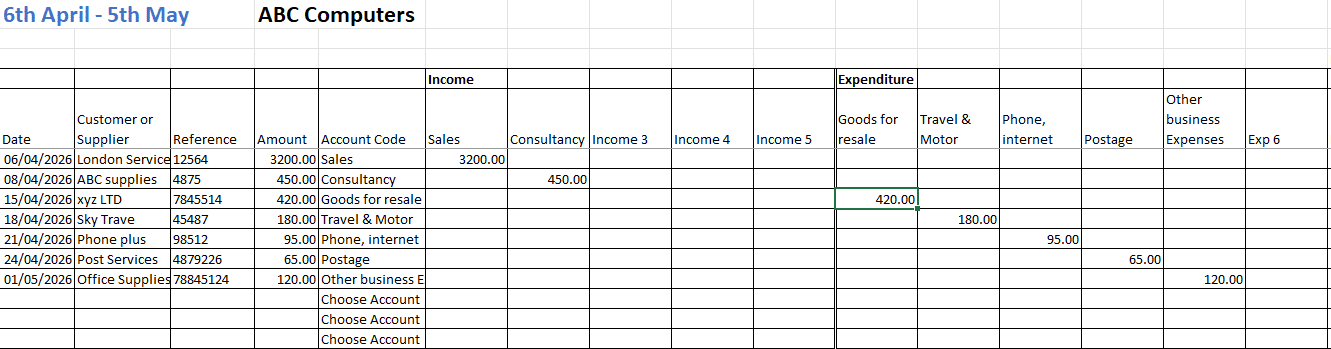
Check that your chosen software supports MTD for VAT, Income Tax or both, depending on your needs. For Income Tax, confirm whether it handles the annual tax return as well as quarterly updates. Keep the required digital links between your records and submission software rather than manually retyping totals.
Our free MTD spreadsheet template helps sole traders record income and expenses and calculates monthly, quarterly and annual totals. To submit figures to HMRC, you need compatible bridging software, such as Abridge, which we tested with our template using its demo.
Tips for Moving to Making Tax Digital
- Check your requirements: Confirm which MTD rules apply to you and choose software that supports the taxes and income sources you need to report.
- Start before your deadline: Allow time to compare options, try the software and resolve any setup problems.
- Prepare your records: Bring your bookkeeping up to date before transferring information. Keep a backup and check that imported figures match your original records.
- Practise everyday tasks: Try recording expenses, creating invoices and checking reports so you feel comfortable before preparing a submission.
- Use training and support: Follow the provider’s setup guides, tutorials or webinars, and contact support if you get stuck.
- Involve your accountant or bookkeeper: Check that they can access your chosen software and agree who will maintain records and submit information.
- Keep up with changes: Check GOV.UK for current MTD rules and deadlines, and read relevant updates from your software provider.
Frequently Asked Questions
Choosing the Right MTD Software
Choose Making Tax Digital software that meets your tax requirements and suits your everyday bookkeeping. Compare the features, plan limits and ongoing costs, and try the software before committing where possible.
A free plan may cover your needs, while paid software can offer more automation and reporting tools. If you prefer Excel, our free MTD spreadsheet template works alongside compatible bridging software for Income Tax.